Industrial Tank & Pump Control in PLCLogix 5000 — From 4–20 mA Level Signal to Fault-Validated Automatic Control
Introduction
One of the best ways to improve PLC programming skills is to stop thinking only in terms of individual instructions and start thinking in terms of process behavior, equipment states, permissives, feedback, faults, and diagnostics.
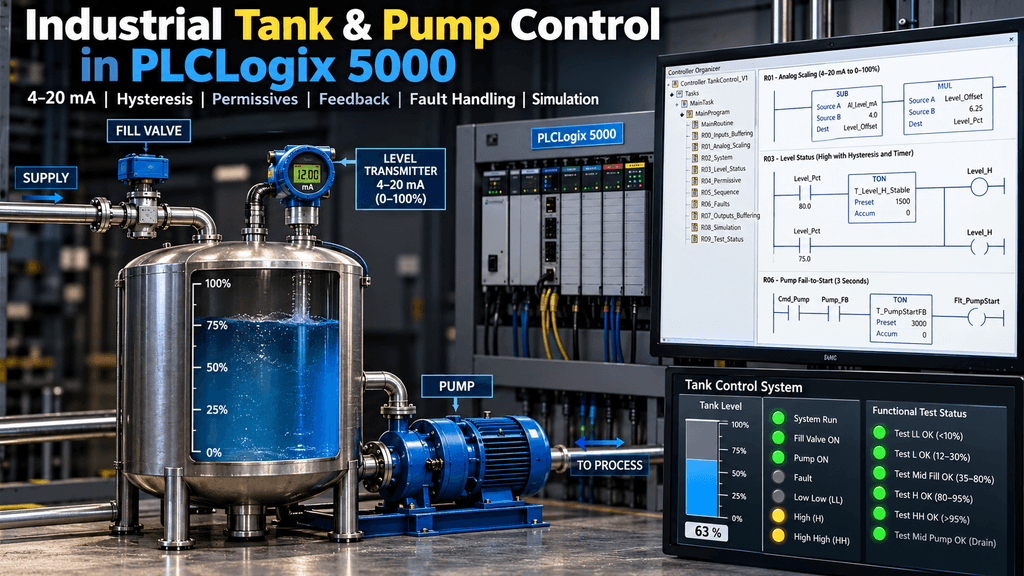
For this project, I built an Industrial Tank & Pump Control V1 in PLCLogix 5000.
The objective was not simply to turn a valve or pump ON and OFF. I wanted to structure the program in a way that resembles an industrial control application as closely as possible within the limitations of the simulator.
The final project includes:
- Digital I/O buffering
- 4–20 mA analog level simulation
- Analog scaling to 0–100%
- Low-Low, Low, High, and High-High level states
- Hysteresis
- Time-qualified level transitions
- Automatic Fill/Drain sequencing
- Permissives
- Pump command vs. running feedback
- Motor overload monitoring
- Fail-to-start detection
- Latched faults and controlled reset
- Simulated motor feedback
- Run and Fault indications
- Functional test status bits for validation
This project became much more than a basic tank exercise.
Process Overview
The simulated process is simple:
             SUPPLY
                |
                v
         +--------------+
         |  FILL VALVE  |
         +--------------+
                |
                v
        +----------------+
        |                |
        |      TANK      |
        |                |
        | Level TX       |
        |   4–20 mA      |
        +----------------+
                |
                v
         +-------------+
         |    PUMP     |
         +-------------+
                |
                v
             PROCESS
The level transmitter is simulated through the PLCLogix analog input interface.
The signal represents:
4 mA  =   0%
20 mA = 100%
The pump drains the tank while the fill valve fills it.
Program Architecture
Instead of placing all logic into one routine, I divided the program into functional areas.
MainRoutine

R00_Inputs_Buffering
R01_Analog_Scaling
R02_System
R03_Level_Status
R04_Permissive
R05_Sequence
R06_Faults
R07_Outputs_Buffering
R08_Simulation
R09_Test_StatusThis separation made troubleshooting much easier because each routine answers a different question.
For example:
R00 → What is coming from the field?

R01 → What does the analog signal mean?

R03 → What level condition exists?

R05 → What does the process want to do?

R04 → Is the equipment allowed to do it?

R07 → What command is actually being sent?

R06 → Did something fail?

R09 → Is the process behaving as expected?
That structure became one of the most valuable parts of the exercise.
R00 — Input Buffering
The physical inputs are first copied into internal tags.
Examples include:
DI_PB_Start
DI_PB_Stop_OK
DI_PB_Reset
DI_Pump_FB
DI_Pump_OL_OK
AI_Level_mA
The control logic therefore does not need to directly reference physical I/O addresses everywhere.
Conceptually:
Physical Input
      ↓
Buffered Tag
      ↓
Control Logic
This makes the program easier to read and also prepares the architecture for future simulation, diagnostics, and hardware changes.
Analog Level Scaling
The analog input from the simulated 1756-IF8 module is configured as a 0–20 mA engineering signal.
The actual process range uses:
4 mA  = 0%
20 mA = 100%
The scaling is performed in two steps.
First, the 4 mA live-zero offset is removed:
Level_Offset = AI_Level_mA - 4.0Then:
Level_Pct = Level_Offset × 6.25because:
100 / 16 = 6.25The validation results were:
| Signal | Level |
|---|---|
| 4 mA | 0% |
| 8 mA | 25% |
| 12 mA | 50% |
| 16 mA | 75% |
| 20 mA | 100% |
This was one of the most useful parts of the project because it connects PLC math directly to a common industrial instrumentation signal.
Level States
The tank uses four logical level states:
Level_LL
Level_L
Level_H
Level_HH
The basic thresholds are:
LL  < 10%
L   < 30%
H   > 80%
HH  > 95%
However, directly switching these bits at the exact threshold can create unstable behavior if the level signal fluctuates.
That led to two additional techniques.
Hysteresis
Each level state uses a separate reset threshold.
For example:
High SET   > 80%
High RESET < 75%
The same idea is used for the other levels:
| State | Activate | Reset |
|---|---|---|
| LL | <10% | >12% |
| L | <30% | >35% |
| H | >80% | <75% |
| HH | >95% | <90% |
This prevents a level signal near a threshold from continuously toggling the process state.
Time-Qualified Level Transitions
I then added stabilization timers before accepting the level transition.
The purpose is to simulate the effect of tank turbulence, sloshing, foam, or short process disturbances.
The final validation times are:
| Level | Threshold | Validation Time |
|---|---|---|
| LL | <10% | 0.5 s |
| L | <30% | 1.5 s |
| H | >80% | 1.5 s |
| HH | >95% | 0.5 s |
For example:
Level_Pct > 80%
       ↓
T_Level_H_Stable
       ↓
1.5 seconds stable
       ↓
Level_H latched
If the signal briefly crosses 80% and falls back before the timer finishes, the transition is rejected.
That prevents unnecessary valve and pump cycling.
Automatic Fill and Drain Sequence
The control sequence uses separate request bits:
Req_Fill
Req_Pump
When Low level becomes active:
Level_L
   ↓
Req_Fill
The Fill Request remains latched while the tank rises through the middle range.
When High level is reached:
Level_H
   ↓
Req_Fill OFF
Req_Pump ON
The pump then remains requested while the tank level falls.
When Low is reached again:
Level_L
   ↓
Req_Pump OFF
Req_Fill ON
This creates the automatic cycle:
LOW
 ↓
FILL
 ↓
HIGH
 ↓
PUMP / DRAIN
 ↓
LOW
 ↓
repeat
Requests Are Not Commands
One design decision I wanted to practice was separating process requests from equipment commands.
For example:
Req_Pumpmeans:
The process wants the pump to run.
But:
Cmd_Pumpmeans:
The pump is actually allowed to receive a run command.
Between them is the permissive logic.
Request
   ↓
Permissive
   ↓
Command
This distinction becomes very useful when troubleshooting.
Pump Permissives
The pump is allowed to run only when several conditions are satisfied.
Conceptually:
System_Run
AND Overload_OK
AND NOT Level_LL
AND NOT Flt_Pump
        ↓
Perm_Pump
This means the process may still request the pump while the pump itself is blocked.
For example:
Req_Pump  = 1
Perm_Pump = 0
Cmd_Pump  = 0
That immediately tells the technician:
The process wants the pump, but something is preventing it from running.
That is far more useful diagnostically than simply clearing the request.
Pump Command vs. Pump Feedback
Another important lesson was distinguishing between:
Cmd_Pumpand:
Pump_FBCmd_Pump = 1 means the PLC is asking the pump to run.
It does not prove that the pump actually started.
The running feedback represents an auxiliary contact, VFD running status, or equivalent field confirmation.
Normal operation looks like:
Cmd_Pump = 1
Pump_FB  = 1
A potential failure looks like:
Cmd_Pump = 1
Pump_FB  = 0
Simulating Pump Feedback
PLCLogix does not provide a real motor contactor physically connected to the simulation, so I created a dedicated simulation routine.
When simulation is enabled:
Cmd_Pump
   ↓
1 second simulated starting delay
   ↓
Pump_FB
The important simulation tags include:
Sim_Enable
Sim_PumpFB_Enable
Sim_PumpFB_Delay
Sim_PumpFB_Raw
When:
Sim_PumpFB_Enable = 1the simulated pump produces running feedback normally.
When:
Sim_PumpFB_Enable = 0the PLC still commands the pump, but feedback never arrives.
This gives me a repeatable method for testing a motor start failure without forcing PLC tags manually.
Pump Fail-to-Start Detection
A 3-second feedback timer monitors the relationship between command and feedback.
Cmd_Pump = 1
AND
Pump_FB = 0
        ↓
T_PumpStartFB
        ↓
3 seconds
        ↓
Flt_PumpStart
If feedback appears before the timer completes, the timer resets and no fault occurs.
If feedback never appears:
Flt_PumpStart = 1This fault is latched.
Overload Fault
The overload circuit uses a healthy signal:
DI_Pump_OL_OK = 1Normal condition:
Overload healthy → 1Trip condition:
Overload trip → 0When the signal is lost:
Flt_PumpOL = 1A common pump fault is then generated from either condition:
Flt_PumpStart
       OR
Flt_PumpOL
       ↓
Flt_Pump
The common fault removes the pump permissive and therefore removes the pump command.
Controlled Fault Reset
The project does not blindly clear faults when Reset is pressed.
The overload fault can only reset after the healthy overload condition has returned.
The pump start fault can only reset when the pump command is no longer active.
This prevents the operator from repeatedly pressing Reset while the underlying fault condition is still present.
Output Buffering and Status Indications
The final output routine writes validated commands to the physical outputs.
The simulator uses:
Output 00 → Fill Valve
Output 01 → Pump
Output 02 → Run Light
Output 03 → Fault Light
I also used the analog output display as a visual representation of:
Level_PctThis is only a training display and is not part of the actual process control.
Functional Validation Routine
One of my favorite additions to this project was:
R09_Test_StatusInstead of repeatedly checking many individual bits during testing, this routine uses the existing process states, requests, permissives, commands, and feedback to generate functional PASS bits.
The validation bits are:
Test_LL_OK
Test_L_OK
Test_MidFill_OK
Test_H_OK
Test_HH_OK
Test_MidPump_OK
These act almost like a small FAT/SAT test panel inside the PLC.
Functional Test Sequence
For a demonstration, the analog level can be moved through the following sequence.
Test 1 — Low-Low
Level < 10%Expected:
Level_LL       ON
Level_L        ON
Req_Fill       ON
Cmd_FillValve  ON

Req_Pump       OFF
Perm_Pump      OFF
Cmd_Pump       OFF
Result:
Test_LL_OK = ONTest 2 — Low
Move the level to approximately:
12–30%Expected:
Level_LL       OFF
Level_L        ON
Req_Fill       ON
Cmd_FillValve  ON
Req_Pump       OFF
Result:
Test_L_OK = ONTest 3 — Mid Range While Filling
Raise the level above the Low reset point but below High.
For example:
50%Expected:
Level_LL OFF
Level_L  OFF
Level_H  OFF
Level_HH OFF

Req_Fill      ON
Cmd_FillValve ON
Cmd_Pump      OFF
This demonstrates that the Fill Request remains latched even though the Low bit is no longer active.
Result:
Test_MidFill_OK = ONTest 4 — High
Raise the level above:
80%and keep it stable long enough for the High validation timer.
Expected:
Level_H        ON
Req_Fill       OFF
Req_Pump       ON
Perm_Pump      ON
Cmd_Pump       ON
Result:
Test_H_OK = ONTest 5 — High-High
Raise the level above:
95%Expected:
Level_H        ON
Level_HH       ON

Perm_Fill      OFF
Cmd_FillValve  OFF

Req_Pump       ON
Cmd_Pump       ON
Result:
Test_HH_OK = ONTest 6 — Mid Range While Draining
Now lower the tank from High toward Low.
For example:
70%Expected:
Level_LL OFF
Level_L  OFF
Level_H  OFF
Level_HH OFF

Req_Pump ON
Cmd_Pump ON
Pump_FB  ON
Result:
Test_MidPump_OK = ONThis verifies the complete chain:
Process Request
      ↓
Permissive
      ↓
Command
      ↓
Running FeedbackWhat I Learned From This Project
The biggest lesson from this exercise was that industrial PLC programming is not just about making an output turn on.
A more useful question is:
Why should the output turn on, what conditions allow it, how do I know the equipment actually responded, what happens if it does not, and how can another technician quickly diagnose it?
This project helped reinforce several concepts:
Raw Signal
↓
Engineering Value
↓
Process State
↓
Request
↓
Permissive
↓
Command
↓
Physical Output
↓
Feedback
↓
Fault
↓
Diagnostic Status
That architecture makes a program much easier to understand and troubleshoot.
Why Hysteresis and Stabilization Matter
The tank level signal deserves special attention.
A real tank may not have a perfectly stable surface.
Depending on the process, the measurement can be affected by:
- turbulence,
- agitation,
- filling velocity,
- discharge flow,
- foam,
- sensor noise,
- or liquid movement.
If the PLC immediately reacts every time the signal crosses a threshold, equipment can cycle unnecessarily.
For that reason, this project combines:
Hysteresis
with
Time Qualification
The hysteresis creates separation between the ON and OFF thresholds, while the timers require the condition to remain stable before accepting a new level state.
That combination produced much cleaner process behavior in the simulation.
V2 Preview
The next version will build on the working V1 rather than replacing it.
Potential V2 objectives:
- UDT-based equipment structures
- AOI-based motor/pump control
- improved I/O buffering architecture
- Manual / Auto modes
- analog transmitter fault detection
- fill valve feedback
- valve fail-to-open / fail-to-close
- pump fail-to-stop
- richer HMI-ready status
- standardized alarm structure
- additional diagnostics
That will let me compare a traditional Ladder architecture against a more reusable UDT/AOI-based design.
Final Thoughts
This project started as a simple tank exercise and gradually became a much better lesson in industrial PLC architecture.
The final result includes not only control logic, but also:
measurement, qualification, sequencing, permissives, feedback, fault detection, simulation, and functional validation.
That is the direction I want to continue following with future PLC projects: not simply asking whether the simulation works, but asking whether the program is structured, understandable, testable, and useful for troubleshooting.
Project: Industrial Tank & Pump Control V1
Platform: PLCLogix 5000
Language: Ladder Logic
Status: V1 Final
Next: V2 — UDT/AOI Architecture