Faults vs. Alarms vs. Notifications: Are We Calling Everything an Alarm?
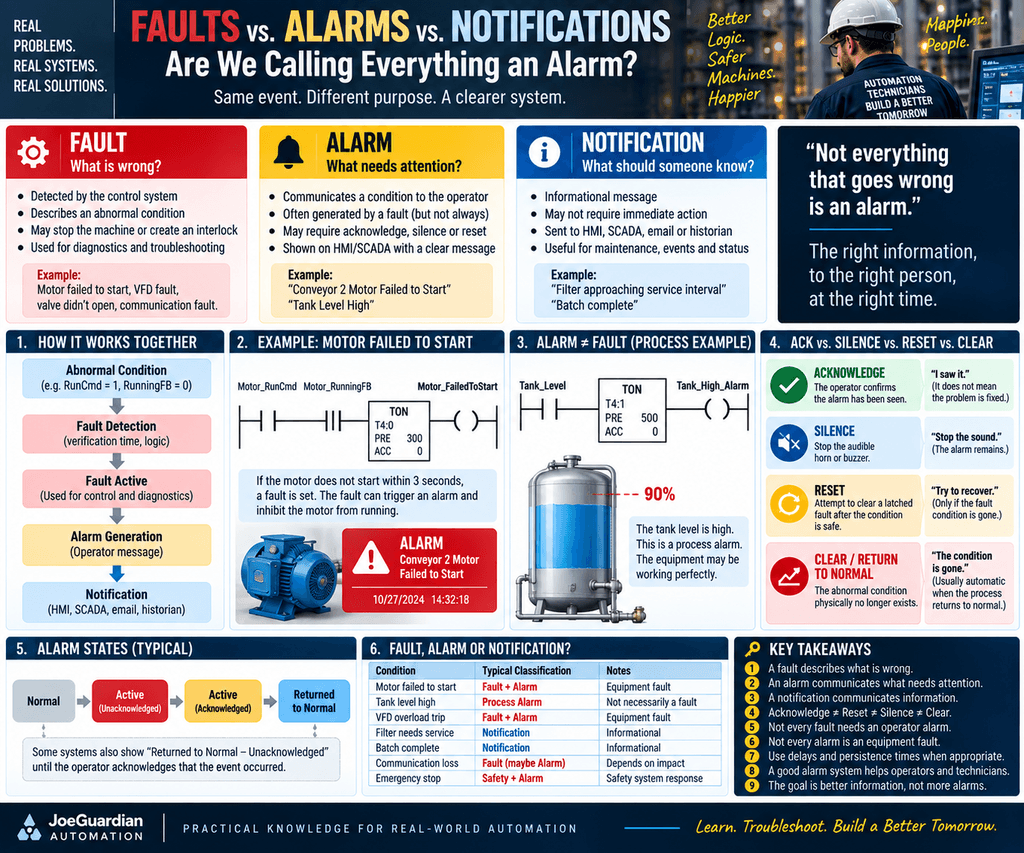
In industrial automation, the word alarm is often used for almost everything that goes wrong.
A motor fails to start.
A tank reaches a high level.
A VFD trips.
A communication module disconnects.
An operator presses an E-Stop.
A maintenance reminder appears.
Very often, all of these conditions end up being called:
“An alarm.”
But from a control architecture and troubleshooting perspective, that can create confusion.
A better approach is to separate three concepts:
FAULT
What is wrong?

ALARM
What requires operator attention?

NOTIFICATION
What information should someone know?
These concepts are related.
But they are not the same thing.
And understanding the difference can make PLC programs much easier to troubleshoot, maintain, and scale.
1. Start with the Abnormal Condition
Everything begins with some physical or logical condition.
For example:
Motor_RunCmd = 1
Motor_RunningFB = 0
That condition alone tells us something.
The PLC wants the motor to run.
But the motor is not confirming that it is running.
After an appropriate verification time:
RunCmd = 1
RunningFB = 0
for 3 seconds
we may determine:
Motor_FailedToStart = 1That is a fault condition.
The machine has detected that expected behavior did not occur.
2. What Is a Fault?
A Fault describes an abnormal condition detected by the control system.
Examples:
Motor_FailedToStart

Motor_Overload

Valve_FailedToOpen

Valve_FailedToClose

VFD_Fault

Sensor_Disagreement

Encoder_Fault

Communication_Fault

Low_Air_Pressure_Fault
A Fault answers:
What is wrong with the machine, equipment, or process?
A fault can affect the control strategy.
For example:
Motor_Faulted
      ↓
Interlock Active
      ↓
Motor_RunCmd inhibited
The PLC may decide:
Do not restart.

Stop the machine.

Hold the sequence.

Transition to Faulted state.

Prevent Auto Mode.
That is machine control behavior.
3. What Is an Alarm?
An Alarm communicates an abnormal condition to the operator.
For example:
FAULT:

Motor_FailedToStart = 1
may generate:
ALARM:

"Conveyor 2 Motor Failed to Start"
Now the control system is doing two different things.
The Fault tells the machine:
Something is wrong.
The Alarm tells the human:
Something requires your attention.
That distinction is important.
4. A Fault Can Generate an Alarm
A common architecture is:
Abnormal Condition
       ↓
Fault Detection
       ↓
Fault Active
       ↓
Machine Response
       ↓
Alarm Generation
       ↓
Operator Message
For example:
Motor Run Command
       ↓
No Running Feedback
       ↓
3 Second Verification
       ↓
Motor_FailedToStart
       ↓
Motor Interlocked
       ↓
Alarm:
"Motor Failed to Start"
This provides a clean troubleshooting trail.
5. But Alarm Does Not Always Mean Fault
Now consider a tank.
Suppose:
Tank_Level = 90%The equipment itself may be healthy.
The level transmitter is working.
The valve is working.
The pump is working.
Nothing is technically broken.
But we may still want:
Tank_High_Alarm = 1because the process is approaching an undesirable condition.
This is a process alarm.
Not necessarily an equipment fault.
That distinction matters.
6. And a Fault Does Not Always Need an Operator Alarm
Consider a brief communication disturbance:
Comm_Status = Bad
for 50 ms
The PLC might detect it internally.
But we may not want to immediately generate a visible alarm.
Instead:
Communication problem
       ↓
Persistence Timer
       ↓
Comm_Fault
       ↓
Alarm if duration or severity requires it
This gives us a useful hierarchy:
Diagnostic Condition
       ↓
Fault
       ↓
Alarm
Not every internal diagnostic condition needs to become an operator alarm.
Otherwise the HMI can become overloaded with nuisance alarms.
7. What Is a Notification?
A Notification is primarily informational.
It may tell someone that something happened or requires awareness without necessarily requiring immediate operator action.
Examples:
Filter approaching service interval

Maintenance inspection due soon

Batch completed

Backup completed

Network device temporarily disconnected and recovered

Energy consumption above target

Recipe successfully loaded
A Notification answers:
What information should someone know?
It may appear as:
HMI message

SCADA event

Historian event

Email

SMS

Maintenance dashboard

CMMS event
Notifications are useful.
But they should not be confused with control faults.
8. Fault, Alarm, Notification
A simple model is:
FAULT
"What is wrong?"
       ↓

ALARM
"What needs attention?"
       ↓

NOTIFICATION
"What should someone know?"
Or:
| Concept | Main Purpose |
|---|---|
| Fault | Diagnose abnormal machine/process behavior |
| Alarm | Demand or indicate operator attention |
| Notification | Communicate information or status |
The categories can interact.
But their responsibilities are different.
9. The Control Response Should Be Separate
This is one of the most important architectural ideas.
Suppose:
Motor_FailedToStart = 1The machine control response might be:
Motor_FailedToStart
        ↓
Motor_Interlock
        ↓
Motor_RunCmd = 0
At the same time:
Motor_FailedToStart
        ↓
Alarm Active
        ↓
HMI:
"Motor Failed to Start"
Those are two separate responsibilities.
FAULT LOGIC
       ↓
Machine Response
versus:
ALARM LOGIC
       ↓
Operator Communication
This separation makes troubleshooting much clearer.
10. Acknowledge Does Not Mean Cleared
This is where alarm terminology often becomes confusing.
Suppose an alarm is active:
Motor_FailedToStart = 1

Alarm_Active = 1

Alarm_Acknowledged = 0
The operator sees the alarm.
Then presses:
ACKNOWLEDGENow:
Alarm_Active = 1

Alarm_Acknowledged = 1
The problem may still exist.
The operator has simply communicated:
“I saw it.”
That is what Acknowledge means conceptually.
It does not necessarily mean:
“The equipment has been repaired.”
or:
“The abnormal condition disappeared.”
or:
“The fault can be reset.”
11. Acknowledge, Silence, Reset, and Clear Are Different
This distinction is extremely useful for technicians.
| Action | Meaning |
|---|---|
| Acknowledge | The operator confirms that the alarm has been seen |
| Silence | Stop the audible horn/buzzer |
| Reset | Attempt to clear a latched fault or machine state after the condition is safe |
| Clear / Return to Normal | The abnormal process condition physically no longer exists |
These should not automatically be treated as the same action.
A useful mental model is:
ACK ≠ RESET

ACK ≠ CLEAR

SILENCE ≠ ACK

RESET ≠ PROBLEM FIXED
12. Example: Acknowledged but Still Faulted
Suppose:
Conveyor_RunCmd = 1
Conveyor_RunningFB = 0
After 3 seconds:
Conveyor_FailedToStart = 1The HMI displays:
ALARM:
"Conveyor Failed to Start"
The operator presses ACK.
Now the system might show:
Fault_Active        = 1
Alarm_Active        = 1
Alarm_Acknowledged  = 1
Horn_Active         = 0
The alarm has been acknowledged.
But the fault is still active.
That is completely valid.
13. Silence Is Not Acknowledge
Suppose the alarm activates a horn:
Alarm Active
      ↓
Horn ON
The operator presses:
SILENCENow:
Alarm_Active = 1

Horn_Active = 0
The alarm condition remains.
The fault may remain.
The operator may or may not have acknowledged the alarm depending on the alarm philosophy.
Silence simply controls the audible annunciation.
14. Reset Is Not Acknowledge Either
Reset normally has a different purpose.
Suppose:
Motor_Overload_Fault = 1After troubleshooting:
Overload condition = healthythe operator presses:
FAULT RESETThen the PLC may evaluate:
Fault condition healthy
AND
Reset_Request
        ↓
Clear Fault Latch
Reset means:
Attempt recovery after the problem has been corrected.
It does not simply mean:
“I saw the alarm.”
15. Return to Normal Is a Condition, Not a Button
Suppose:
Tank_Level > HighLimitcreates:
Tank_High_AlarmLater:
Tank_Level < HighLimitThe abnormal condition is gone.
The alarm has:
Returned to Normal
That is not necessarily the same as Reset.
The process condition itself caused the return.
This distinction is important in alarm systems.
16. Alarm State Can Have Multiple Stages
A useful conceptual model is:
NORMAL
   ↓
ACTIVE - UNACKNOWLEDGED
   ↓
ACTIVE - ACKNOWLEDGED
   ↓
RETURNED TO NORMAL
Some systems can also show:
RETURNED TO NORMAL
BUT
UNACKNOWLEDGED
That means:
The abnormal condition disappeared.
But the operator never acknowledged that the event occurred.
This is common in more sophisticated SCADA alarm systems.
17. Why This Matters to Technicians
Imagine seeing:
Alarm = ACKNOWLEDGEDA technician should not automatically assume:
Equipment is healthy.Acknowledge only tells us something about the operator interaction.
The equipment diagnostic condition must still be checked.
For example:
Alarm Acknowledged = 1

Motor Faulted = 1
is perfectly possible.
18. What About Alarm Delays?
Alarm conditions often need qualification.
Suppose:
Tank_Level > HighLimitfor 100 milliseconds.
Is that enough to alarm?
Maybe.
Maybe not.
For a turbulent process, we might require:
Tank_Level > HighLimit
        ↓
TON 5 seconds
        ↓
High_Level_Alarm
This is often called:
- Alarm delay
- Persistence time
- Qualification time
The goal is to prevent short abnormal excursions from generating unnecessary alarms.
19. But Delays Must Match the Process
There is no universal alarm delay.
For example:
Tank High
→ maybe delay is acceptable
but:
Critical shutdown condition
→ delay may be unacceptable
The process determines the timing.
The programmer should not arbitrarily decide:
All alarms = 5 second delaywithout understanding the equipment.
The delay should come from:
- Process knowledge
- Equipment behavior
- Safety requirements
- Operator experience
- Engineering requirements
20. Alarm Delay Is Not the Same as Debounce
These concepts are related but different.
Debounce
Used to stabilize a rapidly changing signal:
Photoeye

1 0 1 0 1 0
      ↓
Debounce
      ↓
Stable Product_Present
Alarm Persistence
Used to determine whether an abnormal condition lasts long enough to matter:
Tank High
      ↓
5 second qualification
      ↓
Alarm
Both involve time.
But they solve different problems.
21. Safety Events Need Special Treatment
A safety event should not rely on ordinary alarm logic to perform the actual safety function.
For example:
Emergency Stopshould be handled through the appropriate safety architecture.
Conceptually:
E-Stop
   ↓
Safety Circuit / Safety PLC
   ↓
Safe Machine Response
Then the standard PLC or HMI can communicate:
EStop_Activeand generate:
Alarm:
"Emergency Stop Active"
The alarm is informing the operator.
The safety system is performing the safety function.
Those responsibilities should not be confused.
22. Fault Logic and Alarm Logic Should Often Be Separate
A maintainable PLC architecture may contain:
R06_Fault_Logic

Motor_FailedToStart
Valve_FailedToOpen
VFD_Fault
Comm_Fault
and separately:
R07_Alarm_Logic

Motor_FailedToStart
      ↓
Motor_FailedToStart_Alarm

Valve_FailedToOpen
      ↓
Valve_FailedToOpen_Alarm
This might seem like extra programming.
But the routines answer different questions.
23. Four Different Questions
A clean architecture can answer:
FAULT:
What went wrong?

INTERLOCK:
What should the PLC prevent?

ALARM:
What should the operator know?

NOTIFICATION:
Who else should be informed?
That separation is extremely powerful.
For example:
Motor_FailedToStart
        ↓
FAULT
causes:
Motor_RunCmd inhibited
        ↓
INTERLOCK
and:
"Motor Failed to Start"
        ↓
ALARM
and perhaps:
Maintenance event sent to SCADA
        ↓
NOTIFICATION
One abnormal condition.
Several different responsibilities.
24. Alarm Priority Is Another Layer
Not every alarm deserves the same priority.
Conceptually:
| Condition | Possible Classification |
|---|---|
| Filter approaching replacement | Notification / Advisory |
| Tank Level High | Process Alarm |
| Motor Failed to Start | Equipment Fault + Alarm |
| VFD Overload Trip | Fault + Alarm |
| Communication Loss | Fault / Alarm depending on impact |
| Safety Event | Safety response + operator alarm |
The exact classification depends on the plant and alarm philosophy.
But treating everything as:
RED ALARMreduces the usefulness of the alarm system.
25. Avoid Alarm Flooding
If every small condition creates an alarm, operators eventually see:
Alarm
Alarm
Alarm
Alarm
Alarm
Alarm
Alarm
and important information disappears inside noise.
This is known as alarm flooding.
A good alarm system should help answer:
What needs my attention right now?
not:
How many tags can we display in red?
26. The Technician’s Troubleshooting Path
Suppose production reports:
“The conveyor is faulted.”
A good architecture lets us follow:
Conveyor stopped
      ↓
RunCmd inhibited
      ↓
Conveyor_InterlockActive
      ↓
Conveyor_Faulted
      ↓
Motor_FailedToStart
      ↓
RunCmd was ON
but RunningFB was missing
Then the HMI alarm might simply communicate:
"Conveyor Failed to Start"The alarm is not the diagnosis.
It is the entry point into the diagnosis.
That is an important distinction.
27. The Alarm Should Help the Technician
Compare:
ALARM 203with:
Conveyor 2 Failed to Start

Run command was present,
but motor running feedback
was not detected within 3 seconds.
The second message gives the technician a direction.
A good alarm system should not replace troubleshooting.
It should accelerate it.
28. A Practical Architecture
Putting everything together:
INPUTS / FEEDBACK
       ↓
ABNORMAL CONDITION
       ↓
FAULT DETECTION
       ↓
FAULT ACTIVE
       ↓
INTERLOCK / MACHINE RESPONSE
       ↓
ALARM GENERATION
       ↓
HMI / SCADA PRESENTATION
       ↓
ACKNOWLEDGE
       ↓
CONDITION CORRECTED
       ↓
RESET / RETURN TO NORMAL
       ↓
HISTORY / NOTIFICATION
This gives each layer a clear responsibility.
29. A Technician’s Quick Reference
When troubleshooting, think:
FAULT
What physically or logically went wrong?

ALARM
What did the system tell the operator?

ACKNOWLEDGED
Has somebody seen the alarm?

SILENCED
Was the audible warning turned off?

RESET
Was recovery requested after correcting the problem?

CLEARED
Has the abnormal condition actually disappeared?
Those are six different questions.
Do not treat them as one.
30. The Real Debate
The debate is not:
Should we have alarms?
Of course we should.
The deeper question is:
Should alarms themselves become the entire machine diagnostic architecture?
My answer is no.
A better architecture separates:
FAULT DETECTION

MACHINE RESPONSE

ALARM PRESENTATION

OPERATOR ACKNOWLEDGEMENT

FAULT RESET

NOTIFICATION
That separation makes the system easier to understand.
And when the machine fails at 2:00 AM, understanding matters.
Final Thought
Calling everything an alarm may work in a small program.
But as systems become larger, the distinction between Fault, Alarm, Notification, Acknowledge, Silence, Reset, and Clear becomes increasingly valuable.
A useful rule is:
A fault describes what is wrong. An alarm communicates what needs attention. A notification communicates information.
And when the operator presses Acknowledge:
Acknowledged means “I saw it.” It does not mean “the problem is gone.”
Good alarm architecture should help people understand what happened, what the machine did about it, what the operator must do next, and whether the problem has actually been corrected.
The goal is not more alarms. The goal is better information.