One Device, One Control Point: Why Multiple Writes Make PLC Troubleshooting Dangerous
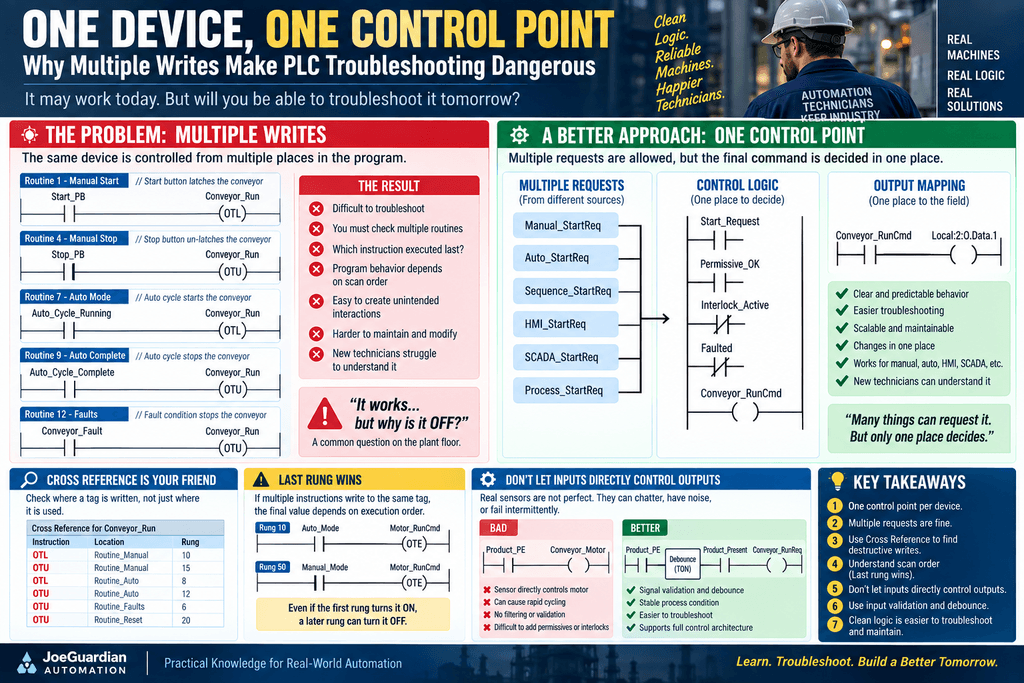
A PLC program can work perfectly and still be difficult to troubleshoot.
That distinction matters.
When we first learn ladder logic, the goal is usually simple:
Make the motor run.
Later, the goal becomes much more demanding:
Make the motor run safely, predictably, and in a way that another technician can understand five years from now.
One programming habit has an enormous effect on that second goal:
How many places in the PLC program are allowed to control the same device or command?
Consider this:
Routine 1
Start_PB
--------------------(OTL Conveyor_Run)

Routine 4
Stop_PB
--------------------(OTU Conveyor_Run)

Routine 7
Auto_Start
--------------------(OTL Conveyor_Run)

Routine 9
Auto_Stop
--------------------(OTU Conveyor_Run)

Routine 12
Conveyor_Fault
--------------------(OTU Conveyor_Run)
Every individual rung may appear reasonable.
The problem is the architecture.
The technician now has to understand several routines, several operating modes, and several instructions before answering one basic question:
Why is
Conveyor_RunON or OFF?
This is where an apparently functional PLC program can become a troubleshooting nightmare.
1. The Multiple-Write Problem
Suppose production calls maintenance:
“Conveyor 2 won’t run.”
You go online with the PLC and find:
Conveyor_RunCmd = 0You perform a Cross Reference.
Instead of finding one clear control rung, you see:
OTL Conveyor_RunCmd    Routine_Manual
OTU Conveyor_RunCmd    Routine_Manual
OTL Conveyor_RunCmd    Routine_Auto
OTU Conveyor_RunCmd    Routine_Auto
OTU Conveyor_RunCmd    Routine_Faults
OTU Conveyor_RunCmd    Routine_Reset
Now troubleshooting changes.
You are no longer simply asking:
What condition is preventing the conveyor from running?
You are asking:
Which one of these instructions executed last?
Which routine is active?
Which mode is controlling the equipment?
Is another instruction rewriting the bit after I turn it ON?
Did something happen several scans ago that left the bit in its current state?
That is a very different problem.
2. One Device Should Have One Clear Command Decision
A better architecture is to allow many things to request a device but have only one place calculate the final command.
For example:
Manual_StartReq
        |
Auto_StartReq
        |
Sequence_StartReq
        |
SCADA_StartReq
        |
        v
   REQUEST LOGIC
        |
        v
  Permissive_OK
        |
        v
 Interlock_Active
        |
        v
  Conveyor_RunCmd
        |
        v
   Output Mapping
        |
        v
Physical Conveyor Output
Now several systems may legitimately request the conveyor.
But only one part of the program answers:
Should the conveyor actually run?
That distinction is extremely powerful.
3. Requests Can Be Distributed. Commands Should Be Controlled.
A large industrial system naturally has many sources of intent.
A motor might be requested by:
Manual Mode
Auto Mode
Sequence Logic
HMI
SCADA
Maintenance Mode
Process Condition
There is nothing inherently wrong with that.
The mistake is allowing every source to directly manipulate the final output command.
Instead:
Manual_StartReq
Auto_StartReq
Sequence_StartReq
SCADA_StartReq
        |
        +------ OR ------+
                        |
                        v
                 Start_Request
                        |
                        v
                 Control Logic
Then:
Start_Request
AND
Permissive_OK
AND
NOT Interlock_Active
AND
NOT Faulted
        |
        v
Conveyor_RunCmd
Now the architecture clearly separates:
WHO WANTS IT TO RUN?
        ↓
REQUEST

IS IT ALLOWED TO RUN?
        ↓
PERMISSIVES / INTERLOCKS

SHOULD IT RUN NOW?
        ↓
COMMAND
4. Why Cross Reference Matters
One of the most valuable troubleshooting tools in Studio 5000 and other PLC platforms is Cross Reference.
When a command behaves unexpectedly, Cross Reference can answer:
Where is this tag used?
But an even more important question is:
Where is this tag written?
Reading a tag in 50 places is usually not a serious problem.
Writing to that same tag from 10 different places can be.
There is a major difference between:
XIC Conveyor_RunCmdand:
OTE Conveyor_RunCmd
OTL Conveyor_RunCmd
OTU Conveyor_RunCmd
MOV value into Conveyor_RunCmd structure
The first is consuming information.
The others may be changing state.
For troubleshooting, the destructive references deserve special attention.
5. The Famous “Last Rung Wins” Problem
Consider this simplified example:
Rung 10

Auto_Mode
--------------------(OTE Motor_RunCmd)
Later:
Rung 50

Manual_Mode
--------------------(OTE Motor_RunCmd)
Suppose:
Auto_Mode   = 1
Manual_Mode = 0
Early in the scan:
Motor_RunCmd = 1Then the processor reaches the second OTE.
Because Manual_Mode is false:
Motor_RunCmd = 0At the end of that execution path, the final state may be OFF.
The first rung did execute correctly.
It simply was not the final write.
This leads to the common troubleshooting expression:
Last write wins.
That phrase is useful, but technicians should understand that the exact behavior depends on program execution order, instruction type, task scheduling, routines being scanned, and controller architecture.
The larger lesson is simpler:
Avoid architectures where understanding a device depends on remembering which destructive instruction happened last.
6. Why Multiple OTL/OTU Instructions Become Difficult
Latch and unlatch instructions make this even more interesting because they store state.
Consider:
Start_Request
--------------------(OTL Pump_RunRequest)
Then:
Stop_Request
--------------------(OTU Pump_RunRequest)
That can be perfectly understandable.
But now add:
Auto_Start
--------------------(OTL Pump_RunRequest)
and:
Auto_Complete
--------------------(OTU Pump_RunRequest)
and:
Fault
--------------------(OTU Pump_RunRequest)
and:
HMI_Command
--------------------(OTL Pump_RunRequest)
and:
Mode_Changed
--------------------(OTU Pump_RunRequest)
The code may still work.
But the technician now has to reconstruct history.
The question becomes:
Which event changed this bit?
That may have happened milliseconds, seconds, or minutes earlier.
7. This Does Not Mean OTL/OTU Are Bad Instructions
This distinction is important.
OTL and OTU are not inherently bad.
They are useful when the control system intentionally needs memory.
Examples include:
Latched Faults
Alarm Memory
Event Capture
Sequence Memory
Operator Requests
Diagnostic Flags
Consider:
Motor_RunCmd = 1
RunningFB    = 0
for a defined period.
We might intentionally execute:
OTL Motor_FailedToStartEven if the original condition disappears later, we may want the fault to remain available for troubleshooting until Reset.
That is legitimate memory.
The problem is not:
Never use OTL.
The better principle is:
Do not distribute uncontrolled writes throughout the program without a clear ownership strategy.
8. Control Ownership Is the Real Issue
Every important control tag should have an identifiable owner.
For example:
Conveyor_RunCmdmight belong exclusively to:
R06_Conveyor_ControlThen every other routine communicates with that control routine through requests and status.
Example:
R02_Mode_Control
        ↓
Auto_Mode

R03_Request
        ↓
Conveyor_StartReq

R04_Permissive
        ↓
Conveyor_PermissiveOK

R05_Interlock
        ↓
Conveyor_InterlockActive

R06_Conveyor_Control
        ↓
Conveyor_RunCmd

R13_Output
        ↓
Physical Output
Now troubleshooting becomes systematic.
9. The Other Dangerous Shortcut: Input Directly Controls Output
Another tempting programming pattern looks like this:
Product_PE
--------------------(OTE Conveyor_Motor)
It looks fantastic.
One input.
One output.
One rung.
Anyone can understand it.
Right?
Not necessarily.
What have we actually told the PLC?
Every time the photoeye is ON, run the motor.
And:
Every time the photoeye is OFF, stop the motor.
That means the physical sensor effectively has direct control over the output.
10. Real Sensors Are Not Perfect
The real industrial world contains:
- Electrical noise
- Mechanical vibration
- Loose connections
- Dirty sensors
- Reflective products
- Misalignment
- Product movement
- Chattering contacts
- Network delays
- Broken wires
- Intermittent devices
Imagine a photoeye producing:
1 1 1 0 1 0 1 1 0 1If that signal directly controls:
Conveyor_Motorthen the command can become:
ON
ON
ON
OFF
ON
OFF
ON
ON
OFF
ON
That is not robust machine control.
11. Short Logic Is Not Necessarily Good Logic
This rung:
Product_PE
--------------------(OTE Motor_Output)
is short.
It is visually clean.
It is easy to create.
But:
Short ≠ Robust
and:
Simple-looking ≠ Maintainable
Good PLC programming is not a competition to create the fewest rungs.
The goal is predictable behavior.
12. Add Input Processing
A more industrial approach might look like:
Physical Photoeye
        ↓
Input Mapping
        ↓
Signal Validation
        ↓
Debounce
        ↓
Product_Present
Now process logic uses:
Product_Presentrather than directly depending on a potentially unstable physical signal.
13. Debounce Changes the Conversation
Suppose the raw sensor behaves like:
Raw_PE

1 1 0 1 0 1 1 1 1 1
Instead of immediately declaring:
Product_Present = Raw_PEwe may require the signal to remain stable:
Raw_PE
   ↓
TON
100 ms stable
   ↓
Product_Present
The exact time depends on the process.
The concept is:
Validate the signal before allowing it to affect important machine behavior.
Now a momentary disturbance does not necessarily become a machine command.
14. But Debounce Is Not Always the Answer Either
We should not blindly put timers on everything.
A 500 ms debounce on a high-speed packaging line could make the system miss products.
A delay on a critical safety function could be unacceptable.
A photoeye detecting slow-moving boxes may tolerate filtering that a registration sensor cannot.
Again:
The process determines the architecture.
Filtering and debounce should be intentional engineering decisions.
15. The Input Should Describe Reality
A useful principle is:
INPUT
     ↓
"What does the field device currently tell me?"
The input should provide information.
The process logic should decide what that information means.
For example:
Photoeye
      ↓
Product_Present
      ↓
Process Logic
      ↓
Conveyor_StartReq
instead of:
Photoeye
      ↓
Motor Output
The difference is subtle but important.
16. From Input to Command
A robust control path may look like:
FIELD INPUT
     ↓
INPUT PROCESSING
     ↓
PROCESS CONDITION
     ↓
REQUEST
     ↓
PERMISSIVES
     ↓
INTERLOCKS
     ↓
COMMAND
     ↓
OUTPUT
     ↓
FEEDBACK
For example:
Product_PE
     ↓
PE_Debounced
     ↓
Product_Present
     ↓
Conveyor_StartReq
     ↓
Conveyor_PermissiveOK
     ↓
NOT Conveyor_Interlock
     ↓
Conveyor_RunCmd
     ↓
Local:2:O.Data.1
     ↓
Conveyor_RunningFB
Now every layer has a purpose.
17. Why This Helps Troubleshooting
Suppose the conveyor does not start.
We can inspect:
Product_PE                = 1
PE_Debounced              = 1
Product_Present           = 1
Conveyor_StartReq         = 1
Conveyor_PermissiveOK     = 0
Conveyor_InterlockActive  = 0
Conveyor_RunCmd           = 0
Immediately we know:
The sensor works.
The input has been validated.
The process requested the conveyor.
No interlock is active.
But a permissive is missing.
That is useful diagnostic information.
18. Compare That with Direct Control
With:
Product_PE
--------------------(OTE Conveyor_Output)
we basically know:
Sensor ON → Output ON
Sensor OFF → Output OFF
There is almost no diagnostic separation.
As the machine becomes more sophisticated, that simplicity becomes a limitation.
19. Output Mapping Should Also Have Clear Ownership
The same philosophy applies to physical outputs.
Instead of controlling:
Local:2:O.Data.1from multiple routines, calculate an internal command:
Conveyor_RunCmdand then have one mapping location:
Conveyor_RunCmd
--------------------(OTE Local:2:O.Data.1)
Now the physical output has one clear source.
Troubleshooting becomes:
Physical Output OFF
        ↑
Conveyor_RunCmd
        ↑
Control Logic
        ↑
Request / Permissive / Interlock
That is a clean trail.
20. This Principle Applies Beyond Motors
The same concept works for:
Valves
Valve_OpenReq
      ↓
Permissives
      ↓
Interlocks
      ↓
Valve_OpenCmd
      ↓
Output
      ↓
Valve_OpenFB
Pumps
Pump_StartReq
      ↓
Pump_Ready
      ↓
Process Permissives
      ↓
Pump_RunCmd
      ↓
VFD Command
      ↓
RunningFB
Doors
Close_Request
      ↓
Close_Permissive
      ↓
Safety Interlock
      ↓
Door_CloseCmd
      ↓
Motor Down Output
      ↓
Closed Limit Switch
Process equipment
The architecture scales because the responsibilities remain understandable.
21. One Control Point Does Not Mean One Huge Rung
This is another important distinction.
“One control point” does not mean:
Put every condition in one giant rung.
You can absolutely separate logic into:
Request Logic
Permissive Logic
Interlock Logic
Mode Logic
Fault Logic
Sequence Logic
The principle is that these routines ultimately feed one clearly owned command.
For example:
R03_Request       → Conveyor_StartReq
R04_Permissive    → Conveyor_PermissiveOK
R05_Interlock     → Conveyor_Interlock
R06_Control       → Conveyor_RunCmd
R13_Output        → Physical Output
That is modular without losing ownership.
22. The Technician’s Cross-Reference Test
Whenever you review an important command, perform this mental test:
Cross Reference: Conveyor_RunCmdThen ask:
How many instructions can change this tag?
If there is one obvious controlling instruction:
Good.
If there are six destructive references:
Investigate why.
Six references are not automatically wrong.
But each additional writer increases the amount of system behavior a technician has to reconstruct.
23. The 2:00 AM Test
Production calls:
“The filling conveyor keeps stopping randomly.”
You go online.
Would you rather see:
Conveyor_RunCmd
controlled in six routines
by OTE / OTL / OTU
or:
Conveyor_StartReq        = 1
Conveyor_PermissiveOK    = 1
Conveyor_Interlock       = 1
Conveyor_RunCmd          = 0

Interlock reason:
Downstream_NotReady      = 1
The second system is telling you a story.
That is what maintainable PLC software should do.
24. Control Logic Should Leave Breadcrumbs
A good PLC program should allow the technician to move backward:
Motor not running
       ↑
Output OFF
       ↑
RunCmd OFF
       ↑
Interlock active
       ↑
Downstream not ready
       ↑
Downstream sensor missing
Each step produces another clue.
Poor architecture produces:
Motor not running
       ↑
RunCmd = 0
       ↑
Six instructions write this tag
       ↑
???
That is the difference between functioning code and maintainable code.
25. A Practical Rule
A useful design rule is:
Many conditions may influence a device, but one clearly defined control point should decide its final command.
In simplified form:
MULTIPLE INPUTS
MULTIPLE REQUESTS
MULTIPLE CONDITIONS
MULTIPLE MODES
MULTIPLE INTERLOCKS
        |
        v
ONE CONTROL DECISION
        |
        v
ONE COMMAND
        |
        v
ONE OUTPUT MAPPING
That is scalable.
That is traceable.
And most importantly, that is easier to troubleshoot.
Final Thought
Multiple writes are dangerous not because a PLC cannot execute them.
The PLC will execute exactly what you programmed.
The danger is that humans must eventually understand the result.
A program with scattered destructive writes may run successfully for years—until one unusual condition occurs and a technician has to figure out which instruction is actually controlling the machine.
Likewise, directly wiring an input condition to an output in ladder may look elegant, but the real industrial world contains noise, failures, bouncing signals, abnormal modes, and process conditions that simple classroom logic does not always represent.
The goal should not be:
How few rungs can I use?
The better question is:
Can the next technician quickly determine why this device is ON or OFF?
A strong industrial PLC architecture usually follows a clear path:
INPUT
  ↓
VALIDATION
  ↓
REQUEST
  ↓
PERMISSIVES
  ↓
INTERLOCKS
  ↓
CONTROL DECISION
  ↓
COMMAND
  ↓
OUTPUT
  ↓
FEEDBACK
One device can have many reasons to run—but it should have one clear place where the final decision is made.