Trigger, Hold-In, Interrupt: Is This Really the Backbone of PLC Programming?
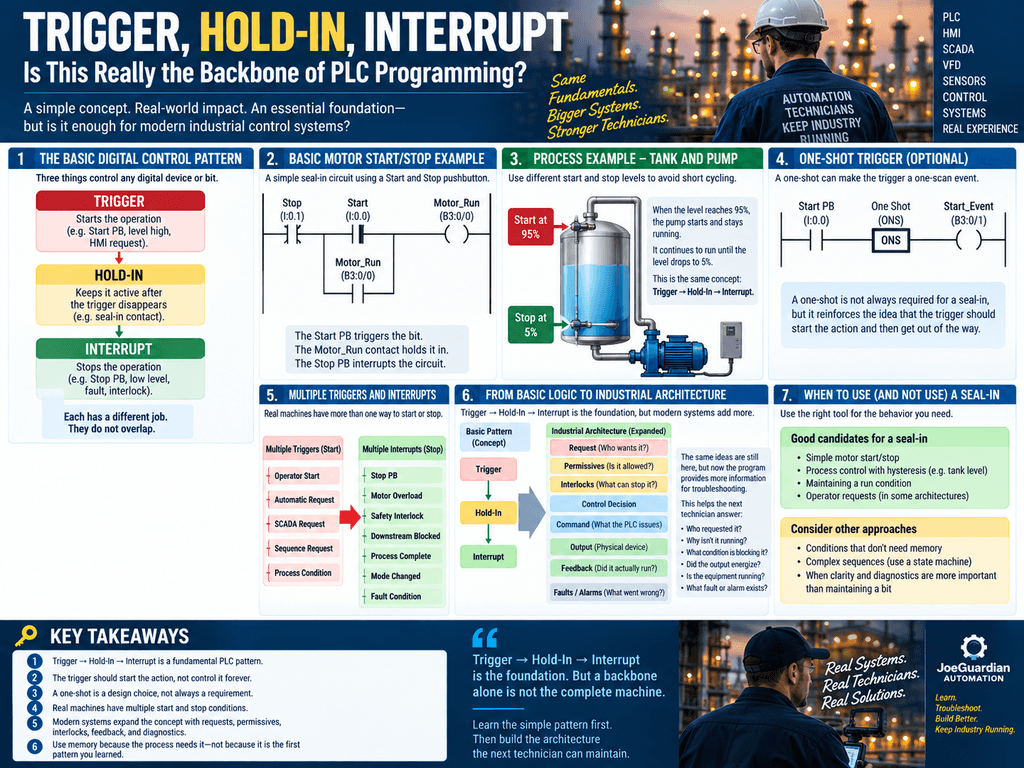
One of the most useful PLC programming patterns a technician can learn is also one of the simplest:
Trigger → Hold-In → Interrupt
The idea is straightforward.
Something starts the action.
Something keeps it active.
Something eventually stops it.
This pattern appears everywhere in ladder logic:
- Motors
- Pumps
- Valves
- Process requests
- Alarm memory
- Sequence conditions
- Automatic cycles
- Mode control
Because of that, it is easy to understand why many PLC instructors treat this pattern as one of the foundations of digital control logic.
But there is an important question for technicians working with modern industrial systems:
Is Trigger → Hold-In → Interrupt enough to build maintainable industrial PLC programs?
The answer is:
It is an excellent foundation—but it is only the beginning.
1. The Basic Digital Control Pattern
The pattern starts with three responsibilities.
TRIGGER
   ↓
HOLD-IN
   ↓
INTERRUPT
The Trigger starts the operation.
The Hold-In maintains it after the original trigger disappears.
The Interrupt breaks the maintained condition.
Conceptually:
Start Event
    ↓
Device / Bit turns ON
    ↓
Hold-In keeps it ON
    ↓
Stop Condition occurs
    ↓
Device / Bit turns OFF
This is an extremely useful way to teach digital control because each part has a different job.
The Trigger does not need to remain active forever.
The Hold-In does not create the original event.
The Interrupt does not start anything.
Each performs a distinct control function.
2. A Simple Motor Example
Consider a traditional motor Start/Stop circuit.
                 Start
                  |
  Stop            |       Motor_Run
--|/|-------+----| |----+--( )
            |           |
            +----| |----+
                 Motor_Run
The operator presses Start.
Motor_Run becomes true.
Once true, its own contact maintains the circuit.
When Stop breaks the logic path, the hold-in disappears and Motor_Run turns OFF.
We can describe this as:
Start PB
   ↓
TRIGGER

Motor_Run contact
   ↓
HOLD-IN

Stop PB
   ↓
INTERRUPT
For learning basic PLC control, this model is powerful because it teaches something bigger than the individual instructions.
It teaches control behavior.
3. The Trigger Should Start the Action—Not Become the Entire Control Strategy
A trigger should normally answer:
What initiates this action?
Examples might include:
Start_PB

HMI_StartRequest

Tank_High

Auto_StartRequest

Cycle_Start

Machine_State = READY
Once the trigger has performed its job, the logic may no longer need that original condition.
This is particularly useful in process control.
Suppose a pump needs to start when a tank reaches a high level.
Tank Level > 95%
        ↓
Pump Starts
If the pump immediately lowers the level to 94.9%, we probably do not want the pump constantly turning ON and OFF around the same threshold.
Instead:
Tank > 95%
     ↓
TRIGGER
     ↓
Pump Running
     ↓
HOLD-IN
     ↓
Tank < 5%
     ↓
INTERRUPT
Now the start and stop conditions are intentionally different.
That creates stable process behavior.
4. This Is Also a Form of Hysteresis
The tank example introduces a very important industrial concept.
Imagine this logic:
IF Tank_Level > 95%
    Pump = ON

IF Tank_Level <= 95%
    Pump = OFF
Near 95%, normal process noise could cause:
95.1%
94.9%
95.2%
94.8%
The pump could repeatedly cycle.
Instead:
START at 95%

STOP at 5%
creates a large operating band.
Conceptually:
        Pump ON
95% ──────────────── Trigger
 |
 |
 |
 |
 |
5%  ──────────────── Interrupt
        Pump OFF
The Hold-In preserves operation between the two thresholds.
This shows why Trigger → Hold-In → Interrupt is more than a Start/Stop pushbutton circuit.
It can describe process behavior.
5. What About the One-Shot?
A common variation is to make the Trigger a one-scan event.
Conceptually:
Start PB
   ↓
ONS
   ↓
Trigger Pulse
   ↓
Hold-In takes control
This reinforces an important programming idea:
The trigger should initiate the action and then get out of the way.
However, technicians should understand something important.
A One-Shot is not always required for a basic seal-in circuit.
A traditional Start PB can remain true for several PLC scans and the seal-in can still work correctly.
For example:
Start PB held for 2 seconds
        ↓
Run command remains true
        ↓
Seal-In becomes active
Nothing inherently breaks.
So the One-Shot should be understood as a design choice, not as a universal requirement.
This distinction matters:
PROGRAMMING REQUIREMENTis not always the same as:
PROGRAMMING PHILOSOPHY6. Multiple Triggers Are Normal
Industrial equipment rarely has only one reason to start.
A pump may be started by:
Operator Start
       OR
Automatic Process Request
       OR
Remote SCADA Request
       OR
Sequence Request
Conceptually:
          Operator Start
               |
Auto Start ----+----> Trigger
               |
SCADA Start ---+
All of these conditions can initiate the same control action.
This is another reason the Trigger concept is useful.
Instead of thinking:
This pushbutton controls the pump.
we start thinking:
These conditions can request the pump to run.
That is already a step toward better industrial architecture.
7. Multiple Interrupts Are Even More Important
A machine may have many reasons to stop.
Consider a conveyor.
Stop PB
   OR
Motor Overload
   OR
Safety Interlock
   OR
Downstream Blocked
   OR
Process Complete
   OR
Mode Changed
Any one of these conditions may need to break the run condition.
Conceptually:
Run Condition
     |
     +--- Stop PB
     |
     +--- Fault
     |
     +--- Interlock
     |
     +--- Process Complete
     |
     ↓
   STOP
This is where the simple Trigger/Hold-In/Interrupt model begins to overlap with concepts technicians encounter in larger programs.
8. Where the Simple Pattern Starts Reaching Its Limit
Now we get to the controversial part.
Suppose every motor, valve, process request, mode, and sequence in a large PLC program is built as some variation of:
Trigger
  ↓
Hold-In
  ↓
Interrupt
Can that work?
Absolutely.
But as the machine becomes more complex, the technician needs more information.
For example:
Why can't the motor start?

Who requested it?

What permissive is missing?

What interlock is active?

Is the motor actually running?

Has the PLC detected a fault?

What mode is the machine in?

Is SCADA involved?

What state is the sequence currently in?
Trigger/Hold-In/Interrupt alone does not automatically answer these questions.
That is where PLC architecture becomes important.
9. From Trigger to Request
A modern industrial program can make the Trigger more explicit.
Instead of:
Start_PB
     ↓
Motor_RunCmd
we can create:
Start_PB
     ↓
Motor_StartRequest
Now we have separated:
Operator intent
from:
PLC command
That distinction becomes very powerful.
REQUEST
    ↓
PLC DECISION
    ↓
COMMAND
The Start pushbutton is no longer “controlling the motor.”
It is requesting that the PLC evaluate whether the motor should run.
10. Add Permissives
A request does not necessarily mean the machine is allowed to run.
For example:
Start_Request
      ↓

Power_OK
Air_Pressure_OK
Upstream_Ready
Correct_Mode
VFD_Ready
      ↓

Permissive_OK
Conceptually:
Request
   +
Permissives
   ↓
Allowed to Start
A Permissive answers:
Are the required conditions present to allow this action?
This is already more descriptive than simply placing every condition inside one giant seal-in rung.
11. Add Interlocks
Then we need conditions that can block or stop operation.
For example:
Safety_Device_Active

Motor_Overload

Downstream_Fault

Door_Open

Emergency_Stop
Conceptually:
Request
   ↓
Permissives
   ↓
Interlocks
   ↓
Control Decision
Now the program is telling the technician not only whether something should run—but why it may not be allowed to run.
12. Then Generate the Command
Once the PLC has evaluated the request and operating conditions:
Start_Request
AND
Permissive_OK
AND
NOT Interlock_Active
AND
NOT Faulted
        ↓
Motor_RunCmd
Now Motor_RunCmd has a clear meaning:
The PLC has decided that this motor should run.
This is much more useful than allowing a physical Start input to directly represent the motor command.
13. Command Still Does Not Mean the Machine Is Running
This is one of the most important distinctions for technicians.
Motor_RunCmd = 1does not prove:
Motor_Running = 1The complete path might be:
Motor_RunCmd
     ↓
PLC Output
     ↓
VFD / Contactor
     ↓
Motor
     ↓
Running Feedback
Therefore:
REQUEST
   ↓
COMMAND
   ↓
OUTPUT
   ↓
FEEDBACK
is more useful diagnostically than simply:
Start
  ↓
Motor
14. Now the Original Pattern Has Evolved
Notice something interesting.
We did not actually throw away:
Trigger
Hold-In
Interrupt
We expanded it.
The Trigger became:
REQUESTThe interrupt concept expanded into:
PERMISSIVES
INTERLOCKS
FAULTS
STOP CONDITIONS
The maintained state became part of:
CONTROL DECISION
COMMAND
SEQUENCE STATE
And then industrial diagnostics added:
OUTPUT
FEEDBACK
FAULT
ALARM
STATUS
So the evolution might look like this:
BASIC CONTROL

Trigger
   ↓
Hold-In
   ↓
Interrupt
becoming:
INDUSTRIAL CONTROL

Request
   ↓
Permissives
   ↓
Interlocks
   ↓
Control Decision
   ↓
Command
   ↓
Output
   ↓
Feedback
   ↓
Fault / Alarm / Diagnostics
That is why both ideas can be correct.
15. The Beginner and the Technician See the Same Circuit Differently
A beginner may see:
Start
Stop
Motor
and think:
This controls the motor.
An experienced technician may look at the same logic and ask:
Who requested the motor?

Is the request still active?

Are the permissives satisfied?

Is an interlock blocking it?

Did the PLC issue the command?

Did the output energize?

Did the VFD receive the command?

Did the motor produce running feedback?

Did the PLC detect a start failure?
That progression represents the difference between simply understanding ladder instructions and understanding a control system.
16. The Troubleshooting Perspective
Consider a motor that will not start.
A basic program might give the technician:
Motor_Run = 0Now what?
In a more diagnostic architecture:
Start_Request       = 1
Permissive_OK       = 1
Interlock_Active    = 0
Motor_RunCmd        = 1
PLC_Output          = 1
Motor_RunningFB     = 0
That immediately tells us something important.
The PLC wants the motor running.
The output has been commanded.
But physical feedback is missing.
Now troubleshooting moves toward:
Output Module
     ↓
Control Wiring
     ↓
Contactor / VFD
     ↓
Motor
     ↓
Feedback Device
The program has helped narrow the problem.
17. Another Example
Suppose instead:
Start_Request       = 1
Permissive_OK       = 0
Interlock_Active    = 0
Motor_RunCmd        = 0
Now we do not waste time checking the contactor first.
We investigate the permissives.
Perhaps:
VFD_Ready           = 1
Air_Pressure_OK     = 1
Upstream_Ready      = 0
Correct_Mode        = 1
Now the troubleshooting trail becomes obvious.
This is what good PLC architecture should provide:
a trail of breadcrumbs.
18. Trigger/Hold-In/Interrupt Still Matters
None of this makes the original pattern obsolete.
Quite the opposite.
The pattern teaches several fundamental ideas:
Events can initiate behavior.
TriggerThe initiating event may disappear while the action continues.
Hold-InEvery maintained action needs a defined way to stop.
InterruptThose three ideas appear repeatedly in industrial programming.
Even advanced architectures still contain them conceptually.
19. But Don’t Turn Every PLC Problem Into a Seal-In Circuit
This is where discipline becomes important.
Not every control problem needs a seal-in.
Sometimes the correct command is simply derived from current conditions.
For example:
Cooling_Fan_Enable
AND
Temperature_High
AND
NOT Fan_Fault
        ↓
Fan_RunCmd
If the process does not require memory, adding memory may only create unnecessary complexity.
Remember:
Use memory because the process needs memory—not because it is the first ladder pattern you learned.
20. State Machines Change the Conversation Again
Once a machine has multiple operating steps, a simple seal-in architecture can become difficult to manage.
Consider:
Idle
Opening
Fully Open
Closing
Fully Closed
Faulted
Now the question is no longer simply:
Should this bit stay ON?
The larger question becomes:
What state is the machine currently in, and what transitions are allowed from that state?
That is where State Machines become valuable.
Instead of many independent hold-in circuits controlling behavior, we may intentionally manage:
CURRENT STATE
     ↓
TRANSITION CONDITIONS
     ↓
NEXT STATE
     ↓
COMMANDS
Again, the Trigger concept still exists.
A transition condition is effectively a trigger.
But the architecture is now managing an entire machine state rather than only one maintained bit.
21. This Is Why Fundamentals Still Matter
Modern PLC programming includes:
- State Machines
- UDTs
- AOIs
- ISA-88 concepts
- Structured programming
- HMI/SCADA integration
- OPC UA
- MES
- Database connectivity
- Predictive analytics
But none of these eliminate the need to understand basic digital behavior.
If a technician does not understand why a bit turns ON, why it stays ON, and what turns it OFF, advanced architecture becomes much harder to troubleshoot.
So Trigger/Hold-In/Interrupt remains an extremely useful mental model.
The mistake would be assuming it is the entire model.
22. The Technician’s Version
A technician can take the original three-part concept and expand it into a troubleshooting framework.
Instead of only asking:
What triggered it?

What holds it in?

What interrupts it?
ask:
WHO REQUESTED IT?

WHAT CONDITIONS ALLOW IT?

WHAT CONDITIONS BLOCK IT?

WHAT COMMAND DID THE PLC ISSUE?

DID THE OUTPUT ENERGIZE?

DID THE EQUIPMENT RESPOND?

WHAT FAULT OR ALARM WAS GENERATED?
That turns a basic programming pattern into a professional troubleshooting methodology.
23. A Practical Evolution
Think of PLC learning in stages.
Level 1 — Basic Digital Control
Trigger
Hold-In
Interrupt
Level 2 — Machine Control
Start Request
Stop Request
Permissive
Interlock
Command
Level 3 — Diagnostics
Command
Output
Feedback
Fault
Alarm
Status
Level 4 — Machine Architecture
Modes
State Machines
Sequences
UDTs
AOIs
ISA-88
Level 5 — Plant Integration
HMI
SCADA
Historian
MES
SQL
Analytics
The advanced levels do not replace the fundamentals.
They build on them.
Final Thought
Trigger → Hold-In → Interrupt deserves its reputation as one of the fundamental patterns of PLC programming.
It teaches something every automation technician must understand:
Something starts an action, something maintains it, and something eventually stops it.
But industrial control systems require another layer of thinking.
As machines become more complex, technicians need to understand not only:
Why is this bit ON?
but also:
Who requested it?
Was the request permitted?
Is an interlock blocking it?
Did the PLC issue the command?
Did the physical device actually respond?
That is where simple ladder logic evolves into industrial control architecture.
So is Trigger → Hold-In → Interrupt really the backbone of PLC programming?
Yes—as a fundamental control pattern.
But a backbone alone is not the complete machine.
The goal is not to abandon the fundamentals.
The goal is to build on them until the PLC program becomes something the next technician can understand, diagnose, and maintain.
Learn the simple pattern first. Then learn how to turn it into an industrial architecture.