Seal-In Logic vs. Latch/Unlatch: Which Is Better for Industrial PLC Control?
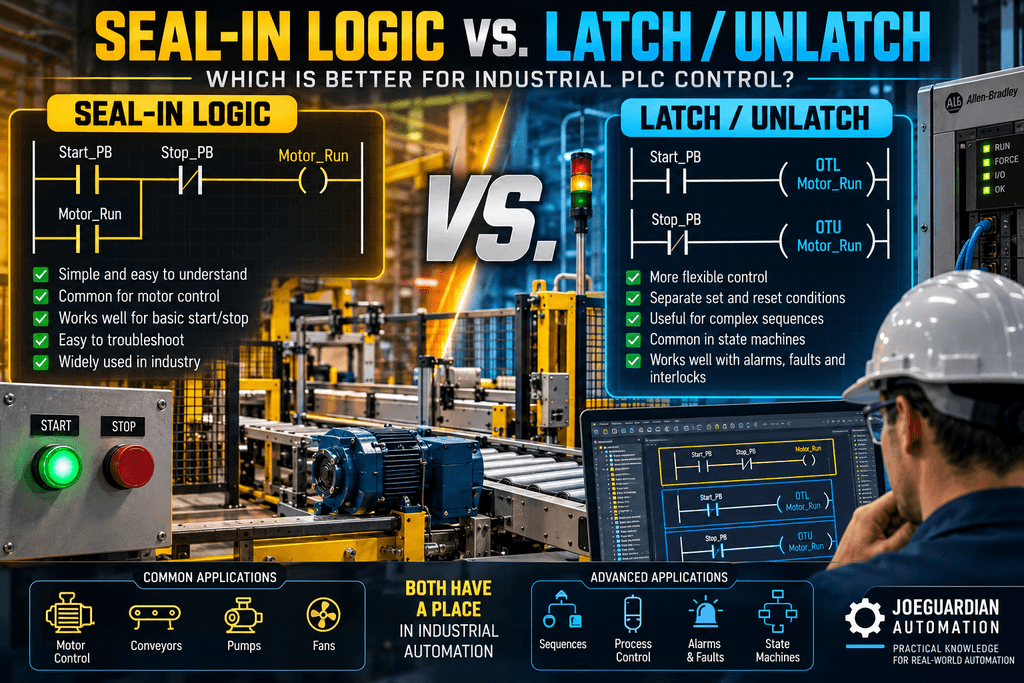
In industrial PLC programming, there are often several ways to make the same machine work.
Two of the most common methods for maintaining a control condition are Seal-In logic and Latch/Unlatch logic.
Both work.
Both are widely used.
Both can be implemented correctly.
And both can create maintenance problems when they are used without considering the technician who will eventually troubleshoot the machine.
So the real question is not:
Which instruction is better?
A better question is:
Which design makes the machine’s behavior easier to understand, troubleshoot, recover, and maintain?
That distinction matters when production is down and someone has to determine not only why a bit is OFF—but also why a bit is still ON.
1. The Traditional Seal-In Circuit
One of the first circuits many PLC programmers learn is the classic motor Start/Stop seal-in circuit.
Conceptually:
        Stop
----| |---------+----| |----------------( )----
                |    Start  |        Motor_RunCmd
                |           |
                +----| |----+
                     Motor_RunCmd
The Start pushbutton initially energizes Motor_RunCmd.
Once Motor_RunCmd becomes true, its own contact maintains the circuit after the operator releases Start.
The Stop condition breaks the circuit.
The important characteristic is that the condition maintaining the command is visible in the same logical path.
For a technician looking at the rung online, this can be very intuitive.
If the motor will not run, we can inspect the rung and ask:
- Is Start being requested?
- Is Stop healthy?
- Are the required conditions true?
- What condition is preventing the rung from becoming true?
The logic itself provides a troubleshooting trail.
2. The Latch/Unlatch Approach
The same general behavior can also be created using Allen-Bradley OTL and OTU instructions.
For example:
Start_PB
--| |------------------------(OTL Motor_RunCmd)
And somewhere else:
Stop_PB
--| |------------------------(OTU Motor_RunCmd)
When the OTL executes, the bit becomes true.
The important difference is that the bit does not require the original rung to remain true.
It remains latched until something explicitly unlatches it.
Conceptually:
EVENT
  |
  v
OTL Motor_RunCmd
  |
  v
Motor_RunCmd = 1
  |
  |
  |   remains ON
  |
  v
OTU Motor_RunCmd
  |
  v
Motor_RunCmd = 0
That behavior is extremely useful when the PLC needs to remember that something happened.
But it also changes how we troubleshoot the program.
3. The Technician’s Problem: Why Is This Bit Still ON?
Imagine arriving at a machine after production reports:
“The conveyor should be stopped, but the Run Command is still ON.”
You open Studio 5000 and see:
Conveyor_RunCmd = 1With conventional derived or seal-in logic, you can normally inspect the rung that controls the command and see the current conditions maintaining it.
With latched logic, the situation can be different.
You might find:
R06_Conveyor_Control

Start_Request
------------------------(OTL Conveyor_RunCmd)
But the instruction responsible for turning it OFF might exist somewhere completely different:
R09_Fault_Logic

Conveyor_Fault
------------------------(OTU Conveyor_RunCmd)
There might even be additional unlatch instructions:
Stop_Request
------------------------(OTU Conveyor_RunCmd)
System_Reset
------------------------(OTU Conveyor_RunCmd)Mode_Changed
------------------------(OTU Conveyor_RunCmd)Cross Reference can help find these instructions.
But now the technician must determine something more difficult:
Which instruction executed, and when?
That is fundamentally different from looking at a rung whose current conditions directly determine the output state.
4. Seal-In Logic Shows Conditions. Latches Remember Events.
This is one of the most useful ways to understand the difference.
A conventional rung is usually answering:
Are the conditions currently true?
A latch often answers:
Did an event occur that I need to remember?
That distinction gives us a powerful design principle.
Condition-driven behavior
Consider:
Run_Request
AND
Permissive_OK
AND
NOT Interlock_Active
AND
NOT Faulted
        |
        v
Motor_RunCmd
Motor_RunCmd represents the current result of current conditions.
If one required condition disappears, the command can disappear.
Event-driven memory
Now consider:
Motor_Failed_To_Start
        |
        v
OTL Motor_StartFault
The physical condition that originally caused the fault may disappear.
But we may intentionally want:
Motor_StartFault = 1until someone acknowledges or resets it.
That is exactly the type of situation where retaining an event can be valuable.
5. This Is Why OTL/OTU Are Not “Bad”
Technicians sometimes develop a dislike for latch instructions after troubleshooting poorly structured programs.
That reaction is understandable.
But OTL and OTU are simply tools.
The real problem is misapplication.
There are legitimate situations where remembering an event is exactly what the process requires.
For example:
Motor running normally
        ↓
Motor failure detected
        ↓
OTL Motor_Fault
        ↓
Physical condition disappears
        ↓
Motor_Fault remains active
        ↓
Operator investigates
        ↓
Fault_Reset
        ↓
OTU Motor_Fault
This behavior may be desirable because otherwise a momentary fault could disappear before anyone knows what happened.
The latch becomes diagnostic memory.
That is very different from randomly latching physical outputs throughout the program.
6. Requests, Commands, and Outputs Are Not the Same Thing
This distinction becomes extremely important in industrial PLC architecture.
Consider three layers:
REQUEST
   ↓
CONTROL DECISION
   ↓
COMMAND
   ↓
OUTPUT
A Request represents intent.
Conveyor_StartReqmeans:
Someone or something wants the conveyor to run.
A Command represents the PLC’s decision.
Conveyor_RunCmdmeans:
The PLC has evaluated the required conditions and is commanding the conveyor to run.
The Output represents the physical interface.
Local:2:O.Data.0means:
Energize this physical output point.
Those should not automatically be treated as interchangeable.
7. Be Careful Latching Physical Outputs
Consider this architecture:
Start_PB
    |
    v
OTL Local:2:O.Data.0
Now the physical output itself has become the memory element.
That may work.
But from a troubleshooting and architecture perspective, we have mixed several responsibilities together.
Compare it with:
Start PB / HMI
       ↓
Start Request
       ↓
Control Logic
       ↓
Permissives
       ↓
Interlocks
       ↓
Run Command
       ↓
Output Mapping
       ↓
Physical Output
Now each tag tells the technician something different.
For example:
Conveyor_StartReq
Conveyor_PermissiveOK
Conveyor_InterlockActive
Conveyor_RunCmd
Conveyor_RunningFB
Conveyor_Faulted
That gives us a diagnostic chain.
If the output is OFF, we can work backward.
If the output is ON but the motor is not running, we can work forward toward the physical equipment.
8. Command Does Not Mean Running
Regardless of whether Seal-In or Latch/Unlatch logic is used, another common mistake is assuming:
Motor_RunCmd = 1means:
Motor is runningIt does not.
A proper troubleshooting architecture should distinguish command from feedback:
Start Request
      ↓
Permissives
      ↓
Interlocks
      ↓
Run Command
      ↓
PLC Output
      ↓
Contactor / VFD
      ↓
Motor
      ↓
Running Feedback
Now we can detect:
RunCmd = 1
RunningFB = 0
After an appropriate verification timer:
Motor Failed to StartThis is where good PLC architecture starts helping the technician instead of simply controlling the machine.
9. What Happens After a Fault?
This is another place where the choice between latched and condition-driven logic becomes important.
Suppose:
Motor_RunCmd = 1and suddenly:
Motor_Overload = 1What should happen?
A robust architecture might produce:
Overload
   ↓
Interlock Active
   ↓
RunCmd = 0
   ↓
Motor Output = 0
But now another question appears:
Should the original Start Request still exist after the fault clears?
There is no universal answer.
Depending on the machine, we may want:
FAULT
  ↓
Stop machine
  ↓
Clear request
  ↓
Require operator to press Start again
Or a controlled process may require another recovery behavior.
The important point is that this should be an intentional design decision, not an accidental consequence of using OTL/OTU.
10. What Happens After a Power Cycle?
This is another question technicians should ask when reviewing control logic:
What happens when the PLC loses power and comes back?
Retentive behavior matters.
A bit representing:
Operator_StartRequestmay have very different restart requirements from a bit representing:
Alarm_Acknowledgedor:
Batch_Step_Completeor:
Maintenance_Mode_RequestWhen using latched or otherwise retentive states, programmers should deliberately consider startup behavior.
Ask:
- Should this condition survive a restart?
- Should First Scan clear it?
- Should the operator have to initiate the command again?
- Could restoring this state cause unexpected machine motion?
- Does the process require controlled recovery?
- What happens after communication is restored?
- What happens after switching Manual/Auto modes?
The instruction itself does not answer these questions.
The control philosophy must.
11. Where Latch/Unlatch Can Make Excellent Sense
OTL/OTU can be very useful when the PLC intentionally needs to remember something.
Examples may include:
Latched Faults
Fault Condition
      ↓
OTL Fault
      ↓
Operator investigates
      ↓
Reset
      ↓
OTU Fault
Alarm Memory
A brief process abnormality occurs and disappears, but we still want the operator to know it happened.
Event Capture
A momentary event needs to remain visible for diagnostics.
Sequence Memory
Some sequence architectures intentionally maintain state information.
Operator Requests
In certain architectures, an operator request may intentionally remain active until accepted, completed, rejected, or cancelled.
The common theme is:
We intentionally want memory.
12. Where Seal-In or Derived Logic Often Has an Advantage
For simple machine commands, condition-based logic can often be easier to diagnose.
Consider:
Run_Request
AND
Permissive_OK
AND
NOT Interlock
AND
NOT Faulted
        |
        v
Motor_RunCmd
Online, the technician can immediately see why the command exists.
If:
Permissive_OK = 0the troubleshooting trail is obvious.
There is less historical behavior to reconstruct.
This is especially valuable for:
- Motor commands
- Conveyor commands
- Valve commands
- Simple Start/Stop control
- Physical output commands
- Equipment enable logic
Again, this is not a universal rule.
It is a maintainability advantage worth considering.
13. The Cross-Reference Test
Here is a practical test technicians and programmers can use.
Pick an important command:
Conveyor_RunCmdPerform a Cross Reference.
Then ask:
Can another technician quickly determine everything capable of turning this command ON and OFF?
If the answer looks like:
Start Request
      ↓
Permissives
      ↓
Interlocks
      ↓
RunCmd
the troubleshooting path is relatively clear.
If the answer looks like:
OTL RunCmd → Routine 3

OTU RunCmd → Routine 7

OTU RunCmd → Routine 12

OTL RunCmd → HMI logic

OTU RunCmd → Fault logic

OTU RunCmd → First Scan
the program may still be technically correct.
But we should ask whether that complexity is necessary.
14. The 2:00 AM Technician Test
Imagine the original programmer is gone.
Production calls:
“The conveyor won’t stop.”
The technician finds:
Conveyor_RunCmd = 1The next question is:
Why?
Good architecture should make that answer discoverable.
The technician should not have to know that:
“Oh, that bit gets latched in Routine 4 during Auto Mode, but Routine 11 unlatches it unless the HMI maintenance bypass is active, except during recovery after a fault.”
That may be functional logic.
But it is expensive logic to maintain.
The true cost appears years later as Mean Time To Repair (MTTR).
15. A Practical Comparison
| Application | Seal-In / Derived Logic | Latch / Unlatch |
|---|---|---|
| Simple Motor Start/Stop | Excellent candidate | Possible, but often unnecessary |
| Motor Run Command | Often preferred | Use carefully |
| Physical PLC Output | Derived command preferred | Avoid casual latching |
| Fault Memory | Possible | Excellent candidate |
| Alarm requiring acknowledgment | Possible | Often useful |
| Event Capture | More difficult | Excellent candidate |
| Operator Request | Good | Can be useful |
| Sequence Memory | Depends on architecture | Can be appropriate |
| Machine State | Depends on architecture | Requires disciplined design |
| Safety Function | Requires proper safety architecture | Do not treat ordinary latch logic as the safety system |
16. The Real Debate Is Not OTE vs. OTL
This is the most important point.
A good PLC programmer should not choose an instruction because:
“I always use OTL.”
or:
“I never use latches.”
Instead ask:
What does this tag represent?
Is it:
- A current condition?
- An operator request?
- A command?
- An output?
- A remembered event?
- A fault?
- An alarm?
- A machine state?
Then choose the architecture that best represents that behavior.
A useful rule of thumb is:
Use condition-driven logic for conditions that should exist only while their requirements are true. Use memory intentionally when the process genuinely needs to remember an event or state.
17. Design for the Technician Who Comes After You
A PLC program is not finished when the machine starts running.
Eventually:
- A sensor will fail.
- A VFD will trip.
- A contactor will fail.
- Communication will be lost.
- An operator will select the wrong mode.
- A machine will recover from a power outage.
- A technician will open the PLC program during a production outage.
That technician needs to answer:
Why is this ON?

Why is this OFF?

What turned it ON?

What turns it OFF?

What is preventing the command?

What should happen after reset?

What should happen after power returns?
The easier the program makes those questions to answer, the more maintainable the control system becomes.
Final Thought
Seal-In logic and Latch/Unlatch logic are not enemies.
They are different tools representing different types of behavior.
The mistake is not using OTL.
The mistake is using memory where memory was never needed—or creating control logic whose behavior cannot easily be reconstructed by the next technician.
Before deciding how to maintain a PLC condition, ask one final question:
If I see this bit ON at 2:00 AM five years from now, will I be able to quickly determine why?
If the answer is yes, you are probably designing in the right direction.
Don’t program only for the machine to run today. Design the logic so the next technician can understand why it is running tomorrow.