PLC vs. SCADA Control: Don’t Leave the Technician at a Troubleshooting Dead End
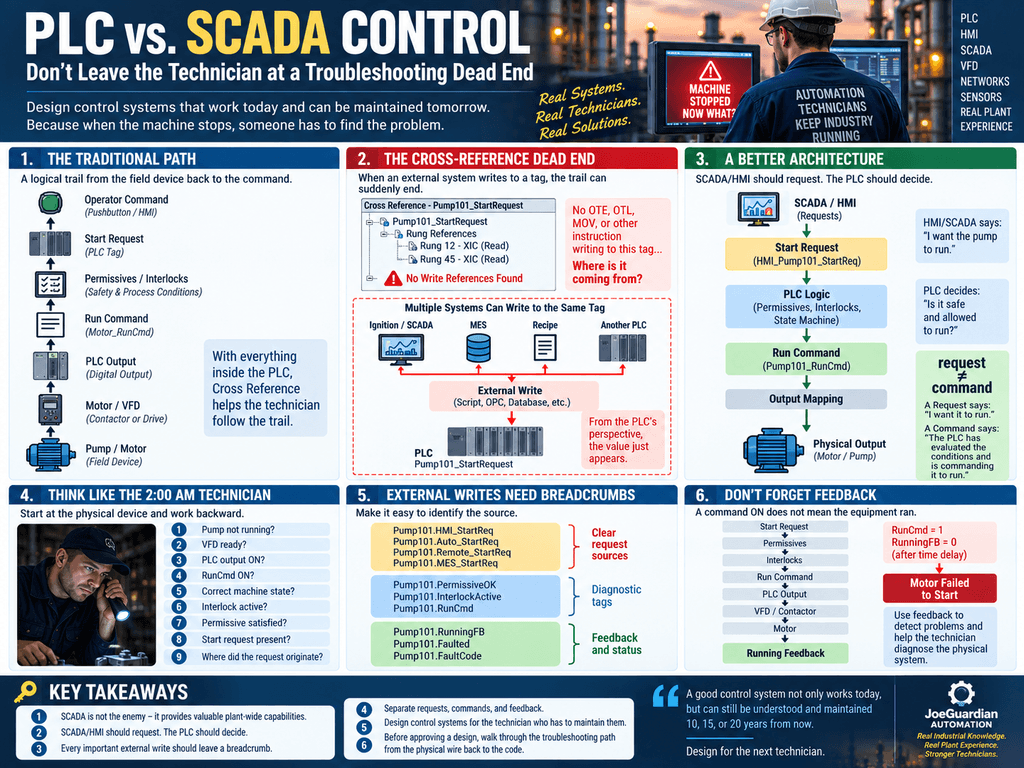
Modern industrial automation systems are no longer isolated PLCs controlling a few inputs and outputs.
Today, a machine may interact with PLCs, HMIs, SCADA platforms, historians, databases, MES systems, remote I/O, VFDs, robots, and software scripts.
This creates powerful systems—but it also creates a serious maintenance problem:
When the machine stops, can the technician still trace what is controlling it?
That question should be considered during system design, not after the first production outage.
The Traditional Troubleshooting Path
For many technicians, troubleshooting starts at the physical problem and works backward.
Suppose a pump will not start.
A typical investigation might look like this:
Pump
  ↑
Motor / VFD
  ↑
PLC Output
  ↑
Run Command
  ↑
Interlocks
  ↑
Permissives
  ↑
Start Request
  ↑
Operator Command
Inside the PLC, Cross Reference is one of the most valuable troubleshooting tools available.
If Pump_RunCmd is OFF, we find where it is generated.
If a permissive is missing, we trace that permissive.
If an interlock is active, we determine what caused it.
There is a logical trail of breadcrumbs from the physical output back toward the original command.
But modern control architectures can break that trail.
The Cross-Reference Dead End
Consider a PLC tag:
Pump101_StartRequestThe PLC program contains:
Pump101_StartRequest
        AND
Pump101_Permissive
        AND
NOT Pump101_Interlock
        AND
NOT Pump101_Fault
        |
        +----> Pump101_RunCmd
The pump is not running because Pump101_StartRequest is OFF.
The technician performs a Cross Reference expecting to find the logic controlling that tag.
But there is no obvious OTE, OTL, MOV, COP, or other instruction writing to it.
Why?
Because the value may be coming from outside the PLC.
Ignition / SCADA / MES
          |
        Script
          |
          v
Pump101_StartRequest
          |
          v
         PLC
From the PLC technician’s perspective, the troubleshooting trail suddenly ends.
Now the questions become much more difficult:
- Is an HMI writing this value?
- Is it an Ignition script?
- Is another PLC writing it?
- Is MES controlling it?
- Is a recipe changing it?
- Is an OPC client involved?
- Is a database transaction involved?
- Is some software service that nobody on night shift knows about responsible?
The problem is not necessarily that external software is controlling something.
The problem is that the technician has lost the trail of breadcrumbs.
SCADA Is Not the Enemy
This should not become a debate where PLC programmers say:
Everything belongs in the PLC.
Modern industrial systems legitimately need higher-level software.
SCADA platforms can provide:
- Historian and trending
- Production reporting
- OEE
- Recipe management
- Setpoint management
- Energy monitoring
- Predictive analytics
- Database integration
- MES integration
- Maintenance information
- Fleet and plant-wide coordination
These capabilities can provide enormous value.
The problem begins when we confuse supervisory control with machine control without considering what happens during troubleshooting.
A Better Architecture: Request vs. Command
One useful design principle is:
SCADA/HMI should request. The PLC should decide.
Instead of allowing an HMI or SCADA application to directly control a physical output:
SCADA
   |
   v
Motor_RunCmd
   |
   v
Physical Output
consider creating an explicit request:
SCADA / HMI
      |
      v
HMI_Pump101_StartReq
      |
      v
PLC Request Logic
      |
      v
Permissives
      |
      v
Interlocks
      |
      v
Machine State
      |
      v
Pump101_RunCmd
      |
      v
Output Mapping
      |
      v
Physical Output
There is an important difference between these two concepts.
A Request says:
I want the pump to run.
A Command says:
The PLC has evaluated the operating conditions and is commanding the pump to run.
That distinction makes troubleshooting much easier.
Think Like the 2:00 AM Technician
A system can be beautifully engineered and still be difficult to maintain.
Imagine production calls maintenance:
“Pump 101 won’t start.”
The technician should be able to work backward:
Pump not running
       ↓
VFD ready?
       ↓
PLC output ON?
       ↓
RunCmd ON?
       ↓
Correct machine state?
       ↓
Interlock active?
       ↓
Permissive satisfied?
       ↓
Start request present?
       ↓
Where did the request originate?
Every step should answer another question.
If the troubleshooting path reaches:
External software writes this tag
              ↓
             ???
the architecture has created a maintenance problem.
External Writes Need Breadcrumbs
Another useful principle is:
Every important external write should leave a breadcrumb.
If SCADA, MES, another PLC, or another software application can influence machine operation, consider exposing diagnostic information that identifies the source.
For example:
Pump101.HMI_StartReq
Pump101.Auto_StartReq
Pump101.Remote_StartReq
Pump101.MES_StartReq

Pump101.PermissiveOK
Pump101.InterlockActive
Pump101.RunCmd
Pump101.RunningFB
Pump101.Faulted
Now the technician can distinguish:
REQUEST
   ↓
DECISION
   ↓
COMMAND
   ↓
OUTPUT
   ↓
FEEDBACK
That is much easier to troubleshoot than a collection of tags being modified by multiple systems.
Don’t Forget Feedback
The troubleshooting chain should not stop at the PLC output.
A PLC commanding something ON does not prove that the equipment actually operated.
For a motor:
Start Request
      ↓
Permissives
      ↓
Interlocks
      ↓
Run Command
      ↓
PLC Output
      ↓
VFD / Contactor
      ↓
Motor
      ↓
Running Feedback
The distinction between Command and Feedback allows the PLC to detect situations such as:
RunCmd = 1
RunningFB = 0
after an appropriate time delay.
That can become:
Motor Failed to StartNow the control architecture is also helping the technician diagnose the physical system.
Control Architecture Should Be Designed for Maintenance
Developers naturally focus on functionality:
Does the system work?
Technicians eventually ask a different question:
Why isn’t it working?
A good industrial control system needs to answer both.
The original developer or system integrator may eventually leave the facility.
The PLC, HMI, SCADA application, network infrastructure, and machine may remain in production for 10, 15, or 20 years.
Future technicians should not need tribal knowledge to understand who is controlling a machine.
A Practical Technician’s Rule
Before approving a control architecture, mentally perform the troubleshooting procedure.
Start at the physical device:
FIELD DEVICE
      ↑
OUTPUT
      ↑
COMMAND
      ↑
STATE / SEQUENCE
      ↑
INTERLOCKS
      ↑
PERMISSIVES
      ↑
REQUEST
      ↑
COMMAND SOURCE
At every level ask:
Can I determine why this condition is ON or OFF?
Then ask:
Can I determine who is writing to it?
If the answer becomes “I don’t know” somewhere between the field device and SCADA, the troubleshooting path needs improvement.
Final Thought
The future of industrial automation is not PLC versus SCADA.
It is PLC and SCADA working together with clearly defined responsibilities.
SCADA developers need to understand what happens when production is down and a technician is standing in front of a machine trying to find the problem.
PLC programmers need to understand that modern plants increasingly depend on databases, historians, MES, analytics, and supervisory software.
And technicians increasingly need enough knowledge of both worlds to troubleshoot the complete system.
The goal should be simple:
Never leave the next technician at a troubleshooting dead end.
pornip
That was amazing
pornip
Its Amazing