Permissives vs. Interlocks: They Are Not the Same Thing
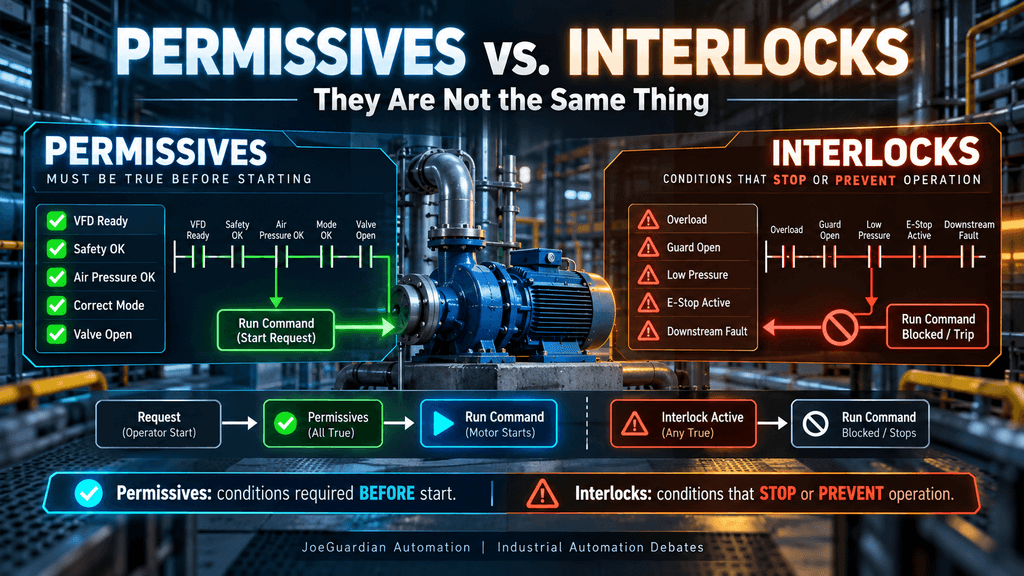
In industrial automation, the words permissive and interlock are often used as if they mean the same thing.
They do not.
Both are conditions that influence whether equipment is allowed to operate, and both may appear in the same PLC logic. But they answer two different questions:
Permissive: Are the required conditions satisfied to allow this equipment to start?
Interlock: Is there a condition that should prevent or stop this equipment from operating?
That distinction may sound small, but it becomes extremely important when troubleshooting machines, designing PLC programs, creating HMI diagnostics, and building control systems that another technician must understand years later.
A well-structured program should make the difference visible.
The Basic Difference
Consider a centrifugal pump.
Before the pump starts, several conditions may need to be satisfied:
- VFD ready
- Correct operating mode selected
- Required valve open
- Adequate suction pressure
- Upstream process available
Those are typically permissives.
They answer:
“Is the process ready for this pump to start?”
Now imagine the pump is already running and one of these conditions appears:
- Motor overload
- Critical low suction pressure
- Guard opened
- Emergency stop activated
- Downstream equipment trips
Those conditions may be treated as interlocks.
They answer:
“Is there a condition that requires us to prevent or stop operation?”
The simplified architecture becomes:
START REQUEST
      |
      v
PERMISSIVES OK?
      |
      +------ NO ------> START BLOCKED
      |
     YES
      |
      v
RUN COMMAND
      |
      v
INTERLOCK ACTIVE?
      |
      +------ YES -----> STOP / BLOCK
      |
     NO
      |
      v
EQUIPMENT RUNS
That separation immediately makes the control philosophy easier to understand.
What Is a Permissive?
A permissive is normally a condition that must be satisfied before an action is allowed to begin.
Imagine an operator presses the Start button for a conveyor.
The PLC receives:
Start_RequestBut pressing Start should not necessarily produce:
Motor_RunCmdfirst the PLC may evaluate:
Drive_Ready
Safety_OK
Downstream_Available
Correct_Mode
Air_Pressure_OK
Only when the required conditions are satisfied should the run command be allowed.
Conceptually:
Start_Request
AND Drive_Ready
AND Safety_OK
AND Downstream_Available
AND Correct_Mode
AND Air_Pressure_OK

= Motor_RunCmd
The permissives act as a gate between the request and the command.
The operator is requesting an action.
The PLC determines whether the process is ready to accept that request.
A Permissive Does Not Necessarily Mean “Fault”
This is one of the most important distinctions.
Suppose a conveyor cannot start because the downstream machine is not ready.
Nothing may actually be broken.
The machine may simply be waiting for another part of the process.
For example:
Downstream_Ready = FALSEmight create:
Permissive_OK = FALSEThe conveyor cannot start.
But that does not automatically mean:
Conveyor_Fault = TRUEThe condition may simply represent the normal sequence of the process.
This is why HMIs should often communicate:
Start inhibited — downstream equipment not ready
instead of displaying something dramatic like:
CONVEYOR FAILURE
Good automation diagnostics distinguish between not ready and failed.
What Is an Interlock?
An interlock is generally a condition that prevents operation or causes operation to stop because continuing would be undesirable.
The condition may protect:
- personnel
- machinery
- product
- process stability
- downstream equipment
For example:
Motor_Overload
Guard_Open
Low_Lube_Pressure
Downstream_Fault
Critical_Low_Level
could contribute to:
Interlock_ActiveConceptually:
Motor_Overload
OR Guard_Open
OR Critical_Low_Level
OR Downstream_Fault

= Interlock_Active
Then:
Interlock_Activemay remove:
Motor_RunCmdor prevent the command from being generated in the first place.
The key idea is that an interlock represents a condition that says:
The equipment must not operate under this condition.
Start Permissive vs. Running Interlock
This distinction becomes much clearer when we consider what happens after the machine starts.
Imagine a pump requires:
Tank_Level_OKbefore starting.
That sounds reasonable.
But what happens if the level drops while the pump is running?
There are several possibilities.
The designer might use the level only as a starting permissive.
Once the pump starts, the condition no longer matters.
Or the level may also act as a running interlock:
Low_Levelcauses the pump to stop.
Neither design is automatically correct.
The correct behavior depends on the process requirements.
This is why simply placing every condition in series with a motor command can sometimes create poor control logic.
The Classic “Everything in One Rung” Problem
Many PLC programs begin with logic similar to this:
Start
Safety_OK
Drive_Ready
Tank_Level_OK
Valve_Open
Pressure_OK
No_Fault
Downstream_OK
Mode_Auto
Motor_Run
All the conditions are placed in one long rung.
Technically, the machine might work.
But several questions become difficult to answer:
- Which conditions are required only before startup?
- Which conditions must remain true while running?
- Which condition stopped the machine?
- Which conditions are process requirements?
- Which conditions represent equipment faults?
- Which conditions should reset automatically?
- Which conditions require operator acknowledgment?
When every condition becomes just another contact in a rung, control philosophy disappears inside the Boolean logic.
The PLC knows why the rung is false.
The technician looking at the machine may not.
A More Maintainable Architecture
For larger machines, I prefer making the control intent visible with intermediate tags.
For example:
Permissive_VFDReady
Permissive_ModeOK
Permissive_AirPressureOK
Permissive_DownstreamReady
These can create:
Permissives_OKSeparately:
Interlock_Overload
Interlock_GuardOpen
Interlock_ProcessTrip
Interlock_DownstreamFault
can create:
Interlock_ActiveThen the equipment command becomes easier to understand:
Start_Request
AND Permissives_OK
AND NOT Interlock_Active

= Run_Command
The ladder logic becomes documentation.
A technician going online does not need to mentally reverse-engineer twenty contacts just to understand why the motor will not start.
Permissives Should Tell You What Is Missing
A single tag such as:
Permissives_OKis useful for control logic.
But it should not be the only diagnostic information available.
Suppose:
Permissives_OK = FALSEThat tells the PLC not to start.
But the technician still needs to know why.
The program should retain individual status information such as:
VFD_Ready
AirPressure_OK
Valve_Open
Downstream_Ready
Mode_OK
The HMI can then display:
START PERMISSIVES

✓ VFD Ready
✓ Safety System OK
✓ Correct Mode
✗ Air Pressure Low
✓ Downstream Available
Now troubleshooting becomes immediate.
The operator sees why the command is blocked.
The technician sees which field device to investigate.
Interlocks Need the Same Diagnostic Visibility
Consider a conveyor that suddenly stops.
If the HMI only says:
CONVEYOR STOPPED
the technician must investigate the entire machine.
Instead, the PLC architecture could identify:
Interlock_Overload
Interlock_Guard
Interlock_Downstream
Interlock_Jam
The HMI can then show:
Conveyor Interlock — Downstream Jam Active
That small architectural decision can save significant troubleshooting time.
Permissive, Interlock, Alarm, and Fault Are Different Concepts
This is where PLC programs frequently become confusing.
Consider:
Air_Pressure_LowThat condition could play several roles.
It might prevent startup:
Permissive_AirPressureOK = FALSEIt might generate an operator alarm:
Alarm_LowAirPressure = TRUEIt might stop a machine:
Interlock_LowAirPressure = TRUEAnd if the condition requires manual reset, it might create a latched fault:
Fault_LowAirPressure = TRUEThe same physical condition can therefore participate in multiple layers of the control strategy.
The terminology should describe what the PLC is doing with the condition, not merely what sensor produced it.
The Time Dimension Matters
Real industrial signals are not always clean.
Pressure may temporarily dip.
A photoeye may flicker.
A level transmitter may oscillate around its threshold.
A communication status bit may briefly drop.
If every transient immediately becomes an interlock, machines can become unnecessarily unstable.
For example:
Low_Pressuremight require:
Low_Pressure continuously for 3 secondsbefore generating:
Interlock_LowPressureThe delay must come from process knowledge.
Too short and nuisance trips occur.
Too long and equipment protection may be compromised.
There is no universal timer value that works for every machine.
What About Safety?
Safety deserves special treatment.
An emergency stop, safety gate, light curtain, or safety relay should not simply be treated as another ordinary process bit because it happens to appear in the PLC program.
Machine safety architecture may involve:
- safety relays
- safety PLCs
- dual-channel circuits
- monitored contactors
- STO
- safety-rated I/O
- required Performance Level or SIL
The standard PLC may receive a diagnostic status such as:
Safety_OKand use it as part of the operational logic.
But that does not mean the standard PLC logic itself provides the required safety function.
This distinction is critical.
Example: Industrial Conveyor
Imagine a conveyor feeding a wrapper.
The operator presses Start.
Before allowing the conveyor to run, the PLC verifies:
Auto_Mode
Drive_Ready
Wrapper_Ready
Safety_OK
No_Active_Fault
Those form:
Conv_Permissives_OKThe command becomes:
Start_Request
AND Conv_Permissives_OK
AND NOT Conv_Interlock_Active

= Conv_RunCmd
Now imagine the conveyor starts.
A product travels downstream and a jam sensor remains active too long.
The PLC generates:
Interlock_ProductJamwhich contributes to:
Conv_Interlock_ActiveThe motor stops.
The HMI displays:
Conveyor stopped — Product Jam Interlock
This is much more useful than simply discovering that Motor_RunCmd became false.
Another Example: Process Pump
Consider a transfer pump.
Startup permissives might include:
Source_Tank_Available
Destination_Tank_Available
Suction_Valve_Open
Discharge_Valve_Open
VFD_Ready
But running interlocks could include:
Motor_Overload
Critical_Low_SuctionPressure
Destination_HighHighLevel
Emergency_Stop
The startup conditions and running protection conditions are now intentionally separated.
That separation reflects the process, not merely the PLC program.
Should Every Permissive Become an Interlock?
No.
That is exactly why the distinction matters.
Suppose the system requires:
Downstream_Readybefore a conveyor starts.
Once the conveyor is operating, the downstream status might temporarily change while product already exists between machines.
Immediately dropping the conveyor could create a worse process condition.
In another machine, losing downstream readiness may require an immediate stop to prevent a pileup.
Same signal.
Different process.
The PLC programmer cannot determine the correct answer from the tag name alone.
This requires understanding the machine.
Should Every Interlock Create a Latched Fault?
Again, no.
Some interlocks disappear automatically when the condition becomes healthy.
Others intentionally require operator reset.
Consider:
Downstream_NotReadyOnce the downstream machine becomes ready again, automatic recovery may be perfectly acceptable.
Compare that with:
Motor_OverloadA manual investigation and reset may be desirable before restarting.
The decision depends on equipment risk, process requirements, safety considerations, and plant operating philosophy.
The Troubleshooting Perspective
Imagine arriving at a machine that will not start.
With poorly structured logic, you open the motor rung and begin tracing contacts:
TRUE
TRUE
TRUE
TRUE
FALSE
TRUE
TRUE
Eventually you find the false condition.
With structured control logic, you might immediately see:
Start_Request         TRUE
Permissives_OK        FALSE
Interlock_Active      FALSE
Run_Command           FALSE
Then:
VFD_Ready             TRUE
Safety_OK             TRUE
Valve_Open            TRUE
AirPressure_OK        FALSE
Downstream_Ready      TRUE
You now know exactly where to begin troubleshooting.
That is not just prettier programming.
It reduces Mean Time To Repair.
The Debate
Some programmers argue that separate permissive and interlock structures create unnecessary tags and complexity.
For very small machines, that argument can be reasonable.
A simple motor might only require:
Start
Stop
Overload
Creating an elaborate control architecture around three signals may provide little benefit.
But as machines grow, the advantage changes.
Once equipment has several operating modes, VFDs, process instrumentation, upstream/downstream coordination, sequence control, alarms, faults, and HMI diagnostics, explicitly separating control concepts becomes increasingly valuable.
The objective is not to create the largest PLC program.
It is to create the clearest representation of the machine’s behavior.
A Practical Rule
A useful way to think about the difference is:
Permissive = “Can I start?”
Interlock = “Am I allowed to continue?”
That is intentionally simplified because real machines contain exceptions.
But it provides an excellent starting point when designing control architecture.
Then ask:
What should happen if this condition disappears after the equipment is already running?
That question often reveals whether you are dealing with a startup permissive, a running interlock, or both.
The Larger Lesson
Industrial PLC programming is not simply about making outputs turn on.
Good control software explains the machine.
A technician should be able to go online and understand:
REQUEST
   ↓
PERMISSIVES
   ↓
COMMAND
   ↓
EQUIPMENT
   ↓
STATUS
while another path protects the operation:
FAULT / PROCESS CONDITION
          ↓
       INTERLOCK
          ↓
     BLOCK OR STOP
This architecture creates something extremely valuable in industrial automation:
breadcrumbs.
When the process stops at 2:00 AM, another technician should be able to follow those breadcrumbs and understand what happened.
Final Thought
Permissives and interlocks may eventually influence the same output, but they describe different intentions within the control strategy.
Permissives establish whether the machine is ready to begin.
Interlocks establish whether the machine is allowed to operate.
Keeping those concepts visible improves programming, HMI diagnostics, commissioning, troubleshooting, and long-term maintainability.
The goal should not simply be:
“Does the machine run?”
A better question is:
“When the machine does not run, does the PLC clearly explain why?”
That difference separates logic that merely works from logic that can be maintained in the real world.