13. Electrical Interlocking in PLC Programs ( 13 of 35 )
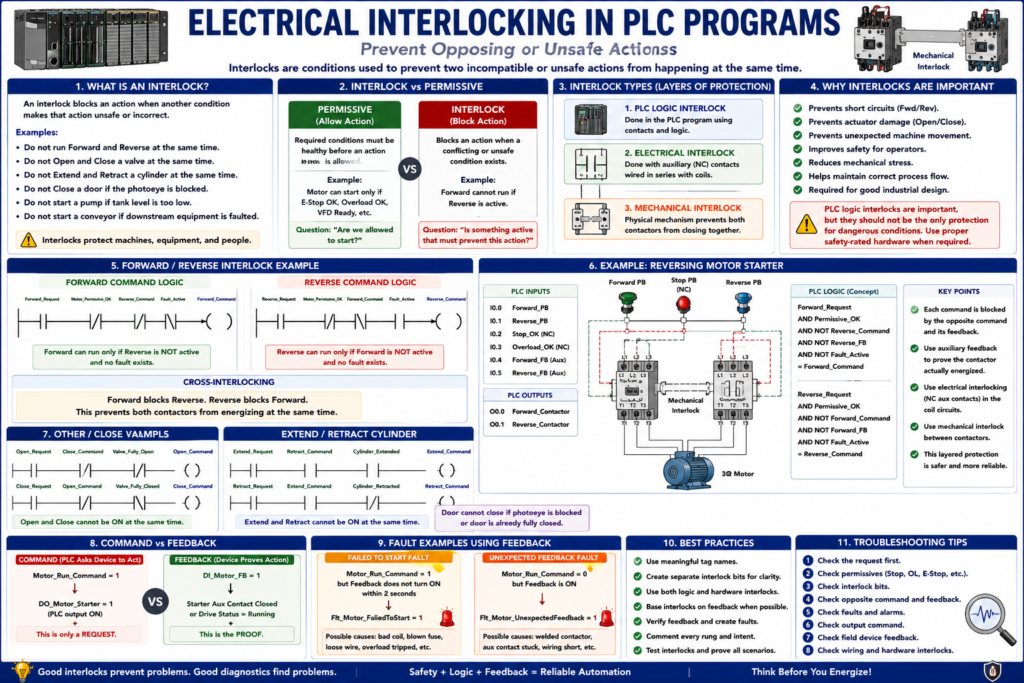
An interlock is a condition used to prevent two incompatible or unsafe actions from happening at the same time.
In simple words:
An interlock blocks an action when another condition makes that action unsafe or incorrect.In PLC programming, interlocks are used to protect machines, motors, actuators, valves, and operators from conflicting commands.
Common examples:
Do not run Forward and Reverse at the same time.
Do not Open and Close a valve at the same time.
Do not Extend and Retract a cylinder at the same time.
Do not Close a door if the photoeye is blocked.
Do not start a pump if tank level is too low.
Do not start a conveyor if downstream equipment is faulted.
In motor control circuits, interlocking contacts are used to prevent incompatible actions. A classic reversing starter uses interlocks so the Forward and Reverse contactors cannot energize at the same time, because that would create a phase-to-phase short circuit.
Why Interlocks Are Important
Without interlocks, a PLC program may allow two commands that should never happen together.
Example:
Forward_Command = ON
Reverse_Command = ON
This is dangerous in a reversing motor starter.
Another example:
Valve_Open_Command = ON
Valve_Close_Command = ON
This can damage a valve actuator or create unstable operation.
Another example:
Door_Close_Command = ON
Photoeye_Blocked = ON
This can create a machine hazard or product damage.
The purpose of an interlock is to prevent incompatible events from occurring. Electrical interlocks govern related operations, while mechanical interlocks physically prevent certain actions from occurring.
Interlock vs Permissive
Many technicians confuse permissives and interlocks.
They are related, but they are not exactly the same.
Permissive
A permissive is a required condition that must be healthy before an action is allowed.
Example:
Motor can start only if:
E-Stop OK
AND Stop circuit OK
AND Overload OK
AND VFD Ready
A permissive says:
“Are we allowed to start?”Interlock
An interlock blocks an action because another conflicting or unsafe action is active.
Example:
Forward cannot run if Reverse is active.
Open cannot run if Close is active.
Close cannot run if Photoeye is blocked.
An interlock says:
“Is something active that must prevent this action?”Simple Difference
| Concept | Main Purpose | Example |
|---|---|---|
| Permissive | Allows action only when required conditions are OK | Motor can start if overload is OK |
| Interlock | Blocks action when a conflicting condition exists | Motor cannot run forward if reverse is active |
A clean PLC program usually has both.
Electrical Interlock vs Mechanical Interlock
Interlocking can exist in different layers.
1. PLC Logic Interlock
This is done in the PLC program.
Example:
Forward_Request AND NOT Reverse_Command = Forward_CommandThe PLC logic prevents both commands from being ON at the same time.
2. Electrical Interlock
This is done with hardwired auxiliary contacts.
Example:
Reverse contactor NC auxiliary contact in series with Forward coil
Forward contactor NC auxiliary contact in series with Reverse coil
In a reversing starter, each contactor commonly has a normally closed auxiliary contact wired in series with the opposite coil. This prevents one contactor from energizing if the opposite contactor is already energized.
3. Mechanical Interlock
This is a physical mechanism between contactors.
Example:
Forward contactor physically prevents Reverse contactor from pulling in.
Reverse contactor physically prevents Forward contactor from pulling in.
Some reversing starters use mechanical interlocking so both contactors cannot physically actuate at the same time. It is common to use both electrical and mechanical interlocking for extra protection.
Important Safety Note
PLC logic interlocks are helpful, but they should not be the only protection for dangerous conditions.
For critical safety functions, use proper safety-rated hardware and design.
Examples:
Safety relay
Safety PLC
Dual-channel safety inputs
Safety contactors
Safety-rated interlock switches
Light curtains
E-Stop safety circuit
A normal PLC interlock is good for machine logic, but safety functions require safety-rated design.
Basic Forward / Reverse Interlock
A forward/reverse motor circuit is the classic interlock example.
Problem
A three-phase motor reverses direction when two motor phases are swapped.
A reversing starter uses two contactors:
Forward contactor
Reverse contactor
If both contactors energize at the same time, it can create a short circuit.
So the logic must prevent this:
Forward_Command = ON
Reverse_Command = ON
Forward Command Logic
Forward_Request
AND Motor_Permissive_OK
AND NOT Reverse_Command
AND NOT Fault_Active
= Forward_Command
Ladder concept:
Forward_Request   Motor_Permissive_OK   Reverse_Command   Fault_Active      Forward_Command
----] [----------------] [----------------]/[---------------]/[--------------------( )----
This means:
Forward can run only if Reverse is not active.Reverse Command Logic
Reverse_Request
AND Motor_Permissive_OK
AND NOT Forward_Command
AND NOT Fault_Active
= Reverse_Command
Ladder concept:
Reverse_Request   Motor_Permissive_OK   Forward_Command   Fault_Active      Reverse_Command
----] [----------------] [----------------]/[---------------]/[--------------------( )----
This means:
Reverse can run only if Forward is not active.This is cross-interlocking.
Cross-Interlocking
Cross-interlocking means each command blocks the opposite command.
Example:
Forward_Command blocks Reverse_Command.
Reverse_Command blocks Forward_Command.
This pattern is used for many devices:
Forward / Reverse
Open / Close
Extend / Retract
Raise / Lower
Heat / Cool
Fill / Drain
Clamp / Unclamp
The idea is simple:
Command A cannot be ON when Command B is ON.
Command B cannot be ON when Command A is ON.
Example: Open / Close Valve Interlock
A motorized valve may have two commands:
Valve_Open_Command
Valve_Close_Command
You should not energize both at the same time.
Open Logic
Open_Request
AND NOT Close_Command
AND NOT Valve_Fully_Open
AND Valve_Permissive_OK
= Valve_Open_Command
Close Logic
Close_Request
AND NOT Open_Command
AND NOT Valve_Fully_Closed
AND Valve_Permissive_OK
= Valve_Close_Command
This prevents both directions from being active at once.
Example: Door Open / Close Interlock
Industrial doors are a great example.
Open Command
Open_Request
AND NOT Close_Command
AND NOT Door_Fully_Open
AND Stop_OK
AND NOT Fault_Active
= Open_Command
Close Command
Close_Request
AND NOT Open_Command
AND NOT Door_Fully_Closed
AND Stop_OK
AND NOT Fault_Active
AND NOT Photoeye_Blocked
= Close_Command
Here, the photoeye acts as an interlock for closing.
If the photoeye is blocked, the door cannot close.That is a practical machine interlock.
Example: Cylinder Extend / Retract Interlock
A pneumatic cylinder may use two solenoids:
Extend solenoid
Retract solenoid
Do not energize both.
Extend Logic
Extend_Request
AND NOT Retract_Command
AND NOT Cylinder_Extended
AND AirPressure_OK
= Extend_Command
Retract Logic
Retract_Request
AND NOT Extend_Command
AND NOT Cylinder_Retracted
AND AirPressure_OK
= Retract_Command
This is the same logic pattern.
Interlock Bits
A professional PLC program may create separate interlock bits.
Example:
Intlk_Forward_Blocked
Intlk_Reverse_Blocked
Intlk_Open_Blocked
Intlk_Close_Blocked
Intlk_Photoeye_Blocked
Intlk_OppositeCommand
Then the command logic becomes easier to read.
Example:
Forward_Request
AND Motor_Permissive_OK
AND NOT Intlk_Forward_Blocked
= Forward_Command
This is cleaner than putting every condition directly into one huge rung.
Professional Interlock Structure
A clean structure may look like this:
1. Build Requests
2. Build Permissives
3. Build Interlocks
4. Build Commands
5. Map Outputs
6. Verify Feedback
7. Generate Faults
Example:
Forward_Permissive_OK
Reverse_Permissive_OK
Intlk_Forward_Blocked
Intlk_Reverse_Blocked
Forward_Command
Reverse_Command
DO_Forward_Contactor
DO_Reverse_Contactor
DI_Forward_FB
DI_Reverse_FB
This makes troubleshooting much easier.
Forward / Reverse Example with Interlock Bits
Interlock Logic
Forward_Command → Intlk_Reverse_Blocked
Reverse_Command → Intlk_Forward_Blocked
Command Logic
Forward_Request
AND Motor_Permissive_OK
AND NOT Intlk_Forward_Blocked
= Forward_Command
Reverse_Request
AND Motor_Permissive_OK
AND NOT Intlk_Reverse_Blocked
= Reverse_CommandThis reads naturally:
Forward is blocked if Reverse is active.
Reverse is blocked if Forward is active.
Hardware Interlock Still Matters
Even if PLC logic is correct, hardware interlocks are still important.
Why?
Because PLC outputs can fail.
Example:
Output module point shorted ON
Wiring mistake
Wrong force applied
Contactor mechanically stuck
Program error
Wrong download
For critical opposing contactors, the electrical control circuit should still include hardware interlocking.
A good reversing starter commonly includes:
PLC logic interlock
Electrical auxiliary contact interlock
Mechanical contactor interlock
Overload protection
Proper fusing/breaker protection
This layered approach is much better than relying on one protection method.
Interlocks and Feedback
Interlocks should often be based on feedback, not only commands.
Example:
Reverse_Command = PLC command
Reverse_Feedback = contactor actually pulled in
Better interlock:
Do not energize Forward if Reverse_Feedback is ON.Why?
Because the real world may not match the command.
Example:
Reverse_Command = OFF
But Reverse contactor is welded/stuck ON
If Forward is allowed only because Reverse_Command is OFF, you may have a dangerous condition.
Better logic checks:
Reverse_Command is OFF
AND Reverse_Feedback is OFF
Example: Safer Forward Logic
Forward_Request
AND Motor_Permissive_OK
AND NOT Reverse_Command
AND NOT DI_Reverse_FB
AND NOT Fault_Active
= Forward_Command
This blocks Forward if Reverse is either commanded or actually proven active.
Example: Opposite Feedback Fault
A good program can also detect abnormal feedback.
Example:
Forward_Command = OFF
DI_Forward_FB = ON
This may mean:
Contactor stuck
Auxiliary contact problem
Wiring problem
Feedback shorted
Fault:
Flt_Forward_UnexpectedFeedbackAnother example:
Forward_Command = ON
DI_Forward_FB = OFF after 2 seconds
Fault:
Flt_Forward_FailedToStartThis makes the system much easier to troubleshoot.
Interlock vs Fault
Another important distinction:
Interlock
Blocks an action while a condition exists.
Example:
Close command blocked because photoeye is blocked.This may not be a fault. It may be normal machine behavior.
Fault
Indicates something abnormal happened.
Example:
Close command was active, but door did not move within timeout.That is a fault.
Example: Photoeye on Door
Interlock
Photoeye_Blocked = ON
Close_Command blocked
This is normal protection.
Fault
Close_Command = ON
Door_Closed_LS does not turn ON within 10 seconds
This is abnormal.
Fault:
Flt_Door_CloseTimeoutInterlock Troubleshooting
When a command does not energize, ask:
Is the request active?
Are permissives OK?
Is an interlock active?
Is a fault active?
Is the opposite command active?
Is the opposite feedback active?
Is the limit switch already made?
Is the field device blocked by another machine condition?
Example:
Open_Request = 1
Open_Command = 0
Possible reasons:
Door already fully open
Close_Command is active
Fault_Active is true
Stop_OK is false
Open_Permissive_OK is false
Interlock bit is active
Common Beginner Mistakes
Mistake 1 — Only Interlocking Commands
Bad:
Forward blocked by Reverse_Command only.Better:
Forward blocked by Reverse_Command OR Reverse_Feedback.Mistake 2 — No Hardware Interlock
PLC logic alone is not enough for opposing contactors.
Use proper hardware interlock design.
Mistake 3 — Calling Every Interlock a Fault
Not every blocked action is a fault.
Example:
Door cannot close because photoeye is blocked.That may be a normal interlock status, not a machine fault.
Mistake 4 — Interlock Logic Hidden Inside Huge Command Rungs
Bad:
One long rung with every condition buried inside.Better:
Create named interlock bits.Example:
Intlk_CloseBlocked_ByPhotoeye
Intlk_OpenBlocked_ByCloseCommand
Intlk_ForwardBlocked_ByReverse
Clear names help troubleshooting.
Automation Technician Notes
When troubleshooting interlocks, follow this path:
Request
↓
Permissive
↓
Interlock
↓
Fault
↓
Command
↓
Output
↓
Feedback
Do not jump directly to the output.
If the output is OFF, the PLC may be intentionally blocking it.
A good technician asks:
What condition is preventing the command?Not just:
Why is the output off?Practical Example: Reversing Motor Starter
Inputs
DI_Forward_PB
DI_Reverse_PB
DI_Stop_OK
DI_Overload_OK
DI_Forward_FB
DI_Reverse_FB
Outputs
DO_Forward_Contactor
DO_Reverse_Contactor
Internal Tags
Forward_Request
Reverse_Request
Motor_Permissive_OK
Intlk_Forward_Blocked
Intlk_Reverse_Blocked
Forward_Command
Reverse_Command
Flt_Forward_FailedToStart
Flt_Reverse_FailedToStart
Logic Flow
Forward PB → Forward_Request
Reverse PB → Reverse_Request
Stop OK + Overload OK → Motor_Permissive_OK
Reverse_Command or Reverse_FB → Intlk_Forward_Blocked
Forward_Command or Forward_FB → Intlk_Reverse_Blocked
Forward_Request + Permissive + No Forward Interlock → Forward_Command
Reverse_Request + Permissive + No Reverse Interlock → Reverse_Command
Commands → Outputs
Outputs → Feedback
Feedback problems → Faults
This is a professional control strategy.
Key Terms
| Term | Meaning |
|---|---|
| Interlock | Logic or hardware condition that blocks incompatible actions |
| Electrical Interlock | Auxiliary contact wiring used to prevent conflicting coils |
| Mechanical Interlock | Physical mechanism that prevents two devices from actuating together |
| Cross-Interlock | Two commands blocking each other |
| Permissive | Required healthy condition before an action is allowed |
| Command | PLC request to energize an output |
| Feedback | Proof that the field device actually responded |
| Opposing Commands | Commands that should never be ON together |
| Forward/Reverse Starter | Motor starter using two contactors for direction control |
| Failed To Start | Fault when command is ON but feedback does not prove operation |
| Unexpected Feedback | Fault when feedback is ON without command |
Final Thoughts
Electrical interlocking is one of the most important concepts in industrial control.
Interlocks prevent incompatible actions such as Forward and Reverse, Open and Close, Extend and Retract, or Fill and Drain from happening at the same time.
In PLC programs, interlocks should be clear, named, and easy to troubleshoot. In real motor control circuits, PLC logic interlocks should be supported by proper electrical and mechanical interlocks, especially for reversing starters and other opposing contactor applications.
The key lesson is:
Interlocks prevent actions that should not happen together.For an Automation Technician, understanding interlocks makes troubleshooting safer, faster, and much more professional.