21. Analog Scaling for PLC Technicians ( 21 of 35 )
In PLC programming, not all logic is simple ON/OFF control.
Sometimes the PLC needs to work with numbers.
The PLC may need to:
Move a value from one tag to another
Compare a process value to a setpoint
Add production counts
Subtract reject counts
Multiply a raw value for scaling
Divide values for calculations
Calculate speed, totals, or percentages
These operations are handled with data move, comparison, and math instructions.
According to Programmable Logic Controllers, 6th Edition, PLC data manipulation instructions include data transfer operations, data compare instructions, numerical data I/O interfaces, closed-loop control, and math instructions such as addition, subtraction, multiplication, and division.
Why These Instructions Matter
Basic ladder logic uses contacts and coils.
Example:
If Start_PB is ON
Then Motor_Run_Command turns ON
But many industrial machines need more than ON/OFF logic.
Example:
If Tank_Level >= 90%
Then stop filling
Or:
If Box_Count = 12
Then index the case
Or:
Move Recipe_Speed_Setpoint into VFD_Speed_CommandThat is where move, compare, and math instructions become important.
1. Data Move Instructions
A move instruction transfers a value from one location to another.
In Allen-Bradley PLCs, a common instruction is:
MOVA MOV instruction copies a value from a source to a destination.
Simple idea:
Source Value → Destination TagExample:
MOV 50 VFD_Speed_CommandThis means:
Move the value 50 into VFD_Speed_Command.MOV Instruction Example
Imagine an operator selects a speed from the HMI.
HMI_Speed_Setpoint = 45.0 HzThe PLC can move that value into the drive command tag:
MOV HMI_Speed_Setpoint VFD_Speed_CommandPlain English:
Copy the operator speed setpoint into the VFD speed command.This is common in VFD control, recipe systems, batch control, and HMI setpoint handling.
Where MOV Is Used
MOV instructions are commonly used for:
Recipe values
HMI setpoints
Default values
Batch quantities
Speed commands
Preset values
Timer presets
Counter presets
Analog output commands
Status codes
Fault codes
Example:
MOV 10 Box_Counter.PREThis could load a preset of 10 boxes into a counter.
Another example:
MOV Fault_Code HMI_Fault_DisplayThis could move a fault code into a tag that the HMI displays.
2. Compare Instructions
Compare instructions allow the PLC to compare values.
The PLC can check if one value is:
Equal to another value
Not equal to another value
Greater than another value
Less than another value
Greater than or equal to another value
Less than or equal to another value
Common comparison instructions include:
| Instruction | Meaning |
|---|---|
| EQU | Equal |
| NEQ | Not Equal |
| GRT | Greater Than |
| LES | Less Than |
| GEQ | Greater Than or Equal |
| LEQ | Less Than or Equal |
| LIM | Limit Test / Within Range |
EQU — Equal
The EQU instruction is true when two values are equal.
Example:
Box_Count = 12Plain English:
If Box_Count equals 12, then the condition is true.Use case:
If 12 bottles are counted, turn on Batch_Complete.Logic concept:
EQU Box_Counter.ACC 12 → Batch_CompleteNEQ — Not Equal
The NEQ instruction is true when two values are not equal.
Example:
Current_Recipe_Number <> Last_Recipe_NumberPlain English:
If the current recipe is different from the last recipe, do something.Use case:
If recipe changed, load new setpoints.GRT — Greater Than
The GRT instruction is true when one value is greater than another.
Example:
Tank_Level > 90%Plain English:
If tank level is greater than 90%, stop filling.Use case:
High level control
Pressure limit
Speed limit
Temperature warning
LES — Less Than
The LES instruction is true when one value is less than another.
Example:
Air_Pressure < 60 PSIPlain English:
If air pressure is less than 60 PSI, create a low air fault.Use case:
Low pressure alarm
Low tank level
Low temperature condition
Low speed detection
GEQ and LEQ
These are very common in process control.
GEQ — Greater Than or Equal
Example:
Tank_Level >= 90%Meaning:
Tank level has reached or passed 90%.LEQ — Less Than or Equal
Example:
Tank_Level <= 10%Meaning:
Tank level is at or below 10%.These instructions are often better than exact equality when working with analog values.
Important Note About Analog Values
With analog signals, avoid relying only on exact equality.
Bad idea:
If Pressure = 50.0 PSIWhy?
Because analog values may fluctuate:
49.8
50.1
49.9
50.2
Better idea:
If Pressure >= 50.0 PSIOr use a range:
Pressure >= 49.5 AND Pressure <= 50.5Analog values are not always perfectly stable.
3. LIM — Limit Test
A LIM instruction checks if a value is within a range.
Example:
Tank_Level between 20% and 80%Plain English:
If the tank level is inside this range, the condition is true.Use cases:
Safe operating range
Temperature band
Pressure window
Speed tolerance
Position range
Acceptable weight range
Example:
If Weight is between 990g and 1010g
Then Product_Weight_OK = ON
This is very useful in real machines.
Practical Compare Example: Tank Filling
Inputs / Values
Tank_Level_Percent
Fill_Setpoint = 90%
Low_Level_Setpoint = 10%
Logic
If Tank_Level_Percent < 90%
Then allow filling
If Tank_Level_Percent >= 90%
Then stop fillingIf Tank_Level_Percent <= 10%
Then low level alarmThis is a simple example of how compare instructions control a process.
4. Math Instructions
Math instructions allow the PLC to calculate values.
Common math instructions include:
| Instruction | Meaning |
|---|---|
| ADD | Addition |
| SUB | Subtraction |
| MUL | Multiplication |
| DIV | Division |
| CPT | Compute expression |
| CLR | Clear value |
| NEG | Negate value |
| ABS | Absolute value |
ADD — Addition
ADD adds two values together.
Example:
Good_Count + Reject_Count = Total_CountUse case:
Calculate total production
Add batch totals
Increment totals
Combine counts
Example:
ADD Good_Count Reject_Count Total_ProducedPlain English:
Good parts plus rejected parts equals total parts processed.SUB — Subtraction
SUB subtracts one value from another.
Example:
Total_Count - Reject_Count = Good_CountUse case:
Calculate remaining quantity
Calculate good production
Calculate material used
Subtract rejected items
Example:
SUB Batch_Target Box_Counter.ACC Boxes_RemainingPlain English:
Batch target minus current count equals boxes remaining.MUL — Multiplication
MUL multiplies values.
Example:
Counts × Scale_Factor = Engineering_ValueUse case:
Analog scaling
Encoder distance calculation
Production rate calculation
Speed conversion
Unit conversion
Example:
MUL Encoder_Count Counts_Per_Inch Position_InchesDIV — Division
DIV divides one value by another.
Example:
Total_Count ÷ Minutes = Parts_Per_MinuteUse case:
Production rate
Average values
Scaling
Speed calculation
Process ratio
Example:
DIV Parts_Count Runtime_Minutes Parts_Per_MinutePlain English:
Calculate production rate.5. CPT — Compute Instruction
The CPT instruction allows a formula or expression to be calculated in one instruction.
Example:
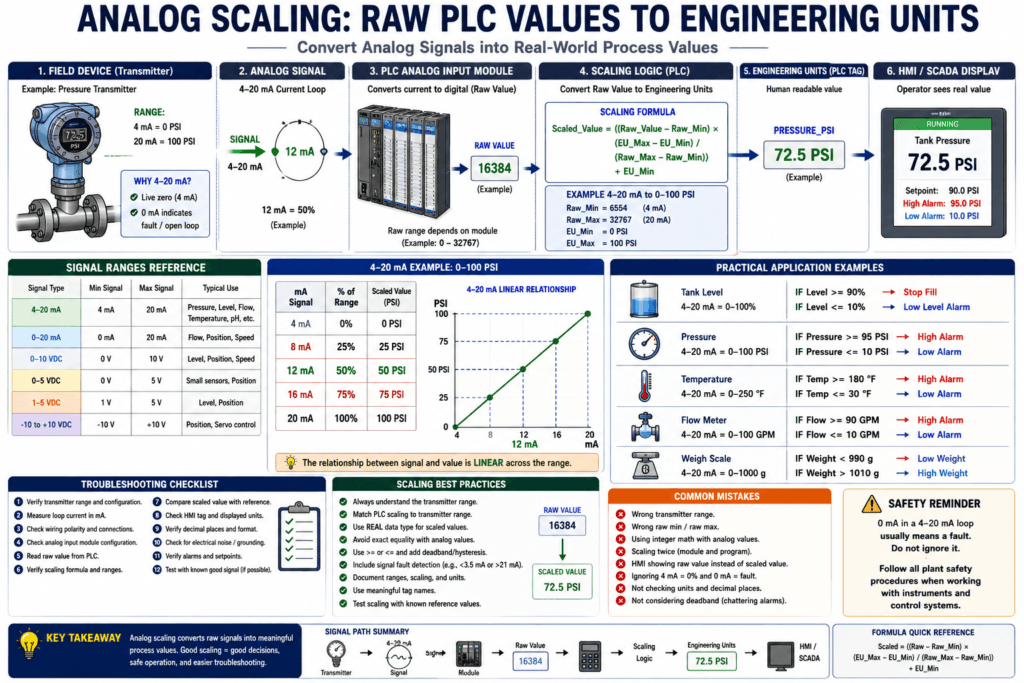
Scaled_Value = ((Raw_Value - Raw_Min) × (EU_Max - EU_Min) / (Raw_Max - Raw_Min)) + EU_MinThis is common in analog scaling.
CPT can make formulas easier to write, but it should be documented clearly.
Practical Math Example: Production Rate
Situation
A conveyor counted 300 boxes in 10 minutes.
The PLC needs to calculate boxes per minute.
Parts_Per_Minute = Box_Count / Runtime_MinutesExample:
300 / 10 = 30 boxes per minuteThis value can be shown on the HMI.
Practical Math Example: Boxes Remaining
Situation
A case needs 24 bottles.
The counter currently has 18 bottles.
Boxes_Remaining = Batch_Target - Current_CountExample:
24 - 18 = 6 bottles remainingThis helps the HMI show useful operator information.
6. Data Types Matter
When using move, compare, and math instructions, data types matter.
Common data types include:
| Data Type | Typical Use |
|---|---|
| BOOL | ON/OFF status |
| SINT | Small integer |
| INT | Integer |
| DINT | Larger integer |
| REAL | Decimal values |
| TIMER | Timer structure |
| COUNTER | Counter structure |
Example:
Counter.ACC is usually an integer-type value.
Analog scaled pressure may be a REAL.
A motor command is usually a BOOL.
Be careful when mixing data types.
Example:
DINT value moved into REAL tag
REAL value used in integer math
Division result rounded unexpectedly
These issues can create confusing results.
7. MOV vs Math Instructions
A MOV instruction does not calculate.
It only copies.
Example:
MOV 100 Speed_CommandThis means:
Speed_Command becomes 100.A math instruction calculates.
Example:
MUL Speed_Percent Max_Hz Speed_CommandThis means:
Speed_Command is calculated from Speed_Percent and Max_Hz.Simple rule:
MOV copies a value.
Math calculates a value.
Compare makes a decision.
8. Compare Instructions in Fault Logic
Compare instructions are very useful for fault detection.
Low Air Pressure Fault
If Air_Pressure < 60 PSI
Then Low_Air_Pressure_Fault = ON
High Temperature Fault
If Temperature > 180°F
Then High_Temperature_Fault = ON
Weight Out of Range
If Weight < Minimum_Weight
OR Weight > Maximum_Weight
Then Weight_Fault = ON
Motor Speed Feedback Fault
If Motor_Command = ON
AND Actual_Speed < Minimum_Running_Speed
After timeout
Then Motor_Speed_Fault = ON
These are practical industrial uses.
9. Move Instructions in Recipe Control
Recipe systems commonly use MOV instructions.
Example: A machine has different product sizes.
Recipe 1
Speed_Setpoint = 35 Hz
Fill_Time = 4.5 sec
Target_Count = 12
Recipe 2
Speed_Setpoint = 45 Hz
Fill_Time = 3.0 sec
Target_Count = 24
When the operator selects a recipe, the PLC moves the correct values into active setpoints.
Example:
MOV Recipe1_Speed Active_Speed_Setpoint
MOV Recipe1_Count Active_Target_Count
MOV Recipe1_FillTime Active_FillTime
This is very common in packaging and process machines.
10. Math Instructions in Analog Scaling
Analog scaling is one of the most important uses of math instructions.
Example:
4–20 mA = 0–100 PSIThe PLC may receive a raw value and convert it into engineering units.
Simple concept:
Raw Analog Value → Math Scaling → PSI / GPM / °F / %Example:
Raw input = 50%
Scaled pressure = 50 PSI
This connects directly to process control and instrumentation.
Common Mistakes
1. Comparing Analog Values with EQU
Avoid this:
EQU Pressure 50.0Better:
GEQ Pressure 50.0Or use a range:
Pressure >= 49.5 AND Pressure <= 50.52. Moving the Wrong Data Type
Example:
MOV REAL_Value DINT_TagThis may cause rounding or unexpected values.
Always check data types.
3. Divide by Zero
Division by zero can cause faults or invalid results.
Bad example:
Parts_Per_Minute = Parts_Count / Runtime_MinutesIf Runtime_Minutes = 0, this is a problem.
Better logic:
If Runtime_Minutes > 0
Then calculate Parts_Per_Minute
4. Overwriting Setpoints
A MOV instruction can overwrite an operator-entered value.
Example:
HMI_Setpoint = 50
MOV Default_Setpoint HMI_Setpoint
If this MOV runs every scan, the operator may not be able to change the setpoint.
This is a very common issue.
5. Math Running Every Scan When It Should Not
Some math should update continuously.
Other math should update only when an event happens.
Example:
Load recipe only when recipe selection changes.Not every scan.
Use one-shots or change detection when needed.
Troubleshooting MOV Instructions
When a value keeps changing unexpectedly, check for MOV instructions.
Ask:
Is another rung moving a value into this tag?
Is the MOV instruction true every scan?
Is the HMI trying to write the same tag?
Is a recipe load overwriting the value?
Is a default value being loaded on startup?
Is the destination tag correct?
A MOV instruction can silently change values and confuse troubleshooting.
Troubleshooting Compare Instructions
When a condition is not turning ON, check:
What is the actual value?
What is the setpoint?
Is the instruction using >, <, >=, or <= correctly?
Is the value scaled correctly?
Is the value a REAL or DINT?
Is the comparison looking at the correct tag?
Is the value fluctuating around the setpoint?
Example:
Tank_Level = 89.8%
Setpoint = 90%
GEQ is false
That may be correct behavior.
Troubleshooting Math Instructions
When a calculated value looks wrong, check:
Are the source values correct?
Are the data types correct?
Is scaling correct?
Is division by zero possible?
Is the destination tag correct?
Is the formula correct?
Is the instruction being scanned?
Is another rung overwriting the result?
Math logic should always be documented clearly.
Automation Technician Notes
For an Automation Technician, move, compare, and math instructions are important because they explain why the PLC makes numeric decisions.
Do not only check if a bit is ON or OFF.
Also check:
What is the value?
What is the setpoint?
What is the comparison result?
What value is being moved?
What calculation is being performed?
What is the destination tag?
Is another instruction overwriting it?
A machine may not be faulted because of a bad sensor. It may be faulted because the scaled value, setpoint, or compare instruction is not behaving as expected.
Practical Example: VFD Speed Command
Situation
The operator enters speed percentage on the HMI.
HMI_Speed_Percent = 60%The PLC needs to convert that into a VFD speed command.
If maximum speed is:
Max_Speed = 60 HzThen:
VFD_Speed_Command = 60% × 60 Hz = 36 HzLogic idea:
Speed_Percent / 100 × Max_Speed = Speed_Command_HzThen the PLC sends the speed command to the VFD.
This uses:
MOV
DIV
MUL
Compare limits
Analog output or network command
Practical Example: Weight Check
Situation
A filling machine must verify product weight.
Target Weight = 1000 g
Minimum Weight = 990 g
Maximum Weight = 1010 g
Logic
If Actual_Weight >= 990
AND Actual_Weight <= 1010
Then Weight_OK = ON
If not:
Weight_Fault = ONThis is a clear use of comparison instructions.
Key Terms
| Term | Meaning |
|---|---|
| MOV | Moves/copies a value from source to destination |
| Source | Original value used by instruction |
| Destination | Tag where result is stored |
| EQU | Equal comparison |
| NEQ | Not equal comparison |
| GRT | Greater than comparison |
| LES | Less than comparison |
| GEQ | Greater than or equal comparison |
| LEQ | Less than or equal comparison |
| LIM | Checks if value is within a range |
| ADD | Adds values |
| SUB | Subtracts values |
| MUL | Multiplies values |
| DIV | Divides values |
| CPT | Computes a formula |
| REAL | Decimal data type |
| DINT | Integer data type |
| Setpoint | Target value used for control |
| Engineering Units | Human-readable units such as PSI, °F, GPM, %, grams |
Final Thoughts
Data move, compare, and math instructions allow a PLC to work with numbers, not just ON/OFF signals.
A PLC can move setpoints, compare process values, calculate production totals, scale analog signals, control VFD speeds, and make decisions based on real process data.
For an Automation Technician, these instructions are essential for troubleshooting modern machines.
The key rule is simple:
MOV copies values.
Compare instructions make decisions.
Math instructions calculate results.
Once you understand these instructions, PLC programs become much easier to read, especially when working with analog signals, recipes, counters, VFDs, and HMI setpoints.