35. IP Addressing Basics for Industrial Automation (35 of 41)
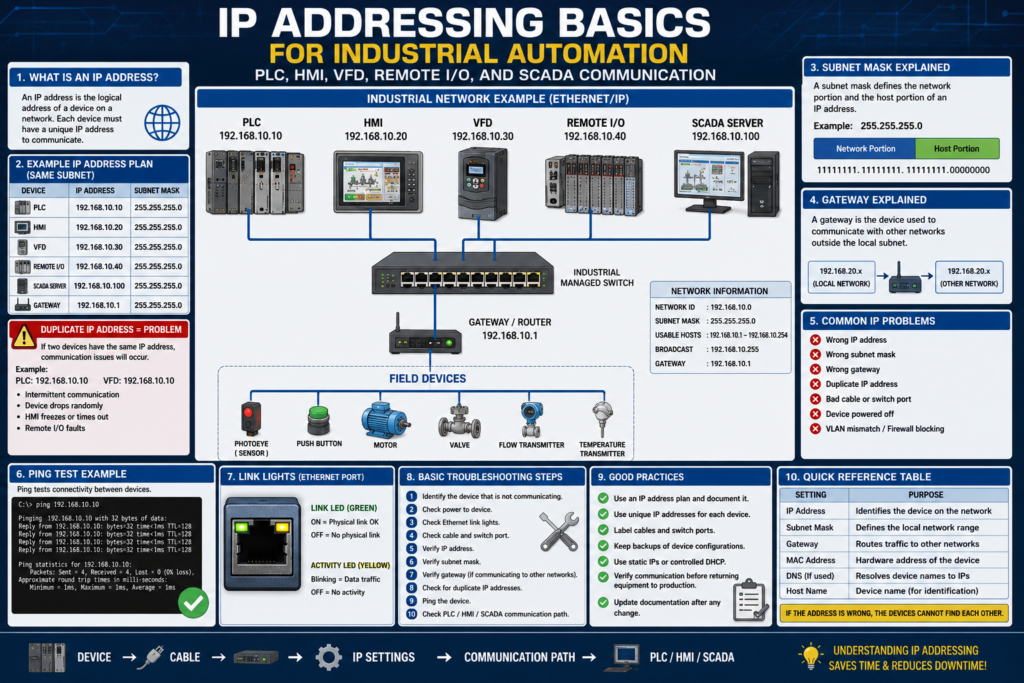
Industrial Ethernet is everywhere in modern automation.
PLCs, HMIs, VFDs, remote I/O racks, vision cameras, SCADA computers, robots, and industrial switches all need to communicate reliably.
For that communication to work, each device must have the correct network settings.
The most important basic settings are:
IP Address
Subnet Mask
Gateway
Device Name
Communication Path
A small mistake in one of these settings can cause:
HMI communication loss
VFD communication fault
Remote I/O fault
SCADA tags not updating
PLC-to-PLC message failure
Engineering laptop cannot connect
A strong automation technician does not need to be a full network engineer at first, but they must understand enough networking to troubleshoot real plant communication problems.
1. What Is an IP Address?
An IP address is the logical address of a device on a network.
Simple definition:
IP Address = The network address used to identify a device.Example:
PLC:        192.168.10.10
HMI:        192.168.10.20
VFD:        192.168.10.30
Remote I/O: 192.168.10.40
SCADA:      192.168.10.100
Each device on the same network must have a unique IP address.
Two devices should not share the same IP address.
2. Why IP Addresses Matter
Industrial devices communicate using IP addresses.
Example:
HMI wants to read PLC tags
        ↓
HMI must know the PLC IP address
        ↓
HMI connects to PLC
        ↓
PLC data appears on HMI
If the PLC IP address is wrong in the HMI configuration, the HMI will not communicate.
If a VFD has the wrong IP address, the PLC may show a drive communication fault.
If remote I/O has the wrong IP address, the PLC may fault the I/O connection.
3. What Is a Subnet Mask?
A subnet mask tells the device which part of the IP address is the network portion.
Common subnet mask:
255.255.255.0Example:
IP Address:  192.168.10.25
Subnet Mask: 255.255.255.0
This usually means the device is on the:
192.168.10.x networkSo these devices are on the same subnet:
192.168.10.10
192.168.10.20
192.168.10.30
192.168.10.40
But this device is on a different subnet:
192.168.20.10because the third number changed from 10 to 20.
4. Simple Subnet Example
Assume all devices use:
Subnet Mask: 255.255.255.0Same network:
PLC: 192.168.1.10
HMI: 192.168.1.20
VFD: 192.168.1.30
These devices can usually communicate directly if cables, switch, and configuration are correct.
Different network:
PLC: 192.168.1.10
HMI: 192.168.2.20
These are not in the same subnet.
They may not communicate unless routing or gateway configuration is correctly set up.
5. What Is a Gateway?
A gateway is the address a device uses to communicate outside its local network.
Simple definition:
Gateway = The path out of the local subnet.Example:
PLC IP:      192.168.10.10
Subnet Mask: 255.255.255.0
Gateway:     192.168.10.1
The gateway is usually a router, Layer 3 switch, firewall, or managed network device.
For isolated machine networks, a gateway may not always be needed.
For networks that communicate with SCADA, plant servers, or other VLANs, the gateway may be very important.
6. When Is a Gateway Needed?
A gateway is usually needed when a device must communicate outside its local subnet.
Example:
PLC network:   192.168.10.x
SCADA network: 192.168.20.x
If the PLC needs to communicate with SCADA on another subnet, the PLC may need a correct gateway.
Without the correct gateway, local devices may communicate, but devices on other networks may fail.
Example symptom:
HMI on same subnet works.
SCADA on another subnet does not work.
Possible cause:
Wrong or missing gateway.7. Duplicate IP Address
A duplicate IP address happens when two devices have the same IP.
Example:
PLC: 192.168.10.10
VFD: 192.168.10.10
This is a serious problem.
Possible symptoms:
Intermittent communication
Device connects and disconnects randomly
HMI freezes sometimes
PLC loses VFD communication
Remote I/O drops out
Ping replies inconsistent
One device works only when the other is powered off
Duplicate IP problems can be difficult because they may look random.
Good IP documentation helps prevent this issue.
8. Static IP vs DHCP / BOOTP
Industrial devices often use static IP addresses.
Static IP
The IP address is manually assigned and stays fixed.
Example:
PLC = 192.168.10.10Static addressing is common for:
PLCs
HMIs
VFDs
Remote I/O
SCADA servers
Industrial switches
DHCP / BOOTP
The IP address is assigned automatically by a server.
This can be useful during setup, but in production it must be controlled carefully.
Common issue:
Device gets a different IP after replacement or power cycle.In many industrial systems, critical devices should use documented static IP addresses or controlled DHCP reservations.
9. IP Address Documentation
Every industrial network should have an IP address list.
A good IP list includes:
Device name
IP address
Subnet mask
Gateway
MAC address
Switch name
Switch port
Panel location
Device role
Firmware version if important
Backup file location
Example:
| Device | IP Address | Subnet | Gateway | Switch / Port |
|---|---|---|---|---|
| Filler PLC | 192.168.10.10 | 255.255.255.0 | 192.168.10.1 | Stratix-01 Gi1/3 |
| Filler HMI | 192.168.10.20 | 255.255.255.0 | 192.168.10.1 | Stratix-01 Gi1/4 |
| VFD-101 | 192.168.10.30 | 255.255.255.0 | 192.168.10.1 | Stratix-01 Gi1/5 |
| Remote I/O | 192.168.10.40 | 255.255.255.0 | 192.168.10.1 | Stratix-01 Gi1/6 |
Without documentation, troubleshooting becomes slow and risky.
10. Ping Test
A ping test checks if one device can reach another device over the network.
Example from a laptop:
ping 192.168.10.10If communication is good, you may see replies.
Concept:
Laptop sends test packet to PLC
PLC replies
Ping succeeds
If ping fails, possible causes include:
Wrong IP address
Wrong subnet
Bad cable
Bad switch port
Device powered off
Firewall blocking ping
Duplicate IP
VLAN mismatch
Device not configured
Important:
A successful ping proves basic network reachability, but it does not prove PLC communication, EtherNet/IP connection, or HMI tag configuration is correct.
Ping is only one test.
11. Link Lights
Ethernet ports usually have link/activity LEDs.
Common meaning:
Link light ON = physical connection detected
Activity blinking = traffic is moving
No light = no physical link
If there is no link light, check:
Cable
Connector
Switch port
Device power
Wrong port
Damaged Ethernet jack
Fiber media converter if used
Do not start with software if the physical link is not present.
12. Common IP Addressing Problems
Common mistakes include:
Wrong IP address
Wrong subnet mask
Wrong gateway
Duplicate IP address
Wrong HMI shortcut path
Wrong PLC communication path
Device set to DHCP accidentally
Laptop on wrong network
VLAN mismatch
Gateway missing for SCADA communication
Old IP address after device replacement
These are common in real plants, especially after:
Replacing a VFD
Replacing an HMI
Changing a PLC
Adding remote I/O
Moving an Ethernet cable
Changing a switch
Connecting an engineering laptop
Restoring a backup
13. Example: HMI Cannot Communicate with PLC
Symptom
HMI displays communication error.Check
PLC powered?
HMI powered?
Ethernet link lights ON?
PLC IP correct?
HMI shortcut points to correct PLC IP?
HMI and PLC on same subnet?
Gateway needed?
Can laptop ping PLC?
Can laptop ping HMI?
Any recent changes?
Possible root cause
PLC IP was changed, but HMI communication shortcut still points to the old IP.14. Example: VFD Communication Fault
Symptom
PLC shows VFD communication fault.Check
VFD powered?
Ethernet cable connected?
Link light ON?
VFD IP correct?
PLC I/O tree has correct IP?
VFD electronic keying compatible?
VFD adapter healthy?
Duplicate IP?
Switch port active?
Possible root cause
Replacement VFD was installed with default IP address.15. Example: Engineering Laptop Cannot Connect
Symptom
Laptop cannot go online with PLC.Check
Laptop IP address
Laptop subnet mask
Correct Ethernet adapter selected
Can laptop ping PLC?
Is laptop on same VLAN?
Is firewall blocking communication?
Is RSLinx / FactoryTalk Linx path correct?
Is PLC responding to other devices?
Example:
PLC:    192.168.10.10
Laptop: 192.168.10.200
Subnet: 255.255.255.0
This is likely correct for same subnet communication.
But:
PLC:    192.168.10.10
Laptop: 192.168.20.200
Subnet: 255.255.255.0
This is not the same subnet.
16. Basic Troubleshooting Method
Use this sequence:
1. Identify the device that is not communicating.
2. Check power.
3. Check Ethernet link lights.
4. Check cable and port.
5. Verify IP address.
6. Verify subnet mask.
7. Verify gateway if communication crosses networks.
8. Check for duplicate IP.
9. Ping the device if allowed.
10. Check PLC/HMI/SCADA communication path.
11. Check switch or VLAN configuration.
12. Check recent changes.
13. Document the root cause.
This method prevents guessing.
17. Technician Checklist
When checking IP addressing, verify:
Device powered ON
Ethernet link light ON
Correct cable connected
Correct switch port
Correct IP address
Correct subnet mask
Correct gateway
No duplicate IP address
Laptop IP compatible
HMI shortcut correct
PLC I/O tree IP correct
SCADA tag path correct
Switch/VLAN correct
Documentation updated
Backups available
18. Best Practices
Use these best practices:
Keep an updated IP address list.
Label Ethernet cables.
Label switch ports.
Document device names and locations.
Use static IPs or controlled reservations for critical devices.
Avoid duplicate IPs.
Backup switch configurations.
Backup PLC and HMI programs.
Record IP settings before replacing devices.
Verify communication before returning equipment to production.
Do not connect unknown devices to OT networks without approval.
Final Thoughts
IP addressing is one of the most practical skills for automation technicians.
Many communication problems are not caused by bad PLC logic.
They are caused by basic network issues:
Wrong IP
Wrong subnet
Bad cable
Duplicate IP
Wrong gateway
Wrong communication path
A technician who understands IP addressing can troubleshoot HMIs, VFDs, remote I/O, SCADA connections, and PLC-to-PLC communication with more confidence.
Always follow the path:
Device → Cable → Switch → IP Settings → Communication Path → PLC / HMI / SCADAIf the address is wrong, the devices cannot find each other.
That simple idea explains many industrial network problems.