29. Motor Troubleshooting in Real Plants (29 of 41)
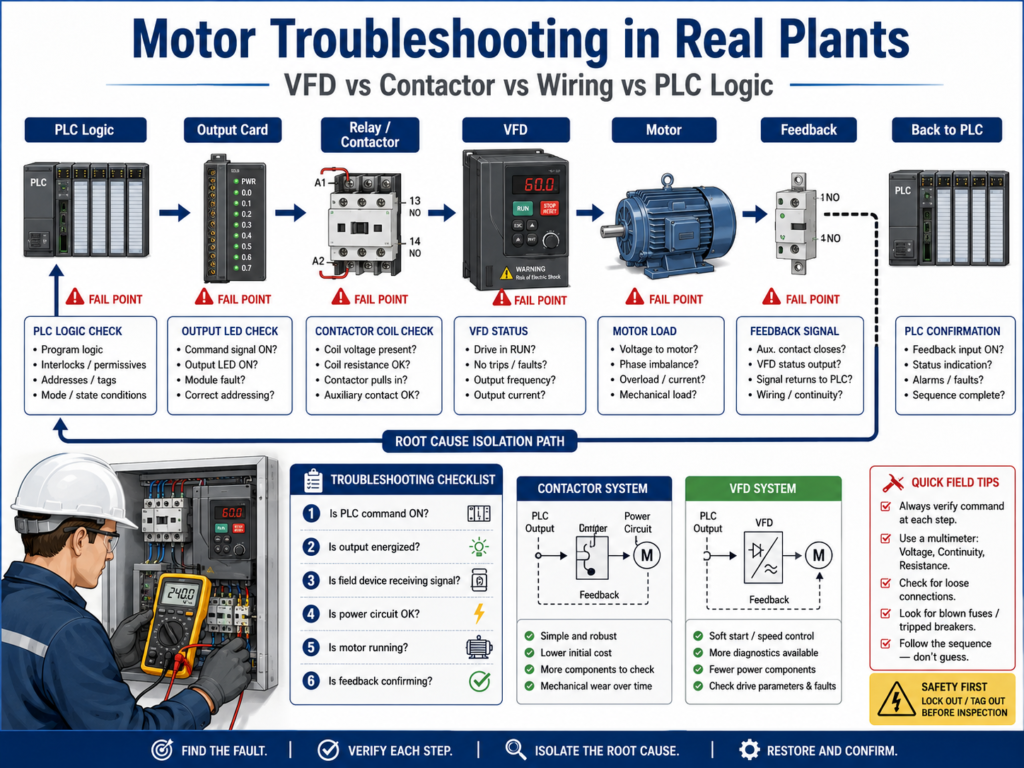
When a motor fails in a real plant, the problem is rarely just “the motor is bad”.
Most of the time the issue is somewhere in this chain:
PLC Logic → Wiring → Output Device → Field Device → Feedback → ProcessSo the real skill is not guessing.
It is isolating where the signal is lost.
1. The Golden Rule of Motor Troubleshooting
Always find the FIRST point where the signal fails.
Do NOT jump to replacing parts.
Instead follow this logic:
PLC → Output → Device → Field → Feedback2. The 5 Layers of Motor Control
A motor system typically has 5 troubleshooting layers:
Layer 1 — PLC Logic
- Start command
- Permissives
- Interlocks
- Faults
- State machine
Layer 2 — Output Signal
- PLC output energized?
- DO card LED ON?
Layer 3 — Field Interface
- Relay
- Contactor coil
- VFD digital input
Layer 4 — Power Circuit
- Motor starter
- Overload relay
- VFD power stage
Layer 5 — Feedback
- Aux contact
- VFD run status
- Encoder / sensor
3. Case 1 — PLC Says RUN but Motor Does NOT Start
Symptom:
Motor_Run_Command = ON
Motor is OFF
Step-by-step:
✔ PLC Output Check
- Is DO energized?
✔ Field Device Check
- Is contactor pulling in?
- Is VFD receiving RUN?
✔ Power Check
- Is voltage present at motor starter?
- Is overload tripped?
Most common causes:
Blown fuse
Loose wiring
Bad relay
No 120/24V control power
VFD disabled
Overload tripped
4. Case 2 — Motor Starts Then Stops Immediately
Symptom:
Motor starts for 1–2 sec then stopsLikely causes:
🔴 Feedback problem
Motor_Run_Command ON
Feedback never arrives
→ PLC stops motor (fault logic)
🔴 Interlock triggers
Jam sensor ON
Downstream OFF
Safety drops
🔴 VFD fault
Overcurrent
Undervoltage
Drive faulted
5. Case 3 — Contactor Not Pulling In
Check sequence:
1. PLC Output
- Is bit ON?
2. Voltage at coil
- 24VDC / 120VAC present?
3. Coil condition
- Open coil?
- Burned coil?
4. Mechanical
- Stuck contactor?
Typical failure points:
Broken wire to coil
Blown fuse in control circuit
Bad output relay
Loose terminal
Burned contactor coil
6. Case 4 — VFD Does Not Start Motor
Check:
PLC side:
Run command = ON?
Permissives OK?
Fault bit active?
VFD side:
Drive in LOCAL or REMOTE?
Enable input present?
Fault code?
Run permissive satisfied?
Common VFD issues:
Parameter mismatch
Speed reference missing
Safety input open
Drive fault latched
Incorrect control mode (Local vs Remote)
7. Wiring Problems (MOST COMMON IN REAL PLANTS)
Many “PLC problems” are actually wiring problems.
Symptoms:
Signal flickers
Motor random stop
Intermittent faults
Input not stable
Causes:
Loose terminal
Broken conductor inside cable
Bad grounding
Noise from VFD
Shared neutral issues
8. PLC Logic Problems
Sometimes the issue is not field — it is logic.
Examples:
Missing permissive
Interlock stuck TRUE
Fault not reset
Wrong state machine transition
Duplicate output logic
Example:
Motor_Run_Command depends on:
- Safety_OK
- Permissive_OK
- NOT Fault

If Fault never clears → motor never runs
9. VFD vs Contactor Troubleshooting Difference
Contactor System:
Simple ON/OFF coil
Easy to check voltage
Mechanical wear common
VFD System:
Digital communication or inputs
Parameter issues common
Fault codes critical
Enable chain required
10. Fast Troubleshooting Method (REAL PLANT FLOW)
Use this every time:
1. Is PLC command ON?
2. Is output ON?
3. Is field device receiving signal?
4. Is power circuit OK?
5. Is motor running?
6. Is feedback confirming?
11. Example Full Breakdown
Problem:
Motor will not run
Step 1:
PLC: Motor_Run_Command = ONStep 2:
Output LED ON = YESStep 3:
Contactor coil = NO voltageConclusion:
Output wiring / fuse / relay issue
NOT PLC logic
12. Feedback = Most Ignored Problem
If feedback is wrong:
Motor may run but PLC thinks it stopped
OR
Motor stops but PLC thinks it is running
This creates false faults.
13. Key Technician Insight
80% of motor issues are NOT PLC programming problems.
They are:
Wiring
Power
Devices
Sensors
Field failures
14. Best Troubleshooting Strategy
Do not guess
Do not replace parts immediately
Follow signal path
Verify each layer
Isolate the first failure point
15. Technician Checklist
PLC command ON?
Output energized?
Voltage at device?
Device response?
Motor running?
Feedback correct?
Fault active?
Interlock blocking?
Wiring intact?
Power present?
Final Thoughts
Motor troubleshooting is not about replacing parts.
It is about following the signal like a detective:
PLC → Output → Device → Motor → FeedbackOnce you master this, you can diagnose almost any industrial motor issue quickly and confidently.