9. Capacitive Sensors: Detecting Liquids, Plastic, Glass, and Powders (9 of 15)
Introduction
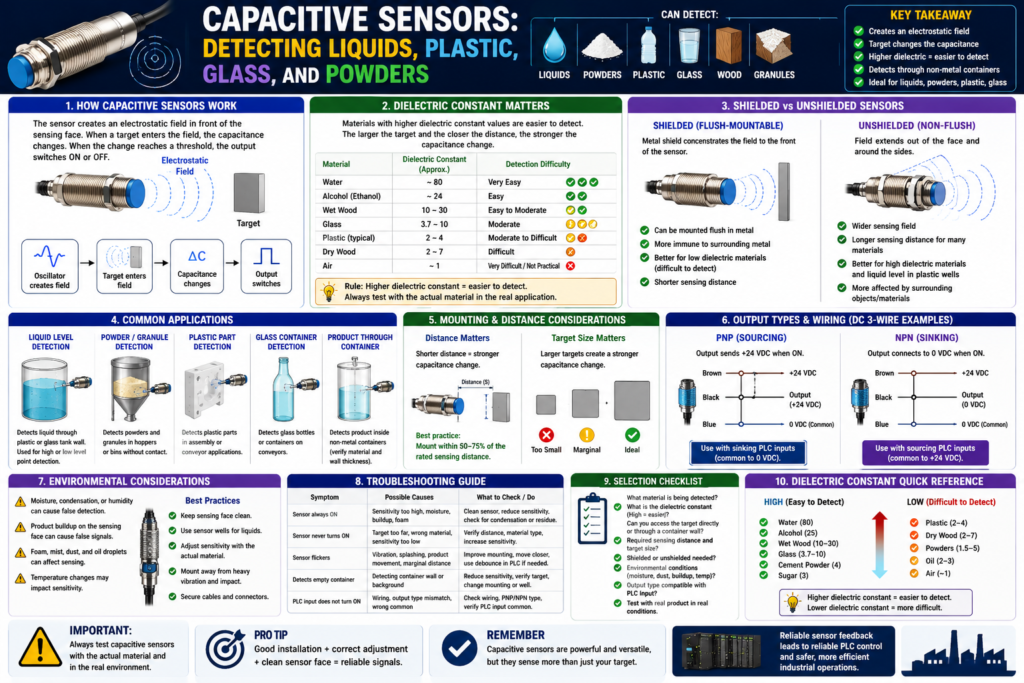
Capacitive sensors are industrial proximity sensors used to detect materials that many other sensors cannot detect easily.
Unlike an inductive proximity sensor, which is mainly used for metal detection, a capacitive proximity sensor can detect both metallic and non-metallic materials.
Capacitive sensors can be used to detect:
Liquids
Plastic
Glass
Powders
Granules
Wood
Paper
Cardboard
Oil
Product inside containers
Some metals
This makes them useful in packaging, filling, material handling, tanks, hoppers, and process applications.
The Rockwell Automation sensor manual explains that capacitive proximity sensors create an electrostatic field and react to changes in capacitance when a target enters that field. When the capacitance reaches a threshold, the sensor output changes state.
In simple words:
A capacitive sensor detects a material by sensing how that material changes the sensor’s electric field.What Is a Capacitive Sensor?
A capacitive proximity sensor is a non-contact sensor that can detect objects or materials without physically touching them.
It works by creating an electrostatic field in front of the sensor face.
Basic concept:
Sensor creates electrostatic field
↓
Target enters the field
↓
Capacitance changes
↓
Sensor detects the change
↓
Output switches ON or OFF
↓
PLC input changes state
PLC tag examples:
DI_Hopper_Material_Present
DI_Tank_Level_High_Cap
DI_Plastic_Part_Present
DI_Glass_Bottle_Present
DI_Powder_Level_High
DI_Product_In_Container
Most capacitive sensors used in PLC systems are discrete sensors, meaning the PLC sees them as ON or OFF.
Why Capacitive Sensors Are Useful
Capacitive sensors are useful because they can detect materials that inductive sensors cannot.
An inductive sensor is excellent for metal.
A capacitive sensor can detect many non-metallic materials.
Example:
Inductive sensor:
Detects metal bracket.

Capacitive sensor:
Can detect liquid, powder, plastic, glass, cardboard, or product through a container wall.
This is why capacitive sensors are often used for:
Liquid level detection
Powder level detection
Plastic part detection
Glass bottle detection
Material presence in hoppers
Product detection through non-metal containers
How Capacitive Sensors Detect Materials
A capacitive sensor reacts to changes in capacitance.
Capacitance is affected by:
Target size
Target distance
Target material
Dielectric constant
Moisture content
Container wall material
Environmental conditions
The Rockwell manual states that a capacitive sensor’s ability to detect a target is determined by the target’s size, dielectric constant, and distance from the sensor. Larger targets create stronger capacitive coupling, materials with higher dielectric constants are easier to detect, and shorter distance increases coupling strength.
In technician language:
Bigger target = easier to detect
Closer target = easier to detect
Higher dielectric constant = easier to detect
What Is Dielectric Constant?
The dielectric constant describes how strongly a material affects an electric field.
For capacitive sensors, this is very important.
Materials with a high dielectric constant are easier to detect.
Materials with a low dielectric constant are harder to detect.
The Rockwell manual gives a good example: water has a dielectric constant around 80, making it very easy for capacitive sensors to detect, while air has a dielectric constant close to 1, making it very difficult to detect.
Simple idea:
Water = easy to detect
Air = not detected
Plastic = depends on type and thickness
Powder = depends on density and material
Glass = can be detected, but may also be used as a container wall
Common Material Examples
The manual lists many industrial materials and their dielectric constants. Some examples include:
| Material | General Detection Behavior |
|---|---|
| Water | Very easy to detect |
| Alcohol | Easy to detect |
| Aqueous solutions | Easy to detect |
| Wet wood | Easier than dry wood |
| Glass | Detectable depending on application |
| Powdered milk | Detectable |
| Cement powder | Detectable |
| Cereal | Detectable |
| Sugar | Detectable |
| Flour | More difficult than water |
| Air | Very difficult / not practical |
The important point is:
A capacitive sensor does not detect every material equally.The material’s dielectric constant, density, moisture, size, and distance all matter.
Detecting Liquids
Capacitive sensors are very useful for liquid detection.
Applications:
High-level detection
Low-level detection
Liquid presence
Tank level point detection
Bottle fill verification
Liquid through plastic or glass container
Example:
A capacitive sensor is mounted outside a plastic tank.
When liquid reaches the sensor height, the sensor output turns ON.
The PLC sees high level.
PLC tag:
DI_Tank_High_Level_CapPLC use:
Stop fill valve
Alarm high level
Prevent pump start
Enable transfer sequence
Show level status on HMI
Logic concept:
DI_Tank_High_Level_Cap
= Tank_High_Level_Alarm
Important:
Capacitive sensors used for liquid level are usually point-level devices.
They tell the PLC if material is present at that point.
They do not usually provide full continuous level unless using a special analog sensor.
Detecting Through Container Walls
One powerful feature of capacitive sensors is that they can sometimes detect material through a non-metal container wall.
Example:
Plastic tank wall
Glass container wall
Plastic sight tube
Non-metal hopper wall
The Rockwell manual explains that materials with high dielectric constants may be sensed through container walls made of lower dielectric constant materials. It gives an example where alcohol or flour may be considered through a glass wall, but emphasizes that each application should be tested because values vary with material size and density.
Practical example:
Sensor mounted outside a plastic tank
Liquid inside tank rises to sensor level
Sensor detects liquid through tank wall
PLC input turns ON
This can be very useful because the sensor does not need to touch the product.
Detecting Powders and Granules
Capacitive sensors are also used for powder and bulk material detection.
Applications:
Powder level in hopper
Granule level in bin
Product presence in chute
Material low-level detection
Material high-level detection
Example:
A capacitive sensor is mounted on a hopper.
When powder reaches the sensor face, the output turns ON.
The PLC sees material present.
PLC tag:
DI_Hopper_Material_PresentPLC use:
Low material alarm
High material alarm
Refill request
Prevent empty running
Stop fill sequence
Logic concept:
NOT DI_Hopper_Material_Present
AND Hopper_Run_Command
= Hopper_Low_Material_Alarm
Important field note:
Powders can build up on the sensor face.
Buildup can cause false detection.
This is one of the most common capacitive sensor problems.
Detecting Plastic and Glass
Capacitive sensors can detect plastic and glass, depending on:
Material type
Thickness
Distance
Sensor sensitivity
Target size
Background conditions
Humidity
Mounting
Example applications:
Plastic cap detection
Plastic container presence
Glass bottle detection
Part presence in assembly machine
Product through plastic guide
However, plastic and glass can sometimes be tricky because their dielectric constants are lower than water and many liquids.
Practical rule:
The sensor may detect the container itself, the product inside, or both.
Test the real application.
That is why adjustment and field testing are very important.
Shielded vs Unshielded Capacitive Sensors
Capacitive sensors can be shielded or unshielded, similar to inductive sensors, but the application behavior is different.
Shielded Capacitive Sensors
Shielded capacitive sensors have a metal band around the probe.
This directs the electrostatic field toward the front of the sensor.
The Rockwell manual explains that shielded capacitive sensors concentrate the electrostatic field forward and can be flush-mounted in surrounding material without false triggering. They are well suited for sensing materials with low dielectric constants because the concentrated field helps detect difficult targets.
Best for:
Flush mounting
Tight spaces
Lower dielectric materials
More focused detection
Applications where surrounding material may interfere
Simple rule:
Shielded = focused field, flush-mountable, better for difficult targets.Unshielded Capacitive Sensors
Unshielded capacitive sensors have a wider sensing field.
They may offer longer sensing distances for some materials, but they require more care around surrounding objects.
The Rockwell manual explains that unshielded capacitive sensors are well suited for high dielectric constant materials and for differentiating between high and low dielectric materials. It also notes that unshielded sensors are more suitable for plastic sensor wells used in liquid level applications.
Best for:
Liquid level applications
Plastic sensor wells
High dielectric materials
Longer sensing distance in some applications
Detecting through container walls
Simple rule:
Unshielded = wider field, often better for liquid/container applications, but more sensitive to surroundings.Environmental Considerations
Capacitive sensors are powerful, but they can be sensitive to their environment.
Because they react to changes in the electrostatic field, many things can affect them.
Possible environmental issues:
Moisture
Humidity
Dust
Mist
Oil droplets
Product buildup
Foam
Condensation
Temperature changes
Nearby material
Operator hand near sensor
Water spray
Dirty sensor face
The Rockwell manual specifically warns that any material entering a capacitive sensor’s electrostatic field can cause an output signal, including mist, dust, dirt, and droplets.
This is why capacitive sensors must be adjusted carefully.
Important technician rule:
Capacitive sensors can detect the product, but they can also detect buildup, moisture, or contamination.Advantages of Capacitive Sensors
Capacitive sensors have several strong advantages.
Advantages:
Detect many non-metallic materials
Can detect liquids
Can detect powders and granules
Can detect through plastic or glass walls in some applications
Non-contact detection
Useful for point-level detection
Can replace mechanical switches in some applications
Good for product presence where metal sensing will not work
Examples:
Detect liquid level in plastic tank
Detect powder in hopper
Detect plastic part presence
Detect glass bottle presence
Disadvantages of Capacitive Sensors
Capacitive sensors also have important disadvantages.
Disadvantages:
Sensitive to humidity
Sensitive to product buildup
Can false trigger from dust, mist, foam, or moisture
Requires careful adjustment
Material dielectric constant matters
Detection distance may be short
Background materials can affect sensing
Container wall thickness matters
Not ideal when product residue accumulates heavily
This is why capacitive sensors can create frustrating intermittent problems if the application is not tested under real plant conditions.
Capacitive vs Inductive Sensors
| Feature | Capacitive Sensor | Inductive Sensor |
|---|---|---|
| Detects metal | Yes | Yes |
| Detects plastic | Yes, depending on material | No |
| Detects liquid | Yes | No |
| Detects glass | Yes, depending on application | No |
| Detects powders | Yes, depending on material/density | No |
| Detection field | Electrostatic field | Electromagnetic field |
| Sensitive to moisture/buildup | More sensitive | Less sensitive |
| Common use | Level/material detection | Metal position detection |
| Best example | Liquid level in tank | Cylinder metal target |
Simple takeaway:
Inductive sensors are best for metal.
Capacitive sensors are better for non-metal materials and level/material detection.
Capacitive Sensor PLC Applications
1. Tank High-Level Detection
Application:
Detect when liquid reaches high level.Sensor:
Capacitive proximity sensor mounted outside plastic tankPLC tag:
DI_Tank_High_Level_CapPLC use:
Stop filling
Generate high-level alarm
Prevent overflow
Show level status on HMI
Logic concept:
DI_Tank_High_Level_Cap
= Tank_High_Level_Alarm
2. Hopper Low Material Detection
Application:
Detect if powder or granules are present in a hopper.Sensor:
Capacitive sensor mounted at low-level pointPLC tag:
DI_Hopper_Material_Low_OKPLC use:
Allow feeder to run
Alarm when material is low
Prevent dry running
Request refill
Logic concept:
Feeder_Run_Command
AND NOT DI_Hopper_Material_Low_OK
= Hopper_Low_Material_Alarm
3. Plastic Part Detection
Application:
Confirm plastic part is present before assembly.Sensor:
Capacitive proximity sensorPLC tag:
DI_Plastic_Part_PresentPLC use:
Cycle permissive
Reject missing part
Assembly sequence feedback
HMI part-present status
Logic concept:
Start_Cycle_Request
AND DI_Plastic_Part_Present
AND No_Faults
= Cycle_Enable
4. Product Through Container Detection
Application:
Detect liquid or product inside a container.Sensor:
Capacitive sensor looking through plastic or glassPLC tag:
DI_Product_In_ContainerPLC use:
Verify fill
Reject empty container
Confirm product presence
Alarm missing product
Logic concept:
Container_At_Check_Station
AND NOT DI_Product_In_Container
= Reject_Container
PLC Logic: Using Capacitive Sensor Feedback
Capacitive sensors are usually used like other discrete inputs in ladder logic.
Basic structure:
Raw Input → Input Buffer → Debounce/Validation → PLC LogicExample:
Local:1:I.Data.0 → DI_Tank_High_Level_Cap → Tank_High_Level_StableWhy use debounce/validation?
Because capacitive sensors may be affected by:
Foam
Splashing
Powder movement
Material buildup
Humidity
Vibration
Example debounce logic concept:
DI_Hopper_Material_Present
TON Material_Present_Stable_Timer

Material_Present_Stable_Timer.DN
= Hopper_Material_Present_Stable
This prevents short false transitions from becoming logic decisions.
Important:
Do not use debounce to hide a bad sensor application.
First fix mounting, adjustment, buildup, and environmental issues.
Troubleshooting Capacitive Sensors
Basic Checklist
When troubleshooting a capacitive sensor, ask:
1. Is the sensor powered?
2. Does the sensor LED change when the material is present?
3. Is the sensor adjusted correctly?
4. Is the target material detectable?
5. Is the material wet or dry?
6. Is there buildup on the sensor face?
7. Is moisture or condensation present?
8. Is the sensor detecting the container wall instead of the product?
9. Is the container wall too thick?
10. Is the sensor shielded or unshielded?
11. Is the output PNP, NPN, 2-wire, or 3-wire?
12. Does the PLC input LED change?
13. Does the PLC tag change online?
14. Is debounce or validation needed?
Common Symptoms and Causes
| Symptom | Possible Cause |
|---|---|
| Sensor always ON | Product buildup, moisture, sensitivity too high |
| Sensor never turns ON | Target too far, low dielectric material, sensitivity too low |
| Sensor flickers | Splashing, powder movement, vibration, unstable material |
| Sensor works when tank is full but not through wall | Wall too thick or material dielectric too low |
| Sensor detects empty container | Sensitivity too high or container material being detected |
| PLC input does not turn ON | Wiring issue, PNP/NPN mismatch, wrong input common |
| Works in test but fails in production | Humidity, buildup, temperature, product density change |
| False level alarm | Foam, residue, condensation, or sensor adjustment issue |
Practical Field Example: Tank Level Sensor False Trigger
Problem:
Tank high-level sensor turns ON even when liquid is below the sensor.Possible causes:
Condensation on tank wall
Product residue inside tank
Sensor sensitivity too high
Foam near sensor
Sensor detecting wet buildup
Wrong sensor type for application
Troubleshooting:
Clean sensor/tank area.
Verify actual product level.
Check sensor LED.
Reduce sensitivity if adjustable.
Test with tank empty and full.
Check if sensor detects wall only.
Verify PLC input and tag online.
Corrective action may include:
Re-adjust sensor sensitivity.
Move sensor location.
Use a sensor well.
Use a different level technology.
Add PLC validation timer.
Improve cleaning/maintenance.
Practical Field Example: Powder Hopper Low-Level Sensor
Problem:
Hopper material-present sensor flickers during operation.Possible causes:
Powder is moving unevenly
Material is bridging
Sensor sensitivity too low
Dust buildup on sensor face
Vibration
Sensor not mounted at a stable material point
PLC effect:
Low material alarm flickers.
Feeder permissive drops out.
Machine stops intermittently.
Operator sees unstable HMI status.
Corrective action:
Check sensor mounting location.
Adjust sensitivity.
Clean sensor face.
Add validation timer.
Verify material flow pattern.
Consider different sensor technology if needed.
Good PLC Tag Names
Use clear tag names that describe what the capacitive sensor proves.
Good examples:
DI_Tank_High_Level_Cap
DI_Tank_Low_Level_Cap
DI_Hopper_Material_Present
DI_Hopper_High_Level
DI_Plastic_Part_Present
DI_Product_In_Container
DI_Powder_Level_High
DI_Bottle_Fill_Present
Avoid unclear names:
CapSensor1
Input_5
Level_Sensor_A
Sensor_12
A good tag name helps maintenance understand the real condition.
Recommended Documentation Format
Example:
Tag Name:
DI_Tank_High_Level_Cap

Sensor Type:
Capacitive proximity sensor

Application:
High-level liquid detection through plastic tank wall

Signal Type:
24 VDC discrete input

Output Type:
PNP sourcing

Normal State:
ON when liquid reaches high-level point

PLC Use:
High-level alarm, fill valve interlock, HMI status

Important Notes:
Sensor sensitivity must be adjusted with the real product. Check for condensation, foam, and buildup.

Troubleshooting:
Verify sensor LED, tank level, sensitivity setting, buildup, moisture, output voltage, PLC input LED, and tag online.
Another example:
Tag Name:
DI_Hopper_Material_Present

Sensor Type:
Capacitive proximity sensor

Application:
Powder presence detection in hopper

Normal State:
ON when material is present at sensor location

PLC Use:
Feeder permissive and low-material alarm

Failure Effect:
If signal is OFF during operation, feeder may stop or alarm may be generated.
Technician Mindset
When looking at a capacitive sensor, do not only ask:
Is the sensor ON?Ask:
What material is it detecting?
Is the material liquid, powder, plastic, glass, or product residue?
Is the sensor detecting the product or the container wall?
Is humidity affecting the signal?
Is there buildup on the sensor face?
Is the dielectric constant high enough?
Is the sensor adjusted for the real product?
Is the signal stable enough for PLC logic?
Is this input a permissive, interlock, alarm, fault, or HMI status?
This mindset helps separate sensor application problems from PLC logic problems.
Final Thoughts
Capacitive sensors are very useful in industrial automation because they can detect materials that inductive sensors cannot.
They are especially useful for:
Liquids
Plastic
Glass
Powders
Granules
Product inside containers
Material level detection
However, they must be applied carefully.
Capacitive sensors react to changes in an electrostatic field, so they can also be affected by moisture, dust, mist, product buildup, foam, container walls, and environmental changes.
The key takeaway is:
Capacitive sensors can detect many materials, but the material and environment matter a lot.For PLC technicians, the most important rule is:
Always test capacitive sensors with the real material, in the real environment, under real operating conditions.Good capacitive sensor application creates reliable PLC feedback.
Poor capacitive sensor application creates false signals, unstable alarms, and difficult troubleshooting.