10. Ultrasonic Sensors: Distance and Level Detection (10 of 15)
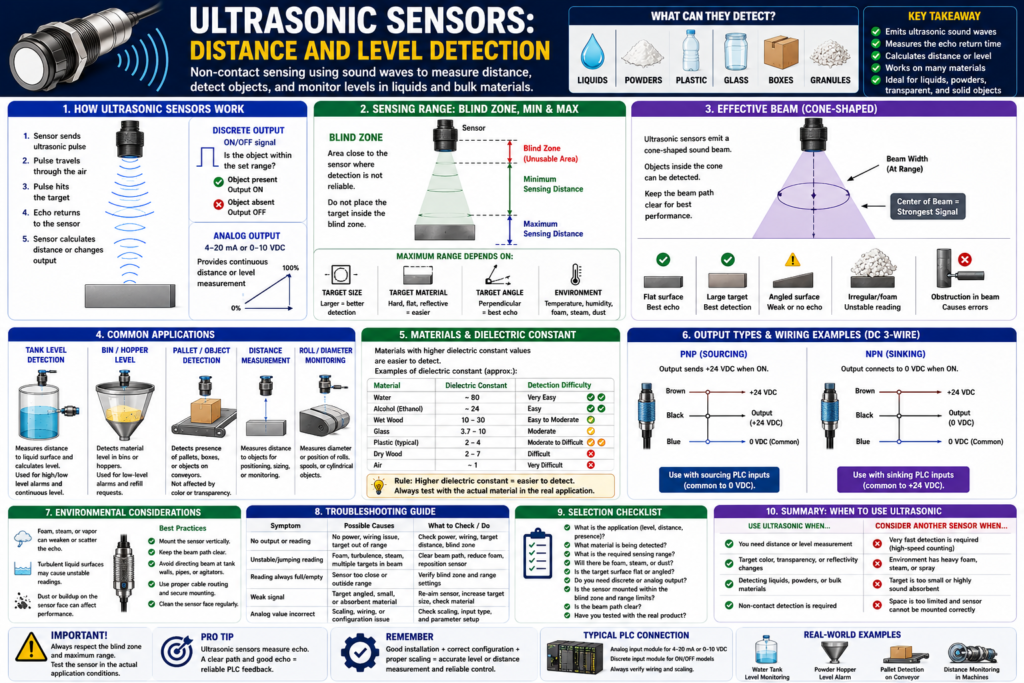
Introduction
Ultrasonic sensors are industrial sensors used to detect distance, presence, or level by using sound waves.
Unlike photoelectric sensors, ultrasonic sensors do not depend on light reflection. This makes them useful for detecting objects that may be difficult for optical sensors, such as:
Transparent objects
Shiny objects
Dark objects
Liquids
Granules
Bulk material
Boxes
Pallets
Objects where color changes
In PLC systems, ultrasonic sensors are commonly used for:
Tank level measurement
Bin level detection
Object distance measurement
Presence detection
Conveyor product detection
Pallet detection
Roll diameter monitoring
Material height monitoring
The Rockwell Automation sensor manual explains that ultrasonic sensors emit high-frequency sound pulses and detect the returning echo. The sensor uses the time it takes for the echo to return to determine distance or presence.
In simple words:
An ultrasonic sensor sends out sound, waits for the echo, and uses that echo to detect distance or level.What Is an Ultrasonic Sensor?
An ultrasonic sensor is a non-contact sensor that uses sound waves above the range of human hearing.
Basic concept:
Sensor sends ultrasonic pulse
↓
Pulse travels through the air
↓
Pulse hits the target
↓
Echo returns to the sensor
↓
Sensor calculates distance or changes output
↓
PLC receives the signal
The target can be:
Liquid surface
Solid object
Box
Pallet
Roll of material
Powder or granule surface
Plastic container
Glass object
The sensor does not need to touch the target.
This makes it useful when contact would be difficult, messy, or unreliable.
How Ultrasonic Sensors Work
An ultrasonic sensor has a transducer that sends and receives sound pulses.
The basic operating principle is called time-of-flight.
That means the sensor measures how long it takes for the sound pulse to travel to the target and return.
Simple example:
Short return time = target is close
Long return time = target is farther away
No echo = target may be too far, angled, absorbent, or missing
For distance or level measurement, the sensor converts this information into either:
Discrete ON/OFF output
Analog 4–20 mA output
Analog 0–10 VDC output
IO-Link or network data
Discrete vs Analog Ultrasonic Sensors
Ultrasonic sensors can be used as either discrete sensors or analog sensors depending on the model and application.
Discrete Ultrasonic Sensor
A discrete ultrasonic sensor gives an ON/OFF signal.
It answers:
Is the object within the detection range?Example:
Pallet present = ON
Pallet absent = OFF
PLC tag:
DI_Pallet_Present_USPLC use:
Conveyor stop
Product present permissive
Jam detection
Object detection
HMI status
Analog Ultrasonic Sensor
An analog ultrasonic sensor provides a variable signal that represents distance or level.
It answers:
How far is the object?
How full is the tank?
What is the material height?
Common analog outputs:
4–20 mA
0–10 VDC
PLC tags:
AI_Tank_Level_Raw
AI_Tank_Level_Pct
AI_Distance_Raw
AI_Distance_Inches
PLC use:
Tank level display
High-level alarm
Low-level alarm
Pump control
Trend on HMI
Distance monitoring
Process control
Ultrasonic Distance Detection
Ultrasonic sensors are very useful for measuring distance.
Example:
Sensor mounted above a conveyor.
Object passes below.
Sensor measures distance to the top of the object.
PLC determines if product is present or too tall.
PLC tag examples:
AI_Object_Distance_Inches
AI_Product_Height_Inches
DI_Object_In_Range_US
Logic example:
AI_Object_Distance_Inches < Object_Present_Distance_SP
= Object_Present
This is useful when the object may vary in color, reflectivity, or surface appearance.
Ultrasonic Level Detection
One of the most common ultrasonic applications is level detection.
Example:
Sensor mounted above a tank.
Sound pulse travels down to the liquid surface.
Echo returns to sensor.
Sensor calculates distance to liquid.
PLC converts distance into tank level.
Important concept:
As the tank fills, distance to the liquid gets smaller.
As the tank empties, distance to the liquid gets larger.
So the PLC may need to scale the signal correctly.
Example:
Tank empty = long distance
Tank full = short distance
PLC tags:
AI_Tank_Level_Raw
AI_Tank_Distance_Inches
AI_Tank_Level_Pct
Example logic:
AI_Tank_Level_Pct >= Tank_High_Level_SP
= Tank_High_Level_Alarm
Another example:
AI_Tank_Level_Pct <= Tank_Low_Level_SP
= Tank_Low_Level_Alarm
Important: Ultrasonic Sensors Have a Blind Zone
Ultrasonic sensors have a small area close to the face of the sensor where detection is not reliable.
This is called the blind zone.
The Rockwell manual explains that ultrasonic proximity sensors have a small unusable area near the sensor face. If the beam leaves the sensor, hits the target, and returns before the sensor has completed its transmission cycle, the sensor cannot accurately receive the echo. This unusable area is called the blind zone.
In simple words:
Blind zone = area too close to the sensor where it cannot measure correctly.Example:
Sensor blind zone = 6 inches
Target distance = 3 inches
Result = unreliable reading
Technician rule:
Do not mount an ultrasonic sensor too close to the target.
Always respect the minimum sensing distance.
Minimum and Maximum Sensing Distance
Ultrasonic sensors have both a minimum and maximum sensing distance.
Minimum Sensing Distance
This is the distance outside the blind zone where the sensor can start reading reliably.
If the target is too close:
Sensor may ignore the echo
Sensor may misread distance
Analog value may jump
Discrete output may be unstable
Maximum Sensing Distance
Maximum sensing distance depends on the target.
The Rockwell manual explains that target size and material determine the maximum distance at which the sensor can detect the object. Materials that absorb sound, such as foam, cotton, and rubber, are more difficult to detect than acoustically reflective materials such as steel, plastic, or glass.
Practical meaning:
Hard, flat, reflective target = easier to detect
Soft, absorbent target = harder to detect
Small target = harder to detect
Far target = harder to detect
Effective Beam
Ultrasonic sensors do not send a perfectly straight narrow line.
They emit sound in a cone-shaped beam.
The Rockwell manual explains that when the transducer vibrates, it emits ultrasonic pulses that propagate in a cone-shaped beam, and the sensing range can often be adjusted through sensitivity settings.
In simple words:
Ultrasonic beam = cone-shaped detection areaThis matters because the sensor may detect objects inside the cone that are not the intended target.
Example:
Sensor aimed at tank liquid level.
Beam also sees tank wall, pipe, ladder, agitator, bracket, or foam.
Reading becomes unstable.
Technician rule:
Make sure the ultrasonic beam has a clear path to the target.Target Considerations
Ultrasonic sensors depend heavily on the echo coming back from the target.
Important target factors:
Target size
Target material
Target shape
Target angle
Target surface texture
Target distance
Target temperature
The Rockwell manual notes that smaller targets are more difficult to detect, and the farther a target is from the sensor, the longer it takes for the echo to return.
Target Angle
Target angle is very important.
A flat target should ideally face the sensor.
Bad application:
Sensor sound hits angled surface.
Echo reflects away from the sensor.
Sensor receives weak or no echo.
Better application:
Sensor points perpendicular to a flat target surface.
Echo returns directly to sensor.
Example:
Flat liquid surface = usually good
Angled metal plate = may reflect sound away
Irregular pile of powder = may give unstable echo
Target Surface
Surface texture also matters.
Good echo targets:
Flat liquid surface
Flat plastic surface
Flat cardboard box
Metal plate
Glass object
Difficult targets:
Foam
Cotton
Rubber
Soft fabric
Irregular powder pile
Very small object
Angled object
Highly turbulent liquid surface
Environmental Considerations
Ultrasonic sensors work through air, so the environment matters.
Important environmental factors:
Air temperature
Air pressure
Humidity
Steam
Wind or air movement
Ambient ultrasonic noise
Dust
Foam
Condensation
Vapor
Obstructions in the beam
The Rockwell manual notes that ultrasonic sensors include noise suppression circuitry to help them function in noisy environments, and that normal atmospheric pressure changes have little effect on accuracy. However, extreme high or low pressure environments are not intended applications because pressure extremes can damage the transducer or sensor face.
Air Temperature
Temperature affects the speed of sound.
If temperature changes significantly, the measurement can shift.
Many industrial ultrasonic sensors include temperature compensation, but technicians should still consider temperature in the application.
Example:
Cold storage area
Hot tank area
Outdoor tank
Steam or warm vapor above liquid
Possible issue:
Level reading shifts as air temperature changes.Foam, Steam, and Vapor
Foam and vapor can be difficult for ultrasonic level applications.
Example:
Foam on liquid surface absorbs or scatters sound.
Steam or vapor changes the echo path.
Sensor reading becomes unstable.
Possible result:
Analog level jumps
High-level alarm flickers
Pump control becomes unstable
HMI trend looks noisy
Technician rule:
Ultrasonic level sensors work best with a clear air path and a stable surface.Advantages of Ultrasonic Sensors
Ultrasonic sensors have several strong advantages.
Advantages:
Non-contact sensing
Can detect many materials
Can detect transparent objects
Can detect shiny or dark objects
Good for distance measurement
Good for level measurement
Not dependent on target color
Useful for liquids and solids
Can provide analog measurement
This is why they are useful where photoelectric sensors may struggle because of color, transparency, or reflectivity.
Disadvantages of Ultrasonic Sensors
Ultrasonic sensors also have limitations.
Disadvantages:
Blind zone near sensor face
Affected by target angle
Affected by soft or sound-absorbing materials
Affected by foam, vapor, or turbulence
Cone-shaped beam may detect unwanted objects
Slower response than some photoelectric sensors
Requires clear path to target
Mounting location is very important
Important:
Ultrasonic sensors are excellent tools, but they are not magic.
The echo must return reliably.
Ultrasonic vs Photoelectric Sensors
| Feature | Ultrasonic Sensor | Photoelectric Sensor |
|---|---|---|
| Detection method | Sound echo | Light beam/reflection |
| Target color effect | Low | Can be high |
| Transparent object detection | Often good | Can be difficult |
| Shiny object detection | Often good | Can be difficult |
| Distance measurement | Good | Depends on sensor type |
| Level measurement | Good | Usually not typical |
| Speed | Usually slower | Usually faster |
| Main challenge | Echo quality | Light/reflection quality |
Simple takeaway:
Photoelectric sensors depend on light.
Ultrasonic sensors depend on sound echo.
Ultrasonic vs Capacitive Sensors for Level
| Feature | Ultrasonic Level Sensor | Capacitive Level Sensor |
|---|---|---|
| Detection type | Non-contact from above | Point level or through wall |
| Output | Discrete or analog | Usually discrete, sometimes analog |
| Best for | Distance/continuous level | Point level detection |
| Affected by | Foam, vapor, turbulence | Buildup, moisture, dielectric constant |
| Contact with product | No contact | Usually no contact, but close to wall/product |
| Common use | Tank level percentage | High/low level point |
Simple takeaway:
Use ultrasonic when you need distance or continuous level.
Use capacitive when you need point level or material presence.
PLC Applications
1. Tank Level Measurement
Application:
Measure liquid level in a tank.Sensor:
Ultrasonic level sensor with 4–20 mA outputPLC tags:
AI_Tank_Level_Raw
AI_Tank_Level_Pct
PLC use:
HMI level display
High-level alarm
Low-level alarm
Pump start/stop
Trend
Batch control
Logic concept:
AI_Tank_Level_Pct >= Tank_High_Level_SP
= Tank_High_Level_Alarm
2. Bin or Hopper Level
Application:
Measure material height in a bin or hopper.Sensor:
Ultrasonic sensor mounted above materialPLC tags:
AI_Hopper_Level_Pct
AI_Hopper_Distance_Inches
PLC use:
Low material alarm
Refill request
Prevent empty running
Production tracking
Important:
Irregular material surfaces may cause unstable readings.
Validation or filtering may be needed.
3. Pallet Detection
Application:
Detect a pallet or large object on a conveyor.Sensor:
Discrete ultrasonic sensorPLC tag:
DI_Pallet_Present_USPLC use:
Conveyor stop
Zone occupied status
Transfer permissive
Jam detection
Logic concept:
DI_Pallet_Present_US
AND Transfer_Ready
= Conveyor_Stop_Request
4. Roll Diameter Monitoring
Application:
Monitor diameter of a roll of material.Sensor:
Analog ultrasonic distance sensorPLC tags:
AI_Roll_Distance_Inches
AI_Roll_Diameter_Inches
PLC use:
Low roll alarm
Speed compensation
Tension control support
HMI display
PLC Scaling Example
For an analog ultrasonic level sensor:
4 mA = tank empty
20 mA = tank full
PLC scaling:
Raw Analog Input → Engineering UnitsExample tags:
AI_Tank_Level_Raw
AI_Tank_Level_mA
AI_Tank_Level_Pct
If using distance instead of direct level:
Distance to liquid = measured value
Tank height = known value
Level = Tank height - distance
Example:
Tank height = 100 inches
Distance from sensor to liquid = 30 inches

Level = 100 - 30 = 70 inches
Then:
Level percent = 70%This is why it is important to understand whether the sensor output represents:
Distance to target
or
Level of material
Troubleshooting Ultrasonic Sensors
Basic Checklist
When troubleshooting ultrasonic sensors, ask:
1. Is the sensor powered?
2. Is the target inside the sensing range?
3. Is the target outside the blind zone?
4. Is the sensor aimed correctly?
5. Is the target surface flat enough to return an echo?
6. Is the target too small?
7. Is the target material absorbing sound?
8. Is there foam, steam, vapor, dust, or turbulence?
9. Is something else inside the beam cone?
10. Is the analog signal changing?
11. Is the PLC input configured for 4–20 mA or 0–10 VDC correctly?
12. Is the scaling correct?
13. Is filtering or validation needed?
14. Does the HMI value match the real process?
Common Symptoms and Causes
| Symptom | Possible Cause |
|---|---|
| Sensor reads zero or minimum | Target inside blind zone |
| Sensor gives no reading | Target too far, no echo, wrong angle |
| Reading jumps | Foam, turbulence, vapor, unwanted object in beam |
| Level reads backwards | Scaling/inversion issue |
| PLC value does not change | Wiring, analog card setup, sensor output issue |
| Sensor detects wrong object | Cone-shaped beam sees pipe, wall, agitator, bracket |
| Reading works on bench but not tank | Foam, vapor, turbulence, mounting angle |
| High alarm flickers | Unstable echo or no filtering |
Practical Field Example: Tank Level Reading Jumps
Problem:
Tank level on HMI jumps from 40% to 75% and back.Possible causes:
Foam on liquid surface
Agitator creating turbulence
Sensor aimed at tank wall
Pipe inside beam cone
Steam or vapor above liquid
Wrong scaling
Analog signal noise
Sensor mounted too close to maximum fill level
Troubleshooting steps:
Check actual liquid level.
Check sensor mounting angle.
Confirm blind zone clearance.
Look for foam, vapor, turbulence, or obstructions.
Verify analog signal at the PLC card.
Check scaling logic.
Add filtering only after fixing application issues.
Practical Field Example: Pallet Sensor Does Not Detect
Problem:
Ultrasonic sensor sometimes misses pallets.Possible causes:
Pallet surface is angled or irregular.
Sensor is aimed at a gap.
Target distance is near maximum range.
Sensor sensitivity is too low.
Beam is detecting conveyor frame.
Sensor response time is too slow for the application.
Corrective actions:
Re-aim the sensor.
Use a larger target area.
Move the sensor closer.
Adjust sensitivity.
Verify output signal at the PLC input.
Consider photoelectric or mechanical detection if ultrasonic is not reliable.
Good PLC Tag Names
Use clear tag names that describe what the ultrasonic sensor is measuring or proving.
Discrete examples:
DI_Pallet_Present_US
DI_Object_In_Range_US
DI_Bin_High_Level_US
DI_Tank_High_Level_US
Analog examples:
AI_Tank_Level_Raw
AI_Tank_Level_Pct
AI_Tank_Distance_Inches
AI_Hopper_Level_Pct
AI_Roll_Diameter_Inches
AI_Object_Distance_mm
Avoid unclear names:
UltraSensor1
Sensor_5
Level_A
Input_9
Recommended Documentation Format
Example:
Tag Name:
AI_Tank_Level_Pct

Sensor Type:
Ultrasonic level sensor

Application:
Non-contact liquid level measurement

Signal Type:
4–20 mA analog input

Mounting:
Top-mounted above tank, aimed at liquid surface

Normal Range:
0–100% tank level

PLC Use:
HMI level display, high-level alarm, low-level alarm, pump permissive

Important Notes:
Respect blind zone. Keep beam clear of tank wall, pipes, agitator, foam, and vapor.

Troubleshooting:
Check sensor power, echo status, mounting angle, blind zone, analog signal, scaling, HMI value, and process conditions.
Another example:
Tag Name:
DI_Pallet_Present_US

Sensor Type:
Discrete ultrasonic sensor

Application:
Pallet detection on conveyor

Normal State:
ON when pallet is within sensing range

PLC Use:
Zone occupied status, transfer permissive, conveyor stop request

Troubleshooting:
Check sensor LED, target distance, angle, beam path, output type, PLC input LED, and tag online.
Technician Mindset
When looking at an ultrasonic sensor, do not only ask:
Is the sensor ON?Ask:
Is the sensor measuring distance or giving ON/OFF status?
Is the target inside the reliable sensing range?
Is the target outside the blind zone?
Is the echo returning directly to the sensor?
Is the surface flat, angled, turbulent, foamy, or absorbent?
Is anything else inside the cone-shaped beam?
Is the PLC scaling distance correctly into level?
Is this signal used for alarm, permissive, control, trend, or HMI display?
This mindset helps you troubleshoot the real cause instead of blaming the PLC logic too quickly.
Final Thoughts
Ultrasonic sensors are powerful industrial sensors for distance and level detection.
They work by sending sound pulses and measuring the returning echo. This makes them useful for applications where color, transparency, or reflectivity can make photoelectric sensing difficult.
They are especially useful for:
Tank level
Bin level
Distance measurement
Pallet detection
Object detection
Roll diameter monitoring
But ultrasonic sensors must be applied correctly.
The most important limitations are:
Blind zone
Target angle
Target material
Foam
Vapor
Turbulence
Cone-shaped beam
Environmental conditions
The key takeaway is:
Ultrasonic sensors measure by echo. No reliable echo means no reliable feedback.For PLC technicians, the most important rule is:
Before blaming the PLC scaling or ladder logic, verify the sensor mounting, target surface, blind zone, beam path, and process conditions.Good ultrasonic sensor application creates reliable level and distance feedback.
Reliable feedback creates better PLC control, better HMI information, and faster troubleshooting.