4. COP vs CPS in Studio 5000 — Block I/O Buffering and Data Consistency (4 of 10)
In the previous article, we built an I/O mapping layer using individual instructions.
For digital signals, we used logic such as:
XIC Physic
al_Input
OTE Internal_Tag
For numeric values, we introduced:
MOV Source DestinationThis approach is extremely easy to understand and troubleshoot.
But what happens when a PLC has dozens or hundreds of related values that need to be transferred?
Creating one instruction for every value can become repetitive.
Studio 5000 provides two powerful instructions for copying larger groups of data:
COPand:
CPSAt first glance, they look almost identical.
Both copy data from a Source to a Destination.
However, there is one major difference:
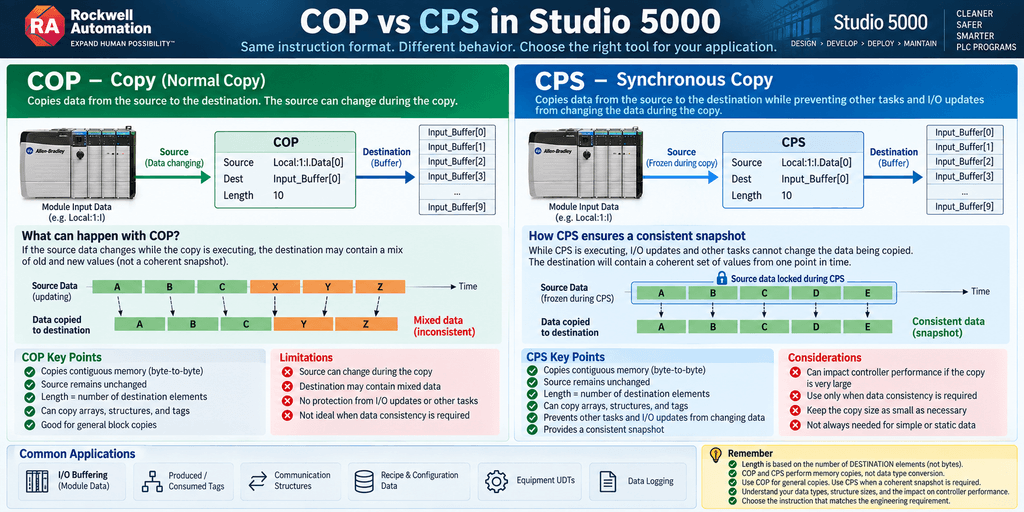
CPS protects the copy from being interrupted by other tasks or I/O updates while the transfer is taking place.
That difference becomes important when we need a consistent snapshot of data.
What Is COP?
COP means:
Copy
Its basic format is:
COP
Source: Source_Tag
Dest:   Destination_Tag
Length: Number_of_Destination_Elements
For example:
COP
Source: Input_Data[0]
Dest:   Input_Buffer[0]
Length: 10
This copies data from the source into the destination.
Rockwell describes COP and CPS as direct byte-to-byte copies through contiguous memory. The source remains unchanged while the destination is overwritten.
Conceptually:
SOURCE
  ↓
 COP
  ↓
DESTINATION
Simple Array Example
Suppose we create:
Raw_Input_Data[10]and:
Buffered_Input_Data[10]Both are arrays of:
DINTThe instruction could be:
COP
Source: Raw_Input_Data[0]
Dest: Buffered_Input_Data[0]
Length: 10
Because the destination elements are DINTs and each DINT contains 4 bytes:
10 DINT × 4 bytes = 40 bytesSo the operation transfers:
40 bytesfrom the source array into the destination array. Rockwell uses this same type of example in its instruction documentation.
COP Does Not Mean “Copy Length Bytes”
This is one of the most important details to understand.
The Length parameter does not simply mean number of bytes.
It represents:
Number of destination elements to copy.
Consider:
COP
Source: SourceArray[0]
Dest: DestinationArray[0]
Length: 10
If the destination array contains DINTs:
1 DINT = 4 bytesthen:
Length 10represents:
10 × 4 = 40 bytesThis is extremely important when Source and Destination use different data types.
Why Destination Type Matters
Imagine:
Source_Arraycontains:
SINTbut:
Destination_Arraycontains:
DINTA Length of:
10is interpreted relative to the destination element size.
Therefore you must understand:
SINT = 1 byte
INT  = 2 bytes
DINT = 4 bytes
REAL = 4 bytes
before using COP or CPS.
A wrong Length can copy more data than the programmer intended.
COP Is a Memory Copy
Another very important concept is that COP is not doing intelligent data conversion.
It performs a byte-level memory copy.
Think:
MEMORY
████████████████
      ↓
     COP
      ↓
████████████████
MEMORY
It is not equivalent to saying:
Convert every source value into the destination data type.
That distinction matters tremendously.
MOV vs COP
This helps explain the difference between:
MOVand:
COPA simple mental model is:
MOV
Move a value.
Value
  ↓
 MOV
  ↓
Destination
COP
Copy a block of memory.
Memory Block
     ↓
    COP
     ↓
Memory Block
This is why COP can be very useful for:
- Arrays
- Structures
- Large data blocks
- Communication buffers
- Equipment data
- I/O images
Example: Copying a Structure
Suppose we have:
Motor_Dataand an array:
Motor_Array[10]If both use the same structure, a COP could conceptually perform:
COP
Source: Motor_Data
Dest: Motor_Array[5]
Length: 1
This copies one destination structure into:
Motor_Array[5]Rockwell specifically documents COP/CPS copying structures as well as arrays.
Where COP Can Help With I/O Buffering
Imagine a digital input module exposes a group of input data.
Instead of individually mapping:
Input 0 → DI_Input0
Input 1 → DI_Input1
Input 2 → DI_Input2
Input 3 → DI_Input3
...
Input 31 → DI_Input31
we may decide to copy a larger block.
Conceptually:
Physical Input Data
        ↓
       COP
        ↓
Input Buffer
Then the application can work from the buffered data.
This can dramatically reduce the number of individual mapping instructions.
But There Is a New Problem
Consider this situation.
We want to copy:
Data[0]
Data[1]
Data[2]
Data[3]
...
Data[99]
into:
Buffer[0..99]But the source data is being updated asynchronously.
What happens if the source changes while the copy is taking place?
Potentially, part of the destination could represent one moment in time while another part represents a slightly different moment.
Conceptually:
SOURCE BEFORE UPDATE

A
B
C
D
E
The copy begins:
A → copied
B → copied
C → copied
Then the source changes:
A
B
X
Y
Z
The copy continues:
Y → copied
Z → copied
The destination could conceptually contain:
A
B
C
Y
Z
That is not a coherent snapshot of either source state.
This is the type of problem CPS is designed to address.
What Is CPS?
CPS means:
Synchronous Copy
Its format looks almost identical:
CPS
Source: Source_Tag
Dest:   Destination_Tag
Length: Number_of_Destination_Elements
For example:
CPS
Source: Raw_Data[0]
Dest: Snapshot_Data[0]
Length: 100
The important difference is what happens while the copy executes.
Rockwell states that during a CPS operation, I/O updates and other tasks cannot change the data involved until the copy is complete. This allows the destination to represent a consistent image of the source data at one point in time.
The Snapshot Concept
This is probably the easiest way to understand CPS.
Imagine taking a photograph.
Without synchronization:
Object moving
      ↓
Picture being captured
      ↓
Possible inconsistent image
With CPS:
Data
 ↓
FREEZE THE VIEW
 ↓
COPY COMPLETE DATA SET
 ↓
Release
The result is a coherent snapshot.
COP vs CPS
The basic difference can be summarized like this:
| Feature | COP | CPS |
|---|---|---|
| Copies data | Yes | Yes |
| Copies contiguous memory | Yes | Yes |
| Source remains unchanged by instruction | Yes | Yes |
| Can copy arrays | Yes | Yes |
| Can copy structures | Yes | Yes |
| Prevents other tasks/I/O updates from changing data during copy | No | Yes |
| Good for ordinary block copies | Yes | Yes |
| Good when coherent snapshot matters | Maybe | Excellent |
Why Asynchronous I/O Matters
This connects directly to something introduced earlier in this series.
A common misconception is:
The PLC reads every input at the beginning of the scan and nothing changes until the next scan.
That mental model is too simplistic for Logix controllers.
ControlLogix and CompactLogix systems can exchange I/O independently from the execution of a particular program routine.
Therefore:
PLC Task Executionand:
I/O Communicationdo not necessarily occur as one perfectly synchronized operation.
Conceptually:
PLC TASK

────Logic────Logic────Logic────Logic────


I/O COMMUNICATION

──Update──────Update──────Update──────
Those events can occur independently.
This is one reason data consistency may matter when copying larger I/O or communication structures.
Example: Input Buffer Snapshot
Imagine a module provides:
Module_Input_Datacontaining multiple related values.
We want:
Input_Bufferto represent one consistent set of values.
We could use:
CPS
Source: Module_Input_Data
Dest: Input_Buffer
Length: 1
Conceptually:
I/O MODULE
     ↓
Module Input Structure
     ↓
    CPS
     ↓
Input Buffer Snapshot
     ↓
Application Logic
Now the control logic processes the buffered image.
Why Would Consistency Matter?
Imagine a high-speed process providing:
Position
Speed
Status
Sequence
Timestamp
These values belong together.
If:
Positioncomes from one update and:
Speedcomes from another update, the resulting data set may not accurately represent the process at one point in time.
For some applications that may not matter.
For others, it can matter significantly.
Example: Produced Data
Rockwell provides a useful example involving a data array that will be produced to another controller.
Conceptually:
Application Data
      ↓
     CPS
      ↓
Produced Data Buffer
      ↓
Network
      ↓
Other Controller
The objective is to ensure that the complete produced data set represents one coherent image rather than values that changed partway through the copy.
Does This Mean We Should Always Use CPS?
No.
This is one of the biggest mistakes we should avoid.
It would be easy to conclude:
CPS is safer, therefore use CPS everywhere.
That is not good engineering.
CPS temporarily prevents other tasks and I/O updates from changing the relevant data while the synchronous copy is completed.
That synchronization has a cost.
For a small data structure, the impact may be insignificant.
For a very large copy or a time-critical controller, unnecessary synchronous copies can interfere with controller scheduling and response.
Therefore:
Use synchronization because the application requires coherent data—not simply because CPS sounds more advanced.
When COP Is Usually Appropriate
COP is often appropriate when:
- The source will not change during the operation
- Data consistency across the entire structure is not critical
- The data belongs to the same task
- You are copying static or relatively stable information
- The application can tolerate values being updated independently
- You simply need an efficient block copy
For example:
Recipe_Working
      ↓
     COP
      ↓
Recipe_Backup
may be perfectly reasonable if the recipe is not changing while the instruction executes.
When CPS Becomes Attractive
CPS becomes more attractive when:
- I/O may update asynchronously
- Another task may modify the source
- A produced/consumed data set must remain coherent
- Communication data must represent one snapshot
- Multiple related values must belong to the same update
- Data integrity during the copy is important
The key word is:
Consistency
COP Example
Suppose:
Recipe_Current[20]must be copied into:
Recipe_Backup[20]Both arrays are:
REALWe could use:
COP
Source: Recipe_Current[0]
Dest: Recipe_Backup[0]
Length: 20
Since each REAL is 4 bytes:
20 × 4 = 80 bytesare transferred.
CPS Example
Suppose a communication structure contains:
Machine_Data.Speed
Machine_Data.Position
Machine_Data.State
Machine_Data.Counter
Machine_Data.Timestamp
Machine_Data.FaultCode
and another system needs these values as one coherent snapshot.
We could use:
CPS
Source: Machine_Data
Dest: Machine_Data_Tx
Length: 1
Conceptually:
LIVE DATA
    ↓
   CPS
    ↓
SNAPSHOT
    ↓
COMMUNICATION
Be Extremely Careful With Length
One of the easiest ways to create problems with COP or CPS is using the wrong Length.
Remember:
Length is based on the number of destination elements.
Not simply:
Number of source elementsand not simply:
Number of bytesConsider:
COP
Source: Source
Dest: Destination
Length: 10
Before entering:
10you should understand:
What is the destination data type?
How large is each destination element?
How large is the destination tag?
How large is the source?
Rockwell explicitly warns that programmers should test and verify that COP/CPS do not modify unintended data.
Why This Matters With Structures
Structures can make this even more important.
Suppose:
My_UDTcontains:
BOOL
DINT
REAL
ARRAY
The internal memory layout may involve more than what is visually obvious from looking at the tag members.
When copying structures, you should understand:
- Source structure
- Destination structure
- Base tag boundaries
- Data type compatibility
- Length
Do not simply guess the Length.
COP Is Not a Replacement for Good Architecture
Another important point:
Just because COP can copy an entire block does not mean every I/O architecture should become:
COP everythingIndividual mapping can still be better when troubleshooting clarity matters.
Compare:
Local:1:I.Data.0 → DI_Start_PB
Local:1:I.Data.1 → DI_Stop_PB
Local:1:I.Data.2 → DI_Photoeye
with:
COP ModuleData InputBuffer 1The first version immediately documents each signal.
The second version is compact but requires the technician to understand the data structure.
There is a tradeoff:
Individual Mapping
      ↓
Excellent visibility
More instructions
versus:
Block Mapping
      ↓
Compact architecture
More dependence on structure documentation
The Best Method Depends on the Data
This leads to an important engineering principle.
Do not choose the mapping method first.
First ask:
What type of data am I handling?
For individual discrete signals:
XIC / XIO / OTEmay be ideal.
For one numeric value:
MOVmay be ideal.
For an array or structure:
COPmay be ideal.
For a data set requiring a coherent snapshot:
CPSmay be ideal.
The instruction should match the engineering requirement.
A Practical Decision Tree
A simple way to think about it:
Need to transfer data?
        ↓
Is it one BOOL?
        ↓ YES
Use Boolean Mapping
XIC/XIO → OTE
Otherwise:
Is it one numeric value?
        ↓ YES
       MOV
Otherwise:
Is it a block, array, or structure?
        ↓ YES
Does the entire block need
to remain coherent during copy?
        ↓
     NO      YES
     ↓        ↓
    COP      CPS
This is not an absolute rule, but it is a very useful starting point.
What About Processor Performance?
Now we reach another common question:
Which is faster: individual mapping, COP, or CPS?
There is no useful universal answer without considering:
- Controller family
- Data size
- Task rate
- Number of instructions
- Communication load
- Motion requirements
- I/O configuration
- Program architecture
However, one principle is important:
Optimization should solve an actual performance problem.
Replacing understandable mapping logic with complicated block manipulation simply to save a tiny amount of execution time may make the PLC harder to maintain without providing meaningful operational benefit.
For most normal machines, readability and maintainability should remain major design criteria.
CPS and Task Execution
CPS deserves special attention because synchronous behavior can affect other controller activity.
Imagine:
CPS
Source: Huge_Array[0]
Dest: Huge_Buffer[0]
Length: 5000
That is very different from:
CPS
Source: Small_Data
Dest: Small_Buffer
Length: 1
Synchronizing a very large block unnecessarily can have a greater scheduling impact.
Therefore:
Keep synchronous copies only as large as necessary.
Do not protect data that does not require protection.
Troubleshooting COP and CPS
If a block copy is not behaving as expected, check these items.
1. Source
What exactly is being copied?
Source2. Destination
Where is the data being placed?
Destination3. Destination Data Type
Remember:
Length × Destination Element Sizedetermines the requested byte count.
4. Length
Is the Length correct?
5. Structure Compatibility
Do Source and Destination have compatible layouts?
6. Data Ownership
Can another task, I/O connection, communication instruction, or routine modify the data?
7. Synchronization Requirement
Does the application actually require:
CPSor is:
COPsufficient?
Example Industrial Architecture
A more advanced I/O architecture could look like this:
┌─────────────────────────────┐
│ Physical I/O Module        │
└──────────────┬──────────────┘
               ↓
┌─────────────────────────────┐
│ Module-Defined Input Data  │
└──────────────┬──────────────┘
               ↓
             CPS
               ↓
┌─────────────────────────────┐
│ Input Snapshot Buffer      │
└──────────────┬──────────────┘
               ↓
┌─────────────────────────────┐
│ Signal Processing          │
│ Scaling / Validation       │
└──────────────┬──────────────┘
               ↓
┌─────────────────────────────┐
│ Application Logic         │
└─────────────────────────────┘
But again:
This architecture should be used because the application requires it, not because every Logix program must look this way.
Individual Mapping vs COP vs CPS
Here is a practical comparison:
| Method | Best Use | Visibility | Compactness | Snapshot Protection |
|---|---|---|---|---|
| XIC/XIO → OTE | Individual BOOL signals | Excellent | Low | No |
| MOV | Individual numeric values | Excellent | Moderate | No |
| COP | Arrays / structures / blocks | Moderate | Excellent | No |
| CPS | Coherent arrays / structures / blocks | Moderate | Excellent | Yes |
Each method has a legitimate place.
My Practical Rule
When designing a maintainable industrial PLC program:
Use individual mapping when:
The technician benefits from seeing each physical signal clearly.
Use MOV when:
A single numeric value needs a clear source-to-destination relationship.
Use COP when:
A complete block can be copied safely without requiring synchronization.
Use CPS when:
The application requires the complete data set to represent one consistent snapshot.
That keeps the architecture intentional instead of simply using the most advanced-looking instruction.
The Bigger Lesson
COP and CPS teach an important lesson about modern PLC architecture.
A PLC program is not only about:
Start Motor
Stop Motor
Open Valve
Close Valve
As systems become more advanced, we also have to think about:
Data Ownership
Data Consistency
Task Execution
I/O Updates
Communication
Memory Structures
Synchronization
These concepts become increasingly important when working with:
- Produced/Consumed Tags
- EtherNet/IP devices
- Large UDTs
- Remote I/O
- Motion systems
- Communication gateways
- SCADA interfaces
- High-speed equipment
Understanding COP and CPS is therefore about much more than learning two instructions.
It is an introduction to how data moves through a modern Logix controller.
Final Thought
COP and CPS may look nearly identical on a ladder rung.
But they answer different engineering questions.
COP asks:
How can I efficiently copy this block of memory?
CPS asks:
How can I copy this block while keeping the complete data set consistent during the transfer?
That distinction matters.
Use:
COPwhen a normal block copy is sufficient.
Use:
CPSwhen synchronization is genuinely required.
And most importantly:
Never use COP or CPS without understanding Source, Destination, data type, and Length.
A one-line instruction can manipulate a large amount of controller memory.
That makes these instructions powerful—but also deserving of respect.
Next Article
UDT-Based I/O Mapping — Building a Scalable I/O Architecture in Studio 5000
In the next article, we will move from individual controller tags and raw arrays into User-Defined Data Types (UDTs).
Instead of having:
DI_Motor_FB
DI_Motor_OL
DO_Motor_Run
Motor_Fault
Motor_Running
scattered across the controller, we will begin organizing equipment as:
Motor01.Input.RunFB
Motor01.Input.Overload
Motor01.Command.Run
Motor01.Status.Running
Motor01.Status.Faulted
This is where I/O mapping begins to evolve into a truly scalable industrial PLC architecture.