7. Controller Scope vs Program Scope in Studio 5000
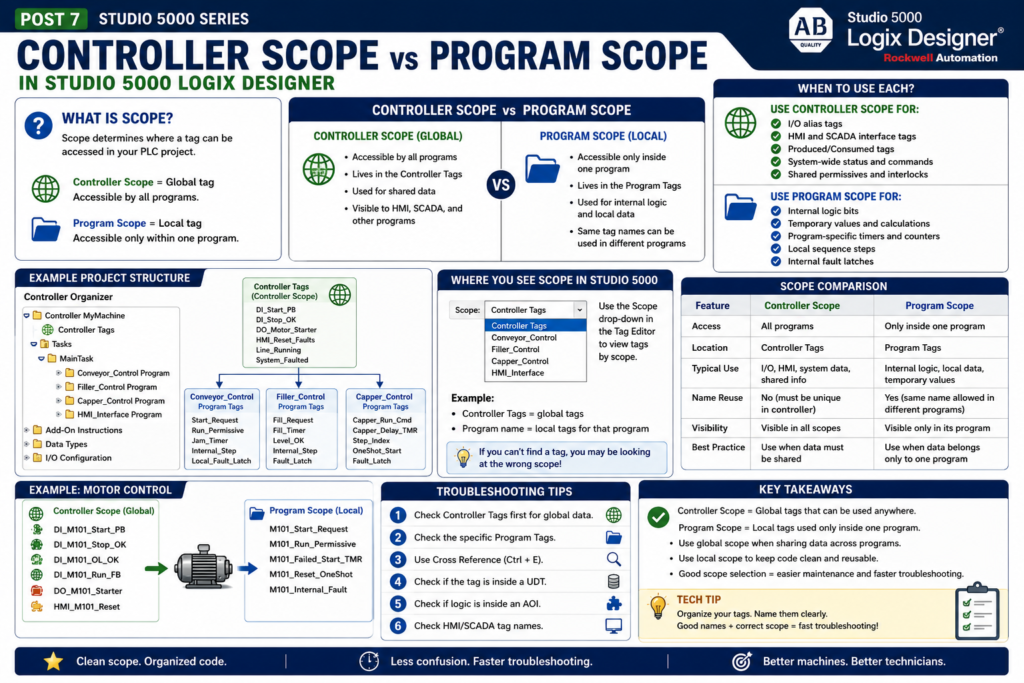
When working with tags in Studio 5000 Logix Designer, one of the most important concepts to understand is scope.
Scope defines where a tag can be used inside the PLC project.
In simple terms:
Controller Scope = Global tag

Program Scope = Local tag
A controller-scoped tag can be accessed by different programs in the controller.
A program-scoped tag can only be accessed inside the program where it was created.
Rockwell’s Studio 5000 lab manual explains that data scope defines where tags can be accessed. It states that controller-scoped tags are accessible by all programs, while parameters and local tags are accessible only by code within a specific program.
Why Scope Matters
Scope matters because a Studio 5000 project can have many programs, routines, tags, I/O points, AOIs, UDTs, HMI commands, and communication data.
If every tag is global, the project can become messy.
If every tag is local, some data may not be available where it is needed.
Good scope selection helps with:
Project organization
Troubleshooting
Code reuse
Avoiding duplicate tag name conflicts
Separating machine sections
Cleaner HMI communication
Cleaner AOI design
The lab manual specifically notes that isolating machine portions or stations into separate programs helps provide isolation, prevent tag name collisions, and improve code reuse.
That is a very industrial concept.
1. What Is Controller Scope?
A controller-scoped tag is a global tag.
That means any program in the controller can access it.
Example:
Controller Tags
 ├── DI_Start_PB
 ├── DI_Stop_OK
 ├── DO_Motor_Starter
 ├── HMI_Start_Cmd
 ├── Line_Running
 └── System_Faulted
Any program can use these tags.
Simple rule:
Use Controller Scope when more than one program needs the tag.Common Uses for Controller Scope
Controller-scoped tags are commonly used for:
Physical I/O alias tags
HMI interface tags
SCADA interface tags
Produced/consumed controller data
System-wide status bits
Plant network communication
Controller-level alarms or summaries
Shared data between programs
Example:
DI_Line_Start_PB
DO_Line_Run_Light
HMI_Reset_Faults
SCADA_Line_Status
System_EStop_OK
Line_Faulted
The lab manual shows that I/O module tags are created in Controller Scope, and it notes that local modules in the controller chassis are called “Local.”
That is why physical I/O data is normally controller-scoped.
Controller Scope Example
Imagine a packaging line with multiple programs:
MainTask
 ├── Conveyor_Control
 ├── Filler_Control
 ├── Capper_Control
 └── HMI_Interface
The HMI reset command may need to be used by multiple programs.
Example:
HMI_Reset_All_FaultsThis should probably be controller-scoped because multiple programs may need to read it.
Another example:
Line_EStop_OKIf many programs need to know the E-stop status, controller scope makes sense.
2. What Is Program Scope?
A program-scoped tag is a local tag.
It only exists inside one program.
Example:
Program: Conveyor_Control

Program Tags:
 ├── Start_Request
 ├── Run_Permissive
 ├── Jam_Timer
 ├── Internal_Step
 └── Local_Fault_Latch
Only the Conveyor_Control program can directly access those tags.
The lab manual explains that local tags are isolated from other programs, and routines cannot access the local tags of another program. It also says local tag names can be reused across multiple programs.
Simple rule:
Use Program Scope when the tag is only needed inside one program.Common Uses for Program Scope
Program-scoped tags are good for:
Internal logic bits
Temporary values
Intermediate calculations
Program-specific timers
Program-specific counters
Local sequence steps
Local permissive bits
Local fault latches
One-shots
State machine internal data
Examples:
Start_Request
Run_Permissive
Fault_Timer
Step_Index
Auto_Start_OneShot
Conveyor_Jam_Latched
These tags do not always need to be global.
Keeping them local makes the program cleaner.
Program Scope Example
Imagine two conveyor programs:
Conveyor_1_Control
Conveyor_2_Control
Each program can have its own local tag named:
Start_RequestThis works because each tag belongs to a different program.
Conceptually:
Conveyor_1_Control.Start_Request
Conveyor_2_Control.Start_Request
The same local tag name can be reused because the scope separates them.
This is one reason program scope is powerful.
Controller Scope vs Program Scope Comparison
| Feature | Controller Scope | Program Scope |
|---|---|---|
| Access | Available to all programs | Available only inside one program |
| Common Use | I/O, HMI, shared system data | Internal logic, local timers, local steps |
| Good For | Global communication | Code isolation |
| Risk | Too many global tags can clutter project | Data not visible to other programs unless designed properly |
| Reuse | Less reusable if tied to global names | More reusable if logic is isolated |
| Example | HMI_Reset_All_Faults | Start_Request |
Simple Industrial Rule
Use this rule:
Controller Scope:
Use for data that must be shared.

Program Scope:
Use for data that belongs only to one machine section or logic block.
Another way to say it:
Global when necessary.
Local when possible.
This keeps the project cleaner and easier to troubleshoot.
Technician View: Why This Helps Troubleshooting
When troubleshooting in Studio 5000, knowing tag scope helps you find the correct tag faster.
Example:
The motor does not start.
You may search for:
Motor_Run_CmdBut if the motor logic is inside a program named Conveyor_Control, the command may be a program-scoped tag.
So the full context may be:
Conveyor_Control.Motor_Run_CmdIf you only look at Controller Tags, you may not see it.
That is why technicians should check both:
Controller Tags
Program Tags
Where to See Scope in Studio 5000
In the tag editor, Studio 5000 lets you view tags by scope.
You may see:
Controller Tags
MainProgram Tags
Conveyor_Control Tags
Filler_Control Tags
The lab manual gives an example during trending where the timer was created in Program Scope, so the user had to select the MainProgram tags to find the timer accumulator value.
That is a great practical example.
If you cannot find a tag, you may be looking at the wrong scope.
Practical Example: Motor Control
Let’s say we have a motor starter in Studio 5000.
Controller-Scoped Tags
These may be global because they connect to physical I/O or HMI:
DI_M101_Start_PB
DI_M101_Stop_OK
DI_M101_OL_OK
DI_M101_Run_FB
DO_M101_Starter
HMI_M101_Reset
Program-Scoped Tags
These may be local because they are internal logic decisions:
M101_Start_Request
M101_Run_Permissive
M101_Failed_To_Start_TMR
M101_Internal_Fault
M101_Reset_OneShot
This creates a clean separation:
Controller Scope = real-world signals and shared commands

Program Scope = internal logic used to make decisions
Practical Example: Conveyor Program
Program: Conveyor_ControlController Scope
DI_Conv_Start_PB
DI_Conv_Stop_OK
DI_Conv_PE_Clear
DO_Conv_Motor
HMI_Conv_Start
HMI_Conv_Stop
Program Scope
Start_Request
Run_Permissive
Jam_Detected
Jam_Timer
Auto_Mode_Active
Run_Command_Internal
The routine may use both:
DI_Conv_Start_PB OR HMI_Conv_Start → Start_Request

Start_Request AND Run_Permissive AND NOT Jam_Detected → Run_Command_Internal

Run_Command_Internal → DO_Conv_Motor
This is much cleaner than making every internal bit global.
HMI Tags: Controller or Program Scope?
This depends on the plant standard and HMI architecture.
Many systems use controller-scoped tags for HMI because they are easier to access from HMI/SCADA.
Examples:
HMI_Start_Cmd
HMI_Stop_Cmd
HMI_Reset_Faults
HMI_Mode_Select
HMI_Speed_Setpoint
However, in more structured projects, HMI data may be organized inside UDTs or program parameters.
For a beginner-friendly industrial approach:
Use controller scope for HMI interface tags,
especially when learning or working with simple systems.
Then as the project becomes more advanced, you can organize HMI data using UDTs and structured device tags.
I/O Tags: Usually Controller Scope
Raw I/O module tags are normally controller-scoped.
Examples:
Local:1:I.Data.0
Local:2:O.Data.3
Alias tags for I/O are often controller-scoped too.
Examples:
DI_Start_PB → Local:1:I.Data.0
DO_Motor_Starter → Local:2:O.Data.3
The lab manual shows that I/O module tags are created in Controller Scope.
This makes sense because physical I/O may be used by different programs, HMI diagnostics, or system-level logic.
Avoid This Mistake: Everything Global
One common beginner mistake is creating every tag in Controller Scope.
This works, but it creates a messy project.
Example:
Start_Request
Run_Request
Temp_Bit_1
Fault_Timer
OneShot
Internal_Logic_1
Step
Step2
Step3
If all these are controller-scoped, the global tag database becomes crowded.
Better approach:
Keep internal logic local to the program.
Only make tags global when they must be shared.
This is cleaner and more industrial.
Avoid This Mistake: Everything Local
The opposite mistake is making everything program-scoped.
That can create problems when another program, HMI, or SCADA system needs access to the data.
Example:
Line_Running
System_Faulted
HMI_Reset
SCADA_Status
These may need to be global or intentionally exposed.
Simple rule:
If the HMI, another program, or another controller needs it,
do not hide it accidentally as a local-only tag.
Program Parameters
Studio 5000 also supports Program Parameters, which are more advanced than basic local tags.
Program parameters can help pass data into or out of programs in a controlled way.
This becomes useful when building reusable program structures.
For this beginner series, remember the simple idea:
Program parameters help define a cleaner interface for program-level logic.This topic becomes more important later when we discuss reusable code, AOIs, and professional project structure.
AOI Connection: Why Scope Prepares You for Add-On Instructions
Understanding scope also prepares you for AOIs.
An AOI has:
Parameters
Local Tags
Logic Routine
The AOI manual explains that AOI logic uses only the parameters and local tags defined by the instruction. It does not directly access controller or program scope tags, which helps make the AOI standalone and reusable.
This is the same professional idea:
Expose only what needs to be connected.
Hide internal logic that does not need to be global.
That is why learning controller scope vs program scope helps you understand AOIs later.
Recommended Scope Strategy
Here is a practical strategy:
Use Controller Scope For:
I/O alias tags
HMI command/status tags
SCADA interface tags
Produced/consumed data
System-wide status
Shared interlocks
Line-level permissives
Use Program Scope For:
Internal requests
Internal permissives
Local timers
Local counters
One-shots
Local sequence steps
Temporary calculations
Program-specific fault logic
Example Scope Layout
Controller Tags
 ├── DI_Start_PB
 ├── DI_Stop_OK
 ├── DO_Motor_Starter
 ├── HMI_Reset_Faults
 ├── Line_Running
 └── System_Faulted

Program: Motor_Control
 ├── Start_Request
 ├── Run_Permissive
 ├── Failed_To_Start_TMR
 ├── Reset_OneShot
 └── Internal_Fault_Latched
This is clean and practical.
Technician Troubleshooting Workflow
When you are troubleshooting and cannot find a tag:
1. Check Controller Tags.
2. Check the specific Program Tags.
3. Use Cross Reference.
4. Check if the tag is inside a UDT.
5. Check if the logic is inside an AOI.
6. Check the AOI instance data.
7. Check HMI/SCADA naming if it is an interface tag.
Scope is one of the reasons a tag may not appear where you expect it.
Final Thoughts
Controller Scope and Program Scope are foundational Studio 5000 concepts.
They define where tags can be accessed and how clean your PLC project will be.
Remember:
Controller Scope = global data available to all programs.

Program Scope = local data available only inside one program.
Use controller scope when data must be shared.
Use program scope when data belongs only to one program.
For automation technicians, understanding scope helps you find tags faster and troubleshoot smarter.
For PLC programmers, understanding scope helps you build cleaner, more reusable, more professional Studio 5000 projects.
Good scope selection leads to:
Cleaner tag databases
Less confusion
Better reuse
Fewer name conflicts
Faster troubleshooting
More professional PLC code