0. Industrial Sensors Explained: The Foundation of PLC Feedback (0 of 15)
Introduction
In industrial automation, the PLC does not physically “see” the machine, conveyor, door, bottle, box, valve, or actuator. The PLC depends on sensors to know what is happening in the real world.
A sensor is a device that detects a changing condition and sends a signal to the control system. That changing condition can be simple, such as:
- A box is present.
- A door is fully open.
- A conveyor has product on it.
- A cylinder is extended.
- A bottle is in position.
- A label is missing.
- A tank level is high or low.
This feedback is what allows the PLC to make decisions. Without sensors, the PLC would only know what it commanded, not what actually happened.
For example, a PLC can command a motor starter or VFD to run, but it needs feedback to confirm that the motor is actually running. A PLC can command a door to open, but it needs a limit switch or sensor to confirm that the door reached the open position.
This is why sensors are one of the most important parts of any industrial control system. The Rockwell Automation sensor manual explains that presence sensing technology is used to monitor, regulate, and control industrial processes, and to help verify that critical process steps are completed as intended.
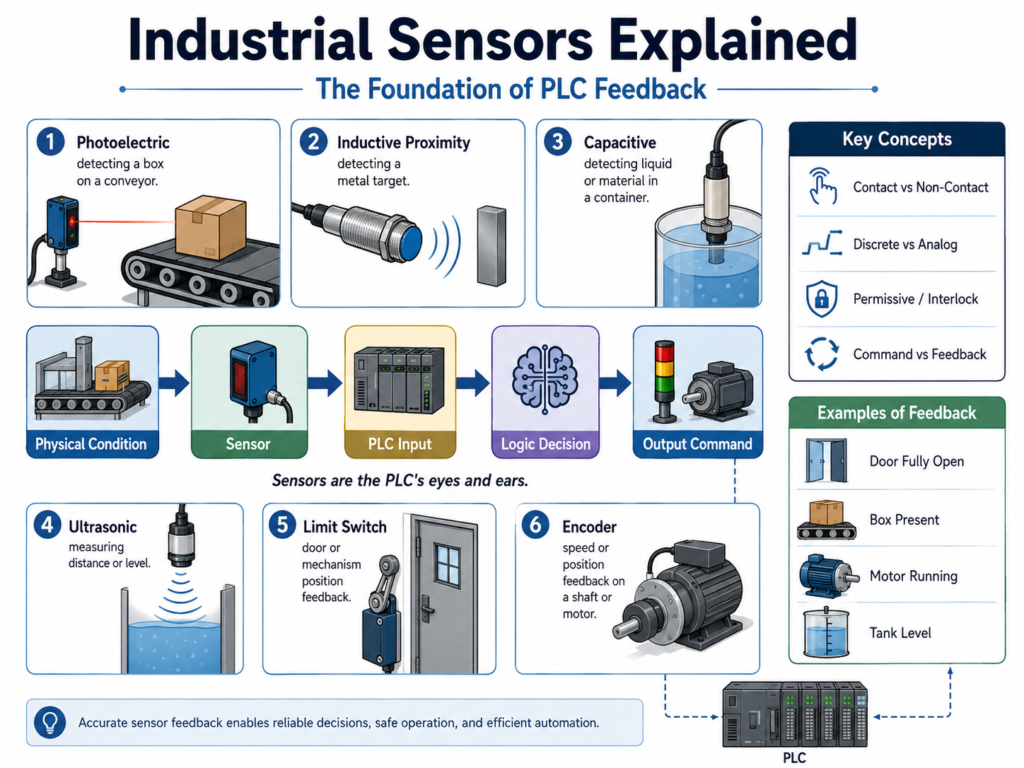
What Is an Industrial Sensor?
An industrial sensor is a field device used to detect a physical condition and convert it into an electrical signal that a control system can use.
In PLC systems, that signal usually goes to a PLC input module.
Basic flow:
Physical Condition → Sensor → PLC Input → Logic Decision → Output CommandExample:
Box Present → Photoelectric Sensor ON → PLC Input ON → Conveyor Logic Allows FillingAnother example:
Door Fully Open → Limit Switch ON → PLC Input ON → PLC Stops Open CommandThe sensor provides the PLC with confirmation from the real machine.
This confirmation is called feedback.
Why Sensor Feedback Matters
Sensor feedback is the difference between a PLC assuming something happened and the PLC verifying that something actually happened.
For example:
PLC Command: Open Door
Feedback Expected: Door Fully Open Limit Switch
The command tells the machine what to do.
The feedback tells the PLC whether the machine actually did it.
This is very important in industrial logic because many problems happen when the command and the feedback do not match.
Example:
Motor_Run_Command = ON
Motor_Running_Feedback = OFF
That means the PLC is asking the motor to run, but the motor is not proving that it is running. This could indicate:
- Overload tripped
- VFD fault
- Starter failure
- Broken wire
- Failed feedback contact
- Mechanical jam
- Motor disconnected
This is where PLC logic can generate a fault or alarm.
Sensor Feedback in PLC Logic
In ladder logic, sensors are commonly used for:
1. Permissives
A permissive is a condition that must be true before an action is allowed.
Example:
Door_Close_Command is allowed only if Photo_Eye_Clear is ON.In ladder logic thinking:
Close Request
AND Photo Eye Clear
AND No Fault
AND Stop OK
= Close Command
The photo eye is not commanding the door to close. It is only giving permission for the close command to happen.
2. Interlocks
An interlock is a condition that prevents or stops an action to protect equipment, process, or personnel.
Example:
If the photo eye detects an obstruction while the door is closing, stop the close command.In ladder logic thinking:
Door Closing
AND Photo Eye Blocked
= Stop Close Motion
This is a very important difference:
Permissive = Must be true before starting
Interlock = Can stop or block the action
3. Position Feedback
Position sensors confirm where a device is.
Examples:
Door Fully Open
Door Fully Closed
Cylinder Extended
Cylinder Retracted
Valve Opened
Valve Closed
For your industrial door logic, position feedback may look like this:
DI_Door_Open_LS
DI_Door_Closed_LS
These inputs help the PLC decide when to stop motion and what state the machine is in.
Example:
Open_Command = ON
Door_Open_LS = ON
Result:
Stop Open Output
Set Door State = Open
4. Fault Detection
Sensors can also be used to detect abnormal conditions.
Example:
Open_Command = ON
Door_Open_LS does not turn ON within 10 seconds
This could generate:
Door_Open_Timeout_FaultAnother example:
Motor_Run_Command = ON
Motor_Feedback = OFF after delay
This could generate:
Motor_Failed_To_Start_FaultThis type of feedback logic is what makes a program more industrial and professional.
Contact vs Non-Contact Sensors
Industrial sensors can be grouped into two major categories:
Contact Sensors
Non-Contact Sensors
Contact Sensors
Contact sensors require physical contact with the object or machine part.
Common examples:
- Limit switches
- Mechanical safety switches
- Some position switches
Example application:
A door physically hits a limit switch when it reaches the fully open position.Advantages:
- Simple to understand
- Easy to troubleshoot
- Can be very reliable
- Often visible and mechanical
Disadvantages:
- Mechanical wear
- Requires physical contact
- Can be damaged by impact
- May need adjustment over time
Non-Contact Sensors
Non-contact sensors detect objects without touching them.
Common examples:
- Photoelectric sensors
- Inductive proximity sensors
- Capacitive sensors
- Ultrasonic sensors
Example application:
A photo eye detects a box on a conveyor without touching the box.Advantages:
- No mechanical contact
- Less wear
- Faster operation
- Good for moving products
- Useful when contact could damage the product
Disadvantages:
- Can be affected by dirt, moisture, reflection, color, target material, or electrical noise
- Requires correct alignment and setup
- Troubleshooting may require more understanding of the sensor type
Discrete vs Analog Sensors
Another important concept is the difference between discrete and analog detection.
Discrete Sensors
A discrete sensor gives a simple ON/OFF signal.
It answers the question:
Is the target there?Examples:
Box present? Yes or No
Door open? Yes or No
Bottle detected? Yes or No
Label present? Yes or No
In PLC logic, this usually appears as a BOOL input:
DI_Box_Present
DI_Door_Open_LS
DI_Label_Detected
Analog Sensors
An analog sensor provides a variable signal, not just ON/OFF.
It answers questions like:
How far?
How much?
What level?
What position?
Examples:
- Tank level
- Distance measurement
- Pressure
- Flow
- Temperature
- Position feedback
Typical analog signals include:
4–20 mA
0–10 VDC
In PLC logic, analog values are usually scaled into engineering units.
Example:
Raw Analog Input → Scaled Tank Level %Common Industrial Sensor Types
Here are some common sensors used in automation.
| Sensor Type | Common Use | Example |
|---|---|---|
| Photoelectric sensor | Detect boxes, bottles, labels, product presence | Conveyor product detection |
| Inductive proximity sensor | Detect metal objects | Detect metal bracket or cylinder position |
| Capacitive sensor | Detect plastic, glass, liquid, powder | Detect material through container |
| Ultrasonic sensor | Detect distance or level | Tank level or object distance |
| Limit switch | Detect mechanical position | Door fully open or closed |
| Encoder | Detect speed or position | Conveyor speed or shaft position |
Example: Conveyor Box Detection
Imagine a conveyor feeding boxes into a filling machine.
The PLC needs to know:
Is the box in position?
Is the box stopped?
Is the filling station ready?
Did the box leave the station?
A photoelectric sensor can detect the box.
Basic logic:
IF Box_Present
AND Filling_Station_Ready
AND No_Faults
THEN Allow_Fill_Cycle
Without the sensor, the PLC would not know if the box is actually there.
Example: Industrial Door Feedback
For an industrial door, sensors are very important.
Possible sensors:
DI_Door_Open_LS
DI_Door_Closed_LS
DI_Photo_Eye_Clear
DI_Motor_Feedback
DI_Overload_OK
These inputs help the PLC control the door safely.
Example logic concept:
Open_Request
AND Door_Not_Open
AND Stop_OK
AND No_Faults
= Open_Command
Then feedback confirms the result:
Open_Command is ON
Door_Open_LS turns ON
= Door reached open position
If the feedback does not happen within the expected time:
Open_Command is ON
Door_Open_LS stays OFF
Timer Done
= Door_Open_Timeout_Fault
This is how sensors become part of professional fault logic.
Good PLC Tag Naming for Sensors
A good naming convention makes troubleshooting easier.
Examples:
DI_Box_Present
DI_Label_Detected
DI_Door_Open_LS
DI_Door_Closed_LS
DI_Photo_Eye_Clear
DI_Motor_Run_FB
DI_Overload_OK
AI_Tank_Level_Raw
AI_Tank_Level_Pct
Recommended prefixes:
| Prefix | Meaning |
|---|---|
DI_ | Digital Input |
AI_ | Analog Input |
FB | Feedback |
LS | Limit Switch |
PE | Photo Eye |
OK | Healthy or permissive condition |
Example:
DI_Photo_Eye_ClearThis name tells us it is a digital input and that the signal is true when the photo eye path is clear.
That is better than:
Sensor_1
Input_3
PE1
Clear names make troubleshooting faster.
Technician Troubleshooting Mindset
When troubleshooting sensors, do not only look at the PLC program. Think from the field device back to the PLC.
A good troubleshooting path:
1. Is the sensor powered?
2. Is the sensor LED changing state?
3. Is the target correct for the sensor type?
4. Is the sensor aligned or adjusted correctly?
5. Is the cable damaged?
6. Is the signal reaching the input module?
7. Is the PLC input LED changing?
8. Is the input tag changing in the program?
9. Is the logic using the correct input condition?
This method helps separate field problems from logic problems.
Example:
Sensor LED turns ON, but PLC input does not turn ON.Possible causes:
- Broken wire
- Wrong input common
- PNP/NPN mismatch
- Bad input module
- Incorrect terminal
- Loose connector
- Wrong PLC tag mapped to the input
Why Sensors Are the Foundation of PLC Feedback
A PLC program can be well written, but if the feedback signals are wrong, missing, noisy, or unreliable, the machine will not behave correctly.
Good sensor feedback allows the PLC to:
- Confirm machine position
- Verify product presence
- Detect missing parts
- Prevent unsafe movements
- Stop sequences at the correct time
- Generate meaningful alarms
- Latch faults when commands fail
- Help technicians troubleshoot faster
In industrial automation, feedback is what connects the physical machine to the PLC logic.
A command tells the machine what to do.
A sensor tells the PLC what actually happened.
That is the foundation of industrial control.
Final Thoughts
Industrial sensors are more than simple ON/OFF devices. They are the feedback layer between the real machine and the PLC program.
For a technician learning PLCs, understanding sensors is just as important as understanding ladder logic. Many machine problems are not caused by bad code; they are caused by bad feedback, poor wiring, misalignment, incorrect sensor selection, or missing permissive and interlock conditions.
Before writing advanced PLC logic, always understand the field devices first:
What is the sensor detecting?
What condition does it prove?
What should happen if the signal is missing?
What should happen if the signal changes unexpectedly?
Should this input be a permissive, interlock, alarm, or fault?
Once you understand that, your PLC logic becomes much more professional, reliable, and easier to troubleshoot.