1. What Is an Industrial Sensor? Contact vs Non-Contact (1 of 15)
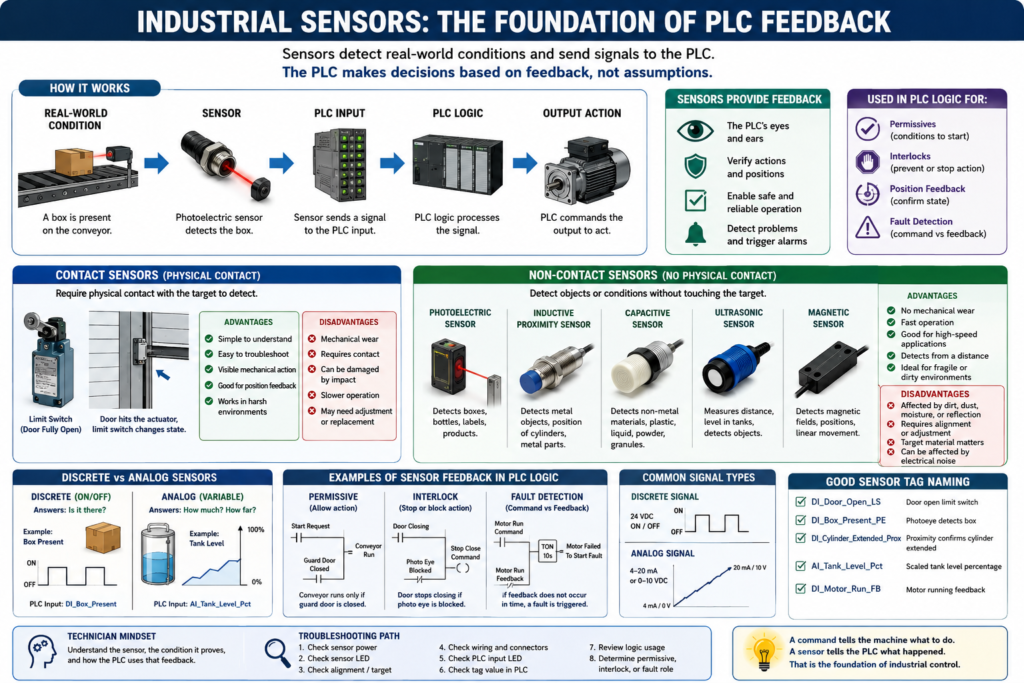
Introduction
In industrial automation, sensors are one of the most important parts of a control system. A PLC can execute logic, energize outputs, control motors, start conveyors, open valves, and trigger alarms, but it cannot physically see what is happening in the machine.
That is the job of the sensor.
An industrial sensor detects a physical condition and sends that information back to the control system. This allows the PLC to make decisions based on real machine feedback instead of only assuming that something happened.
According to the Rockwell Automation sensor reference manual, a sensor is a device used to detect and signal a changing condition. That condition can be the presence or absence of an object, or it can be a measurable value such as distance, level, size, or color.
In simple words:
A sensor connects the real machine to the PLC program.What Does an Industrial Sensor Do?
An industrial sensor detects a condition in the field and converts it into an electrical signal.
That signal can be sent to:
PLC input module
Safety relay
VFD
HMI
SCADA system
Controller
Signal conditioner
For a PLC technician, the most common path is:
Machine Condition → Sensor → PLC Input → Ladder Logic → Output CommandExample:
Box arrives at conveyor station
↓
Photoelectric sensor detects the box
↓
PLC input turns ON
↓
PLC logic allows the filling cycle
Another example:
Door reaches fully open position
↓
Limit switch changes state
↓
PLC input turns ON
↓
PLC stops the open command
The PLC does not know the door is open because it commanded it to open.
The PLC knows the door is open because a sensor confirmed it.
That confirmation is called feedback.
Why Sensors Matter in PLC Systems
Sensors are critical because they allow the PLC to verify the process.
Without sensors, the PLC only knows the command.
With sensors, the PLC knows the result.
Example:
Command: Run Conveyor
Feedback: Conveyor Running
If the PLC turns on a motor output but does not receive motor feedback, something may be wrong.
Possible problems:
Motor overload tripped
VFD faulted
Starter failed
Control fuse blown
Feedback wire broken
Input module not receiving signal
Motor mechanically jammed
This is why industrial PLC programs often compare command vs feedback.
Example:
Motor_Run_Command = ON
Motor_Run_Feedback = OFF
Timer Done = Motor Failed To Start Fault
This is the foundation of professional PLC troubleshooting.
Contact vs Non-Contact Sensors
Industrial sensors can be divided into two major categories:
Contact Sensors
Non-Contact Sensors
Both are used in real machines. The correct choice depends on the application, environment, target material, speed, reliability requirements, and maintenance concerns.
Contact Sensors
A contact sensor detects a condition through direct physical contact with the target object or machine mechanism.
The target must physically touch, move, press, or actuate the sensor.
Common contact sensors include:
Limit switches
Mechanical position switches
Safety switches
Some pressure switches
Some mechanical float switches
A simple example is a door limit switch.
Door moves upward
↓
Door reaches fully open position
↓
Mechanical arm or actuator hits the limit switch
↓
Limit switch changes state
↓
PLC input confirms Door Fully Open
Example: Door Fully Open Limit Switch
In an industrial freezer door, loading door, machine guard, or mechanical slide, a limit switch can be used to confirm position.
Example PLC tag:
DI_Door_Open_LSThis input could mean:
Door is physically at the open position.The PLC can use this feedback to stop the open command.
Basic logic concept:
Open_Command ON
AND Door_Open_LS ON
= Stop Open Motion
This prevents the motor from continuing to drive after the door has already reached the end of travel.
Advantages of Contact Sensors
Contact sensors are often simple and reliable when applied correctly.
Main advantages:
Easy to understand
Easy to troubleshoot
Visible mechanical operation
Good for position confirmation
Can handle industrial environments
Often does not require complex setup
For a technician, this is very helpful. You can usually inspect the sensor, manually actuate it, check the LED or input status, and verify the PLC input.
Example troubleshooting:
Press the limit switch manually.
Check if the PLC input turns ON.
If the input changes, the wiring and input card are probably working.
If the input does not change, check wiring, common, fuse, or input module.
Disadvantages of Contact Sensors
Because contact sensors require physical movement, they also have mechanical limitations.
Possible disadvantages:
Mechanical wear over time
Misalignment
Broken actuator arm
Physical damage from impact
Slower operation compared to electronic sensors
Requires the target to physically touch the sensor
Can fail if dirt, ice, or mechanical obstruction prevents movement
In industrial environments, this matters a lot.
For example, on a freezer door, ice buildup or mechanical misalignment could prevent a limit switch from actuating correctly. The PLC may think the door is not fully open or not fully closed even when the door appears to be in position.
That is not a PLC logic problem.
That is a feedback problem.
Non-Contact Sensors
A non-contact sensor detects an object or condition without physically touching the target.
Instead of mechanical contact, these sensors use a detection principle such as light, electromagnetic fields, capacitance, ultrasonic sound waves, or other sensing methods.
Common non-contact sensors include:
Photoelectric sensors
Inductive proximity sensors
Capacitive proximity sensors
Ultrasonic sensors
Magnetic sensors
Laser sensors
Vision sensors
These sensors are very common on conveyors, packaging lines, filling machines, doors, material handling systems, and automated equipment.
Example: Photoelectric Sensor on a Conveyor
A photoelectric sensor uses light to detect an object.
Example:
A box travels on a conveyor.
The box passes in front of the photoelectric sensor.
The sensor output turns ON.
The PLC input receives Box Present.
Example PLC tag:
DI_Box_Present_PEThe PLC can then use this signal to:
Stop the conveyor
Start a filling cycle
Count product
Reject missing labels
Trigger a timer
Confirm product position
This is a perfect example of sensor feedback in a PLC-controlled process.
Example: Inductive Proximity Sensor
An inductive proximity sensor detects metal.
Common applications:
Detect metal brackets
Detect cylinder position
Detect machine part position
Detect sprocket teeth
Detect metal product
Detect actuator home position
Example PLC tag:
DI_Cylinder_Extended_ProxThis input could confirm:
The cylinder is fully extended.The PLC can use this feedback before allowing the next step in the sequence.
Example:
Cylinder_Extend_Command ON
AND Cylinder_Extended_Prox ON
= Step Complete
Example: Capacitive Sensor
A capacitive sensor can detect materials that inductive sensors cannot, such as:
Plastic
Glass
Powder
Liquid
Granules
Cardboard
Some non-metallic materials
Example application:
Detect liquid level through a plastic container.
Detect material inside a hopper.
Detect powder presence.
These sensors are useful, but they can be more sensitive to the environment. Moisture, buildup, product residue, or incorrect adjustment can cause false detection.
Example: Ultrasonic Sensor
An ultrasonic sensor uses sound waves to detect distance or level.
Common applications:
Tank level
Distance measurement
Object detection
Bin level
Presence detection for difficult targets
Example PLC tag:
AI_Tank_Level_Raw
AI_Tank_Level_Pct
Unlike a simple ON/OFF sensor, many ultrasonic sensors provide analog feedback.
Example:
4–20 mA signal represents tank level from 0–100%.This allows the PLC to monitor the actual level instead of only knowing high or low status.
Advantages of Non-Contact Sensors
Non-contact sensors are extremely useful because they do not need to physically touch the target.
Advantages:
No mechanical wear from contact
Good for fast-moving objects
Useful for fragile products
Good for dirty or repetitive applications when properly selected
Can detect objects at a distance
Can be used where contact would damage the product
Often faster than mechanical sensors
Example:
A newly labeled box or freshly painted part should not be touched by a mechanical switch. A photoelectric sensor can detect it without damaging the surface.
Disadvantages of Non-Contact Sensors
Non-contact sensors are powerful, but they must be selected and installed correctly.
Possible disadvantages:
Can be affected by dirt or dust
Can be affected by moisture
Can be affected by target color or reflectivity
Can be affected by electrical noise
Can require alignment
Can require sensitivity adjustment
Target material matters
Background conditions matter
Example:
A photoelectric sensor may work well with a brown cardboard box but struggle with a shiny, reflective, transparent, or very dark object unless the correct sensing mode is selected.
An inductive sensor may detect steel at one distance but detect aluminum or stainless steel at a shorter distance.
This is why sensor selection matters.
Contact vs Non-Contact: Quick Comparison
| Feature | Contact Sensor | Non-Contact Sensor |
|---|---|---|
| Detection method | Physical contact | Detects without touching |
| Common example | Limit switch | Photoelectric sensor |
| Wear | Mechanical wear possible | No contact wear |
| Speed | Usually slower | Usually faster |
| Troubleshooting | Often easier visually | May require alignment/setup |
| Best for | Mechanical position | Product detection, presence, speed |
| Common issue | Broken actuator or misalignment | Dirt, reflection, material, noise |
Discrete vs Analog Sensors
Another important concept is whether the sensor is discrete or analog.
Discrete Sensor
A discrete sensor gives an ON/OFF signal.
It answers:
Is it there?
Yes or No
Examples:
Box present
Door open
Cylinder extended
Label detected
Guard closed
Motor feedback present
PLC tags:
DI_Box_Present
DI_Door_Open_LS
DI_Cylinder_Extended
DI_Label_Detected
In ladder logic, these are usually used as XIC or XIO conditions.
Analog Sensor
An analog sensor gives a variable signal.
It answers:
How much?
How far?
What level?
What position?
What pressure?
What temperature?
Examples:
Tank level
Pressure transmitter
Flow meter
Temperature transmitter
Distance sensor
PLC tags:
AI_Tank_Level_Raw
AI_Tank_Level_Pct
AI_Line_Pressure_PSI
AI_Distance_Inches
Common analog signals:
4–20 mA
0–10 VDC
1–5 VDC
The PLC usually scales the raw value into engineering units.
Example:
Raw Analog Input → Scaled Tank Level %How Sensors Become PLC Feedback
A sensor becomes useful when the PLC logic uses it to make a decision.
Example:
Sensor: DI_Box_Present
PLC Decision: Is the box in position?
Output: Start fill cycle
Another example:
Sensor: DI_Door_Closed_LS
PLC Decision: Is the door fully closed?
Output: Allow machine to run
This is where sensor feedback connects directly to:
Permissives
Interlocks
Alarms
Faults
Sequences
State machines
HMI indicators
Troubleshooting
Sensor as a Permissive
A permissive allows an action to start only when required conditions are true.
Example:
Start Conveyor only if Guard Door is Closed.Logic concept:
Start_Request
AND DI_Guard_Door_Closed
AND No_Faults
= Conveyor_Run_Command
Here, the sensor proves that the guard door is closed before the conveyor is allowed to run.
Sensor as an Interlock
An interlock blocks or stops an action when an unsafe or undesired condition occurs.
Example:
Stop closing door if photo eye becomes blocked.Logic concept:
Door_Closing
AND Photo_Eye_Blocked
= Remove Close Command
Here, the sensor is not just feedback. It actively prevents motion under the wrong condition.
Sensor as a Fault Trigger
A sensor can also help detect a failed action.
Example:
PLC commands motor to run.
Motor feedback does not turn ON.
After a delay, fault is latched.
Logic concept:
Motor_Run_Command
AND NOT Motor_Run_Feedback
AND Timer Done
= Motor_Failed_To_Start_Fault
This is very common in industrial PLC programs.
Technician Mindset: Always Ask What the Sensor Proves
When looking at a sensor in a machine, do not only ask:
What is this sensor called?Ask:
What condition does this sensor prove?
What does the PLC do with this signal?
Is it a permissive?
Is it an interlock?
Is it feedback?
Is it used for a fault?
Is it used for an alarm?
This mindset helps you understand the machine much faster.
Example:
DI_Door_Open_LSThis input may prove:
The door is fully open.The PLC may use it to:
Stop the open command.
Update the HMI door status.
Allow auto-close timer to start.
Prevent another open command.
Detect open timeout fault.
One sensor can support multiple parts of the PLC program.
Basic Troubleshooting Example
Problem:
The conveyor does not start.Do not immediately assume the PLC logic is bad.
Check the feedback and permissives.
Possible sensor-related causes:
Photo eye blocked
Guard door sensor not made
Box present sensor stuck ON
Limit switch not actuated
Motor feedback missing
Proximity sensor misaligned
Sensor has power but PLC input is not changing
Basic troubleshooting path:
1. Check the sensor LED.
2. Check sensor power.
3. Check target position.
4. Check alignment or adjustment.
5. Check cable and connector.
6. Check PLC input LED.
7. Check input tag online.
8. Check how the input is used in ladder logic.
This method separates field device problems from PLC logic problems.
Good PLC Tag Names for Sensors
Clear tag names make troubleshooting easier.
Good examples:
DI_Box_Present_PE
DI_Label_Detected_PE
DI_Door_Open_LS
DI_Door_Closed_LS
DI_Cylinder_Extended_Prox
DI_Cylinder_Retracted_Prox
DI_Motor_Run_FB
AI_Tank_Level_Pct
Avoid unclear names like:
Sensor1
Input3
PE_A
Switch_2
A good tag name should tell you:
Signal type
Device or condition
Sensor type if useful
Meaning when ON
Example:
DI_Door_Closed_LSThis tells the technician:
Digital Input
Door closed condition
Limit switch
True when door is closed
Final Thoughts
Industrial sensors are the foundation of PLC feedback. They allow the control system to verify what is happening in the real machine.
A command tells the machine what to do.
A sensor tells the PLC what actually happened.
Contact sensors, such as limit switches, are useful for direct mechanical position feedback. Non-contact sensors, such as photoelectric, inductive, capacitive, and ultrasonic sensors, are useful when detection must happen without touching the target.
For PLC technicians, understanding sensors is essential. Many automation problems are not caused by the PLC code itself. They are caused by missing feedback, incorrect sensor selection, poor alignment, damaged wiring, wrong input commons, electrical noise, or misunderstood sensor behavior.
Before troubleshooting the logic, always understand the sensor.
Ask:
What is the sensor detecting?
What does this signal prove?
What should the PLC do when this input turns ON?
What should the PLC do if this input never turns ON?
Is this input used as a permissive, interlock, alarm, or fault?
Once you understand that, the PLC program becomes easier to read, troubleshoot, and improve.