31. PLC Modes: Auto / Manual / Maintenance / Setup (31 of 41)
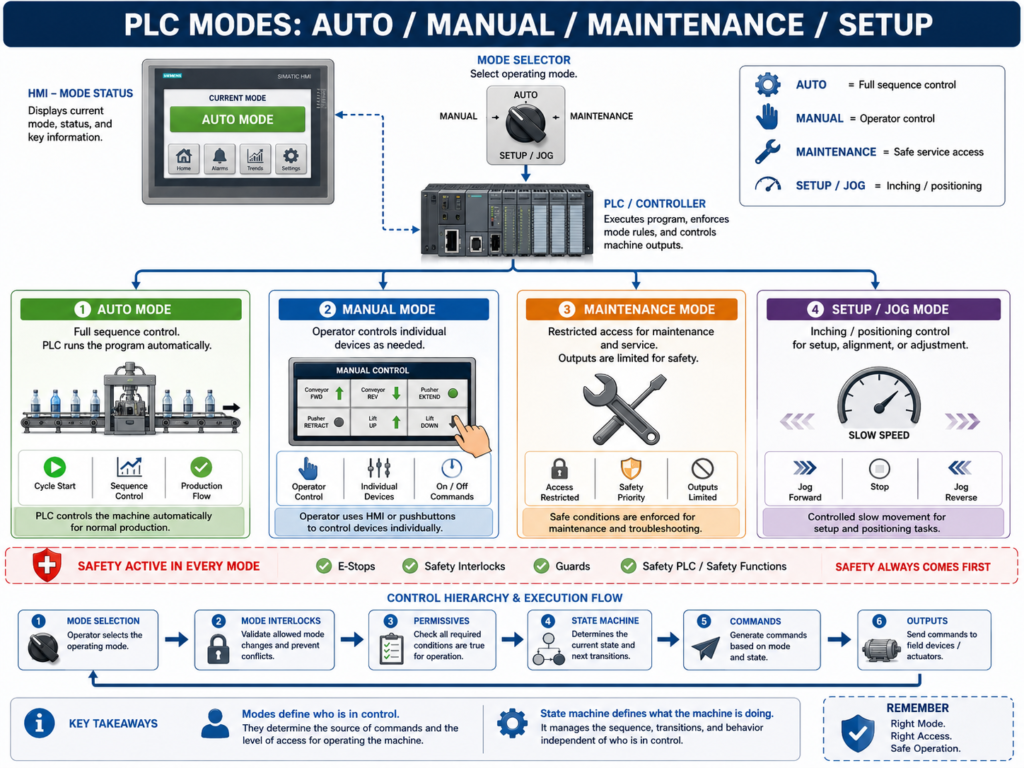
PLC Modes in Real Industrial Systems
Almost every industrial machine operates under different modes of operation.
These modes define:
- Who is in control (operator or PLC)
- What actions are allowed
- What safety rules apply
- How outputs behave
A typical industrial system includes:
AUTO MODE
MANUAL MODE
MAINTENANCE MODE
SETUP / JOG MODE
1. Why PLC Modes Are Important
Modes prevent unsafe or conflicting behavior.
Without mode control:
Operator and PLC could command outputs at the same time
Maintenance could move equipment unexpectedly
Auto sequence could override manual actions
Modes enforce structure:
Only one control philosophy is active at a time2. AUTO Mode (Production Mode)
Auto mode is the normal production state.
In Auto:
PLC controls sequence
Machine runs automatically
Permissives must be true
Interlocks fully active
Example:
Start request → PLC handles full sequence
Conveyor, motors, valves operate automatically
Key rule:
Operator does NOT directly control outputs in Auto
3. MANUAL Mode (Operator Control)
Manual mode allows direct control of devices.
Used for:
- Testing
- Troubleshooting
- Small adjustments
In Manual:
Operator controls individual outputs
PLC still monitors safety
Sequence is disabled or limited
Example:
Motor Jog ON/OFF from HMI
Valve open/close manually
Conveyor inching control
Key rule:
Manual mode still requires safety permissives
4. MAINTENANCE Mode
Maintenance mode is for safe servicing and intervention.
In Maintenance:
Machine is stopped or limited
Some interlocks are bypassed carefully (controlled)
Outputs are inhibited or restricted
Safety remains active
Example use cases:
Sensor replacement
Motor alignment
Mechanical inspection
Calibration
Key rule:
Maintenance mode NEVER disables safety systems
5. SETUP / JOG Mode
Setup mode is used for slow positioning and machine setup.
In Setup:
Low-speed movement allowed
Jog buttons active
Sequence disabled
Step-by-step movement
Example:
Move conveyor inch by inch
Position actuator
Align sensors
Key rule:
Setup mode is controlled and usually speed-limited
6. Mode Selection Logic
Typical PLC structure:
Mode = AUTO / MANUAL / MAINT / SETUPExample logic:
IF Mode = AUTO → run sequence logic
IF Mode = MANUAL → enable HMI controls
IF Mode = MAINT → restrict outputs
IF Mode = SETUP → enable jog functions
7. Mode Priority (Very Important)
Industrial systems follow priority rules:
1. SAFETY (highest priority)
2. MAINTENANCE
3. SETUP
4. MANUAL
5. AUTO (lowest control priority)
Example:
If Emergency Stop = TRUE → ALL modes are blocked8. Mode vs State Machine
Modes are NOT states.
They are control layers above state machines.
Example:
Mode = AUTO
State = RUNNING
Another example:
Mode = MANUAL
State = STOPPED
9. Mode Interlocks
Each mode has its own rules:
AUTO interlocks:
All safety + process permissives activeMANUAL interlocks:
Safety + basic permissives onlyMAINT interlocks:
Safety always active, motion limitedSETUP interlocks:
Speed limited + safety enforced10. Common Mistakes
Allowing manual override without safety
Mixing auto and manual commands
No mode indication on HMI
No mode interlocks
Maintenance mode bypassing safety
11. Best Practice Structure
Mode Selection
    ↓
Mode Interlocks
    ↓
Permissives
    ↓
State Machine
    ↓
Commands
    ↓
Outputs
12. Technician Checklist
What mode is active?
Can modes overlap?
Are outputs blocked correctly?
Is safety independent of mode?
Does HMI clearly show mode?
Are manual controls disabled in Auto?
Is maintenance mode restricted?
Final Thoughts
PLC modes are what separate:
- Safe machines
- Confusing machines
A good mode structure ensures:
Only one control philosophy at a time
Safety always active
Clear operator understanding
Predictable machine behavior
Modes define “WHO is in control”
State machines define “WHAT the machine is doing”