PLC Programmer vs. Process Engineer: How Much of the Machine Should You Really Understand?
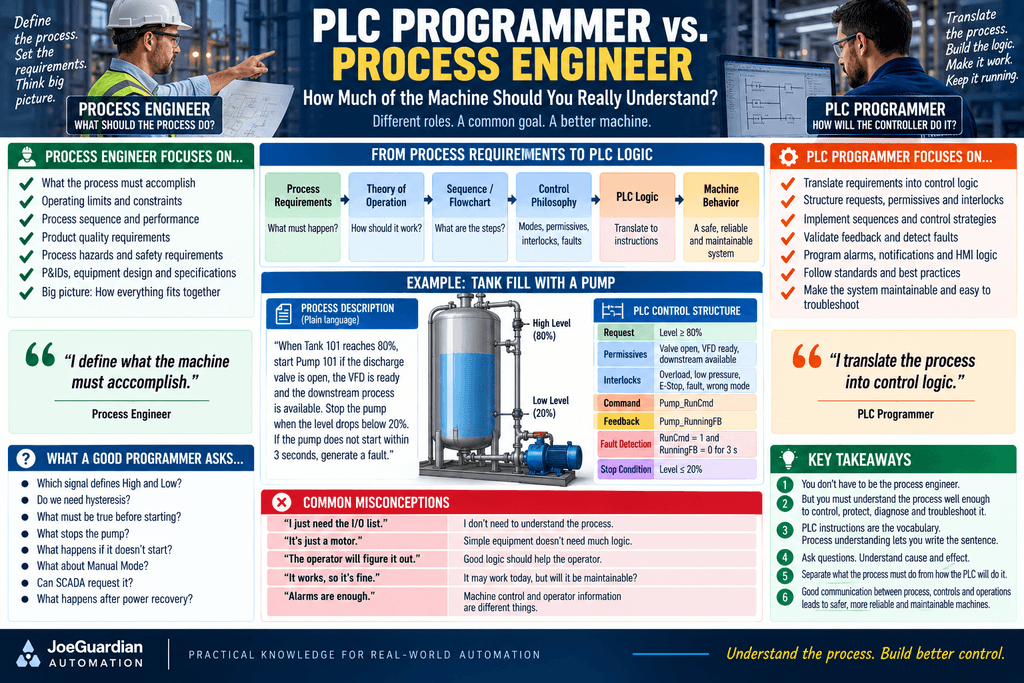
A PLC programmer does not need to be a chemical engineer, mechanical engineer, process engineer, electrician, instrumentation specialist, and machine designer all at the same time.
But there is another extreme that can be just as dangerous:
“Just tell me which inputs turn on which outputs. I don’t need to understand the process.”
That approach may produce ladder logic.
It does not necessarily produce a good control system.
So where should the line be?
How much of the machine does a PLC programmer—or an Automation Technician modifying that program—actually need to understand?
The answer is somewhere between two extremes:
EXTREME #1

"I must be the process expert
before I can write any logic."
and:
EXTREME #2

"I don't need to understand
the process. Just give me the I/O."
A better principle is:
You do not have to invent the process, but you must understand it well enough to control, protect, diagnose, and troubleshoot it.
1. PLC Programming Is More Than Knowing Instructions
A technician can know how to use:
XIC
XIO
OTE
OTL
OTU
TON
TOF
RTO
CTU
MOV
COP
CPT
EQU
GRT
LES
and still struggle to program a real machine.
Why?
Because PLC instructions are only tools.
They do not tell you:
- When a pump should start
- When a valve should open
- Which motor starts first
- Which equipment must already be ready
- What happens if feedback never arrives
- What should happen after a fault
- Which sequence step comes next
- What should happen during Manual Mode
- What should happen during Auto Mode
- What happens after power recovery
Those decisions come from understanding the process.
A useful comparison is:
PLC instructions are the vocabulary. Process understanding lets you write the sentence.
2. A PLC Programmer Is Often a Translator
One useful way to describe the PLC programmer’s role is:
PROCESS REQUIREMENTS
        ↓
Theory of Operation
        ↓
Sequence / Flowchart
        ↓
Control Philosophy
        ↓
PLC Logic
        ↓
Machine Behavior
Someone has to determine what the machine is supposed to accomplish.
That may come from:
- Process Engineering
- Mechanical Engineering
- Electrical Engineering
- Equipment OEM
- System Integrator
- Production
- Operations
- Maintenance
- Safety Engineering
The PLC programmer takes those requirements and converts them into deterministic control behavior.
In that sense, the programmer is partly a translator.
The process engineer may say:
“When Tank 101 reaches the high level, start Pump 101 and continue pumping until the tank reaches the low-level setpoint.”
The PLC programmer converts that statement into something the controller can execute.
3. Translation Requires Understanding
This is where the distinction becomes important.
You cannot accurately translate something you do not understand.
Consider:
“Start the pump when the tank is high.”
That sounds simple.
But a good controls person immediately starts asking questions.
Which tank level signal?

What defines High?

What defines Low?

Is there hysteresis?

Can the operator change the setpoints?

Must a discharge valve be open first?

Does the pump require suction pressure?

Does the VFD need to be Ready?

What happens if the pump does not start?

Can another pump operate as backup?

What happens in Manual Mode?

Can SCADA request the pump?

What stops the pump during a fault?

What happens after power recovery?
Those questions are not unnecessary complexity.
They are the difference between:
Tank_High
    ↓
Pump_Output
and an actual industrial control strategy.
4. Start with the Theory of Operation
Before opening Studio 5000, RSLogix, TIA Portal, or any other programming software, you should ideally be able to explain the process in plain language.
For example:
Tank 101 receives product from an upstream process. When the tank reaches 80%, Pump 101 should start automatically if the discharge valve is open, the VFD is ready, no motor fault is present, and the downstream process is available. The pump should continue running until the level drops below 20%. If running feedback does not appear within three seconds after the run command, stop the pump and generate a failed-to-start fault.
That paragraph already contains most of the control architecture.
5. Convert the Process into Control Questions
From that description we can extract:
Request
Tank_Level >= 80%Permissives
Discharge_Valve_Open
VFD_Ready
Downstream_Available
Correct_Mode
Interlocks
Motor_Overload
Pump_Fault
Low_Suction_Pressure
Emergency_Stop
Command
Pump_RunCmdFeedback
Pump_RunningFBFault Detection
RunCmd = 1
AND
RunningFB = 0
for 3 seconds
Stop Condition
Tank_Level <= 20%Now we have moved from process language to PLC architecture.
6. Process Knowledge Defines the Permissives
A PLC programmer cannot invent good permissives simply by knowing ladder logic.
Suppose we are controlling a pump.
We may need:
Pump_StartReq
AND
VFD_Ready
AND
Discharge_Path_Available
AND
Suction_Pressure_OK
AND
Tank_NotEmpty
AND
Correct_Mode
But why?
Because of the process.
Without process knowledge, a programmer might only write:
Start_PB
----| |----------------( Pump_Run )
Functionally, that may start the pump.
Operationally, it could be completely wrong.
7. Process Knowledge Defines the Interlocks
The same is true for interlocks.
What should force equipment to stop?
For one machine:
Motor Overloadmay be enough.
For another:
Motor Overload
Guard Open
Downstream Fault
High Pressure
Low Flow
Valve Failed Closed
Bearing Temperature High
Safety Circuit Open
may all matter.
The PLC instruction required to implement the interlock is easy.
Understanding why the interlock exists is the important part.
8. The Programmer Should Ask “What If?”
Good process control is not only about normal operation.
It is also about abnormal operation.
For every important action, ask:
What should happen normally?

What if it never starts?

What if it starts but stops unexpectedly?

What if the sensor fails?

What if feedback disagrees with the command?

What if communications are lost?

What if power disappears?

What if power returns?

What if the operator changes modes?

What if the sequence stops halfway through?
This is where PLC programming starts becoming engineering rather than merely instruction placement.
9. The Process Engineer and PLC Programmer Have Different Responsibilities
A useful distinction is:
Process Engineer
Defines things such as:
What the process must accomplish

Operating limits

Process sequence

Quality requirements

Critical parameters

Process hazards

Acceptable operating ranges
PLC Programmer / Controls Engineer
Translates those requirements into:
Requests

Modes

Permissives

Interlocks

Sequences

Commands

Feedback validation

Fault detection

Alarm logic

Operator interfaces
Neither role replaces the other.
10. But Reality Is Not Always That Clean
In many manufacturing plants, there may not be a process engineer standing next to the PLC programmer with a perfect flowchart.
Sometimes the controls technician gets:
"The machine used to work."

"The pump should start around here."

"Ask the operator."

"The OEM manual is somewhere."

"Production needs it running tonight."
That is reality.
This means the technician often has to gather process knowledge from multiple sources.
11. Where Technicians Learn the Process
A strong Automation Technician learns to use:
- P&IDs
- Electrical schematics
- I/O drawings
- Functional descriptions
- Sequence of operation documents
- Equipment manuals
- HMI screens
- Existing PLC code
- Operator knowledge
- Maintenance history
- Trends
- Alarm history
- Field observation
The PLC program is only one source.
Sometimes the most important information comes from watching the machine operate.
12. Talk to the Operator
Operators often know details that do not appear in drawings.
For example:
“That valve takes about six seconds to fully open.”
“If that pump starts before this valve opens, pressure spikes.”
“During cleaning, this sensor always gets wet and briefly changes state.”
“After a product change, the line needs about 20 seconds before the next machine can start.”
Those details matter.
The operator may not know ladder logic.
But the operator may understand the process behavior better than the programmer.
That knowledge should not be ignored.
13. But Operator Knowledge Is Not the Specification
There is also a danger here.
An operator may say:
“We’ve always done it this way.”
That does not automatically mean the method is safe, correct, or intended.
Therefore:
Operator Experience
      +
Engineering Requirements
      +
Machine Documentation
      +
Safety Requirements
      ↓
CONTROL STRATEGY
The PLC programmer should gather information, not blindly encode tribal knowledge.
14. Understand Cause and Effect
One of the most important process skills is understanding relationships.
For example:
Valve opens
     ↓
Flow should increase
or:
Pump starts
     ↓
Pressure should increase
or:
Heater enabled
     ↓
Temperature should rise
Those relationships allow us to create diagnostics.
Without process understanding, we may only command equipment.
With process understanding, we can verify whether the equipment actually accomplished its purpose.
15. Command vs. Expected Result
Consider a valve.
The PLC generates:
Valve_OpenCmd = 1A weak control strategy stops there.
A better strategy asks:
Did Valve_OpenFB become true?An even better strategy asks:
Did the process respond as expected?For example:
Valve_OpenCmd
       ↓
Valve_OpenFB
       ↓
Flow_Increased
Those are three different levels of information.
16. Equipment Feedback Is Not Always Process Feedback
Imagine:
Pump_RunCmd = 1
Pump_RunningFB = 1
Does that prove product is moving?
No.
We could still have:
Flow = 0Perhaps:
- A valve is closed
- The pump lost prime
- The line is blocked
- The impeller is damaged
- The suction tank is empty
Therefore:
COMMAND
   ↓
EQUIPMENT FEEDBACK
   ↓
PROCESS RESPONSE
are different concepts.
Understanding the process reveals that distinction.
17. This Is Why Troubleshooting Requires Process Knowledge
Suppose:
Pump_RunCmd   = 1
Pump_RunningFB = 1
Flow          = 0
A PLC programmer who only understands code might say:
“The PLC is working.”
Technically, perhaps.
But the Automation Technician needs to continue:
Pump running?
      YES
        ↓
Flow present?
      NO
        ↓
Check:
Valve position
Suction condition
Pump prime
Blockage
Instrumentation
Mechanical condition
The PLC is only part of the control system.
18. Process Logic Is Where Machines Become Different
I/O mapping is often repetitive.
A digital input may become:
Local:1:I.Data.0
        ↓
Start_PB
Scaling an analog input follows familiar patterns.
Motor feedback diagnostics can be standardized.
Alarm structures can be standardized.
But process logic changes from machine to machine.
A warehouse door behaves differently from a silo.
A silo behaves differently from a pasteurizer.
A pasteurizer behaves differently from a palletizer.
The basic programming tools remain the same.
Their arrangement changes.
19. The Same Building Blocks Keep Appearing
Even though machines differ, many control concepts repeat:
Request

Permissive

Interlock

Command

Feedback

Fault

Alarm

Mode

State

Timer

Counter
A conveyor may use them.
A valve may use them.
A pump may use them.
A door may use them.
A batch process may use them.
That is why learning architecture matters.
20. From Process Description to State Machine
Suppose the process engineer says:
“The door begins closed. When an Open command is received, open it until the Open Limit Switch activates. When Close is requested, close until the Closed Limit Switch activates. If the photoeye is blocked during closing, reopen the door.”
That description can become states:
0  Idle

10 Opening

20 Fully Open

30 Closing

40 Fully Closed

50 Stopped

60 Faulted
Now the PLC programmer has translated process behavior into a control model.
The state machine is not the process.
It is the software representation of the process.
21. From Process Description to Sequence
For a silo:
Box arrives
     ↓
Conveyor stops
     ↓
Valve opens
     ↓
Product fills box
     ↓
Target weight reached
     ↓
Valve closes
     ↓
Conveyor restarts
That is process knowledge.
The PLC programmer can then implement:
WAIT_FOR_BOX

POSITION_BOX

START_FILL

FILLING

STOP_FILL

RELEASE_BOX
Again:
First understand the operation.
Then choose the programming architecture.
22. Do Not Start with Ladder
This is a valuable habit.
When facing an unfamiliar machine, avoid immediately opening a blank routine and asking:
“What rung should I write first?”
Start with:
What does this machine do?

What are its modes?

What are its major states?

What starts each operation?

What stops it?

What must be true first?

What can prevent it?

How do I know the action succeeded?

What can fail?
The ladder should come after those answers.
23. A Useful Process Worksheet
Before writing logic for an equipment module, fill out something like this:
EQUIPMENT:
Pump 101

REQUEST SOURCES:
Manual Start
Auto Process Request
SCADA Request

START PERMISSIVES:
VFD Ready
Suction Available
Discharge Valve Open
Correct Mode

RUN INTERLOCKS:
Motor Overload
Low Suction Pressure
Downstream Fault

COMMAND:
Pump_RunCmd

FEEDBACK:
Pump_RunningFB

START FAILURE:
RunCmd = 1
RunningFB = 0
for 3 seconds

STOP CONDITIONS:
Process Complete
Operator Stop
Interlock
Fault
Mode Change
Now ladder programming becomes much easier.
24. Add the Fault Questions
Then ask:
What if the pump does not start?

What if it starts unexpectedly?

What if feedback stays ON after Stop?

What if the VFD faults?

What if communication is lost?

What if suction pressure disappears while running?
These questions create the diagnostic layer.
25. Add the Operator Questions
Then ask:
What should the operator see?

What can the operator command?

What should require acknowledgement?

What requires reset?

What information should be displayed during a fault?

Can Manual Mode bypass anything?

Who is allowed to use maintenance functions?
Now we are connecting PLC logic with HMI design.
26. Add the Maintenance Questions
Finally ask:
Can a technician quickly determine:

Why it is OFF?

Why it is ON?

Who requested it?

Which permissive is missing?

Which interlock is active?

Whether the command reached the output?

Whether feedback returned?

Which fault stopped it?
Now we are designing for maintainability.
27. Process Knowledge Improves Alarm Quality
Compare:
ALARM 32with:
Pump 101 Failed to Start

Run command was active for 3 seconds
without Running Feedback.

Check VFD Ready status,
motor starter, and feedback signal.
The second alarm required someone to understand what normal operation should look like.
Good diagnostics are built from process expectations.
28. Process Knowledge Improves Fault Detection
Suppose a valve should open in two seconds.
Then:
OpenCmd = 1
OpenFB = 0
for > 3 seconds
can generate:
Valve_FailedToOpenBut how did we know that three seconds is appropriate?
Not from the TON instruction.
We learned it from the process and equipment.
29. Process Knowledge Improves Timer Selection
Timers should not be arbitrary.
Consider:
Motor_Start_Verification.PRE = 3000Why 3 seconds?
Or:
Valve_Open_Timeout.PRE = 5000Why 5 seconds?
Those values should come from:
- Equipment characteristics
- Process requirements
- Field testing
- OEM recommendations
- Operator experience
- Engineering requirements
A timer preset is part of the process design.
30. The PLC Programmer Should Challenge Ambiguous Requirements
Suppose someone says:
“If the level gets too high, stop everything.”
A good programmer asks:
What is "too high"?

Which transmitter?

What happens if the transmitter fails?

Stop which equipment?

Immediately?

Should upstream equipment stop first?

What happens to downstream equipment?

Does this require operator reset?

Should the event alarm?

Is there a High-High condition?

Is this process protection or safety?
That is not arguing with the process engineer.
That is converting an ambiguous requirement into deterministic control behavior.
31. Sometimes the Specification Is Wrong
This is another reason the programmer needs process understanding.
Suppose the written sequence says:
1. Start Pump
2. Open Discharge Valve
But the actual equipment requires:
1. Open Discharge Valve
2. Verify Open Feedback
3. Start Pump
A programmer who blindly translates the specification may create a problem.
A programmer who understands the equipment can identify the concern and ask for clarification before implementing it.
32. Controls People Live Between Disciplines
Industrial automation sits at the intersection of:
Electrical

Mechanical

Instrumentation

Process

Networking

Software

Operations

Safety
That is why controls work can be challenging.
But it is also what makes the field interesting.
You do not need to become the deepest expert in every discipline.
You need enough understanding to know:
How does this discipline affect the control system?
33. The Automation Technician Has an Advantage
A technician working directly with production equipment often sees something the original programmer never sees:
how the machine behaves after years of real operation.
You see:
- Sensors getting dirty
- Valves becoming slow
- Motors overheating
- Operators changing habits
- Network problems
- Mechanical wear
- Intermittent wiring
- Production modifications
- Maintenance bypasses
- Real fault recovery
That field experience is extremely valuable when evaluating PLC logic.
34. The Best Controls People Understand Both Worlds
A strong controls person can look at:
XIC Pump_StartReq
XIC Pump_PermissiveOK
XIO Pump_Interlock
OTE Pump_RunCmd
and understand the ladder.
But also understand:
Why does the pump need this permissive?

What physical condition creates the interlock?

What process response should occur after the command?

What happens if that response does not occur?
That is the difference between knowing PLC syntax and understanding automation.
35. A Practical Learning Progression
For technicians learning PLC programming:
Stage 1 — Learn Instructions
XIC
XIO
OTE
TON
CTU
MOV
Stage 2 — Learn Control Patterns
Trigger
Hold-In
Interrupt
Seal-In
Requests
Commands
Stage 3 — Learn Architecture
Permissives
Interlocks
Feedback
Faults
Alarms
Modes
States
Stage 4 — Learn Process Thinking
Why should this happen?

When should it happen?

What must happen first?

How do I know it succeeded?

What happens if it fails?
That last stage is where programming starts becoming much more powerful.
36. The Technician’s Five Questions
When looking at unfamiliar equipment, start with these five questions:
1. What starts it?
REQUEST2. What must be true before it can start?
PERMISSIVES3. What can stop or prevent it?
INTERLOCKS4. How do we know it actually worked?
FEEDBACK5. What happens if it does not work?
FAULT / ALARMThose five questions can unlock a surprising amount of industrial logic.
37. The Bigger Architecture
Put everything together:
PROCESS REQUIREMENT
        ↓
REQUEST
        ↓
PERMISSIVES
        ↓
INTERLOCKS
        ↓
CONTROL DECISION
        ↓
COMMAND
        ↓
OUTPUT
        ↓
FEEDBACK
        ↓
FAULT DETECTION
        ↓
ALARM / DIAGNOSTICS
This is where process understanding and PLC architecture meet.
38. So Who Owns the Process?
The process engineer may define:
What must happen.
The controls programmer determines:
How the controller will make it happen.
The Automation Technician eventually has to determine:
Why it didn’t happen.
Those responsibilities overlap more than many people realize.
That is why communication between all three is so important.
39. The Real Debate
So should PLC programmers understand the process?
Absolutely.
But should they be expected to independently invent the chemical, mechanical, or manufacturing process?
Usually not.
The balanced position is:
The process expert owns the process requirements. The controls programmer owns the implementation. But the controls programmer must understand the process well enough to know whether the implementation makes sense.
And the technician maintaining that system needs enough understanding of both sides to troubleshoot it.
Final Thought
Knowing how to program a PLC is not the same as knowing what the PLC should do.
Instructions such as XIC, OTE, TON, and MOV give us the ability to create behavior.
The process tells us which behavior is correct.
You do not need to be the process engineer.
But if you are programming or troubleshooting a machine, you should be able to answer:
What is supposed to happen?

Why is it supposed to happen?

What must be true first?

How do I know it happened?

What should happen if it doesn't?
If those questions cannot be answered, writing more ladder logic is probably not the next step.
Understanding the process is.
Don’t program a machine you cannot explain. Understand the operation first—then translate it into control logic.