4. Zones and Conduits Explained: How IEC 62443 Organizes and Protects Industrial Networks
In the previous post, we introduced IEC 62443 and discussed how it provides a framework for securing Industrial Automation and Control Systems (IACS).
One of the most important concepts within IEC 62443 is the idea of Zones and Conduits.
These concepts form the foundation of secure industrial network design and help answer a critical question:
How do we allow industrial systems to communicate while minimizing cybersecurity risk?
If you’ve ever worked with PLC networks, HMIs, SCADA systems, industrial switches, VLANs, firewalls, or remote access systems, you’ve already encountered the practical implementation of zones and conduits.
Why Zones and Conduits Exist
In the early days of industrial automation, many facilities operated using flat networks.
A flat network might contain:
- PLCs
- HMIs
- Engineering Workstations
- Historians
- Printers
- Office PCs
all connected to the same network.
Example:
PLC
HMI
SCADA
Engineering PC
Office Laptop
Printer

All on the same network
While this may work operationally, it creates major cybersecurity risks.
If one device becomes compromised, attackers may be able to move laterally throughout the network.
IEC 62443 addresses this problem through Zones and Conduits.
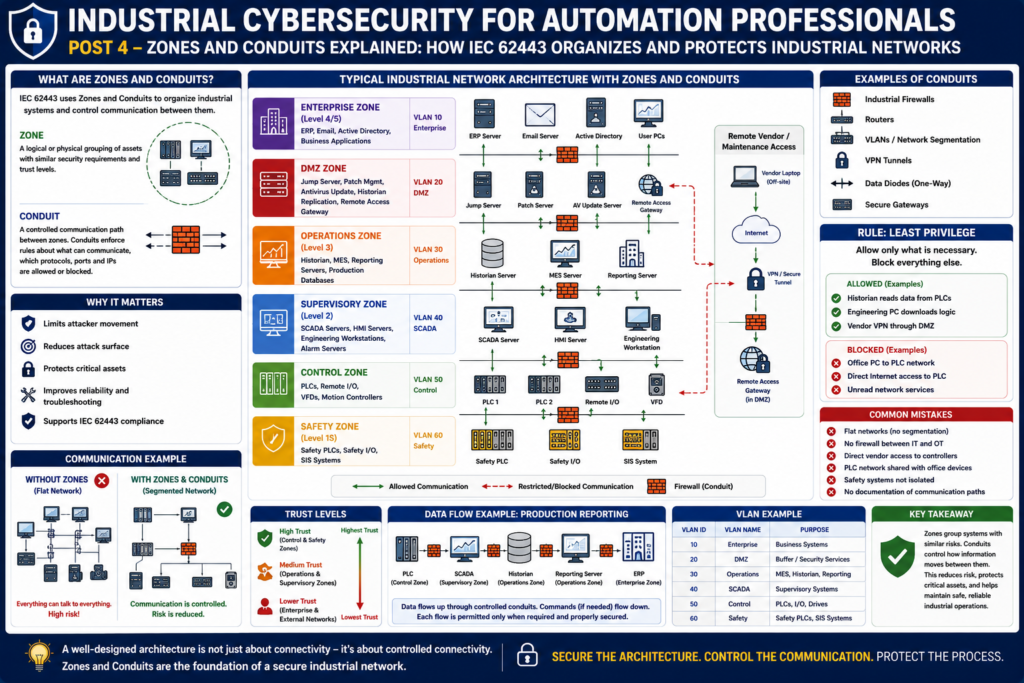
What is a Zone?
A Zone is a logical or physical grouping of assets that share similar:
- Security requirements
- Risk levels
- Functions
- Trust levels
Think of a zone as a security boundary.
Devices inside the same zone generally trust each other more than devices outside the zone.
Examples of Industrial Zones
A manufacturing facility may contain:
Enterprise Zone
Contains:
- ERP servers
- Email servers
- Active Directory
- Corporate applications
DMZ Zone
Contains:
- Jump servers
- Patch management servers
- Historian replication
- Antivirus update servers
Acts as a buffer between IT and OT.
Operations Zone
Contains:
- Historians
- MES systems
- Reporting servers
- Production databases
Supervisory Zone
Contains:
- SCADA systems
- HMI servers
- Alarm servers
- Engineering workstations
Control Zone
Contains:
- PLCs
- Remote I/O
- VFDs
- Motion controllers
Safety Zone
Contains:
- Safety PLCs
- Safety networks
- SIS equipment
Often requires additional protection.
What is a Conduit?
A Conduit is a controlled communication path between zones.
Think of it as a guarded doorway.
Instead of allowing unrestricted communication, conduits enforce rules.
Examples include:
- Firewalls
- Industrial routers
- VPNs
- VLAN trunks
- Data diodes
- Secure gateways
The conduit determines:
- Who can communicate
- What protocols are allowed
- Which ports are open
- What traffic is blocked
Simple Example
Without conduits:
ERP
 │
 PLC
 │
 HMI
 │
 Engineering PC
 │
 Internet
Everything talks to everything.
High risk.
With conduits:
Enterprise Zone
      │
   Firewall
      │
      DMZ
      │
   Firewall
      │
 Operations Zone
      │
   Firewall
      │
 Control Zone
Communication is controlled and monitored.
Much lower risk.
Understanding Trust Levels
Not all devices deserve the same level of trust.
Example:
High Trust
Control Zone
- PLCs
- Controllers
- Safety devices
Medium Trust
Operations Zone
- Historians
- Reporting servers
- MES systems
Lower Trust
Enterprise Zone
- Office computers
- Email systems
- User laptops
As trust decreases, communication should be increasingly restricted.
The Principle of Least Privilege
One of the key ideas behind zones and conduits is:
Allow only what is necessary.
Instead of asking:
“What should we block?”
Ask:
“What must be allowed?”
Everything else remains blocked.
Example:
Historian needs data from PLC:
✅ Allow
Engineering workstation downloads logic:
✅ Allow
Office printer communicates with PLC:
❌ Block
Employee laptop accesses Safety PLC:
❌ Block
Real Plant Example
Let’s use a bottling line.
Systems:
- CompactLogix PLC
- PanelView Plus HMI
- Stratix Switch
- FactoryTalk Historian
- SQL Reporting Server
- ERP System
A secure architecture may look like:
ERP
  │
Firewall
  │
DMZ
  │
Firewall
  │
Historian
  │
SCADA
  │
PLC
Notice:
ERP never communicates directly with the PLC.
Instead:
ERP → Historian → SCADA → PLC
Each step is controlled.
How VLANs Support Zones
Many facilities implement zones using VLANs.
Example:
| VLAN | Purpose |
|---|---|
| VLAN 10 | Enterprise |
| VLAN 20 | DMZ |
| VLAN 30 | SCADA |
| VLAN 40 | PLC Network |
| VLAN 50 | Safety Network |
Even though devices share physical switches, VLANs help create logical separation.
However:
VLANs alone are not security.
Firewalls and access controls are still required.
Firewalls as Conduits
Firewalls are one of the most common conduit technologies.
A firewall can:
- Allow specific IP addresses
- Allow specific protocols
- Block unauthorized traffic
- Log communication attempts
- Alert on suspicious activity
Example:
Allow:
Historian → PLC
Port 44818
EtherNet/IP
Block:
Office PC → PLC
All Traffic
This is the practical implementation of conduit control.
Safety Systems and Separate Zones
Safety systems deserve special attention.
Examples:
- GuardLogix
- Safety PLCs
- Emergency Stop Systems
- Burner Management Systems
- SIS Systems
A compromise of a safety system can have serious consequences.
For this reason, many facilities place safety systems in dedicated zones.
Example:
Control Zone
      │
Firewall
      │
Safety Zone
Additional restrictions reduce risk.
Data Diodes and One-Way Communication
Some highly critical environments use:
Data Diodes
A data diode allows communication in only one direction.
Example:
OT Network ─────► HistorianAllowed:
- Data moves to historian
Blocked:
- Commands return to OT
This prevents external systems from controlling industrial equipment.
Common Zone Design Mistakes
Avoid These
❌ Flat industrial networks
❌ No separation between IT and OT
❌ PLCs directly accessible from office networks
❌ Shared VLANs for PLCs and office devices
❌ Direct vendor access to controllers
❌ No firewall between critical zones
❌ Safety systems sharing unrestricted networks
❌ No documentation of communication paths
Benefits of Zones and Conduits
A properly designed architecture provides:
Improved Security
Attackers have fewer pathways.
Reduced Attack Surface
Less exposure means less risk.
Easier Troubleshooting
Communication paths are documented.
Better Compliance
Supports IEC 62443 requirements.
Better Reliability
Problems are contained within specific zones.
Mapping Zones to the Purdue Model
Zones often align with Purdue levels.
Example:
| Purdue Level | Typical Zone |
|---|---|
| Level 5 | Enterprise |
| Level 4 | Business Systems |
| Level 3 | Operations |
| DMZ | Buffer Zone |
| Level 2 | Supervisory |
| Level 1 | Control |
| Level 0 | Physical Process |
This creates a structured and secure architecture.
Practical Checklist for Automation Technicians
When evaluating an industrial network, ask:
Asset Identification
- Do we know what devices exist?
Segmentation
- Are PLCs separated from office computers?
Firewalls
- Are communications controlled?
Remote Access
- Does vendor access pass through secure gateways?
Safety
- Are safety systems isolated?
Documentation
- Are communication paths documented?
If the answer is “No” to any of these questions, there may be opportunities to improve cybersecurity.
Final Thoughts
Zones and Conduits are the foundation of IEC 62443 network architecture.
Rather than trusting every device equally, they organize industrial systems into logical groups and carefully control how information moves between them.
For automation professionals, understanding Zones and Conduits is one of the most practical cybersecurity skills to develop because these concepts directly influence:
- PLC networks
- SCADA systems
- VLAN design
- Firewall configuration
- Remote access
- Industrial network troubleshooting
A well-designed industrial network does not simply allow communication.
It controls communication.
And that control is one of the strongest defenses against cyber threats.