4. The Backtracking Method: Start at the Point of Failure (4 of 13)
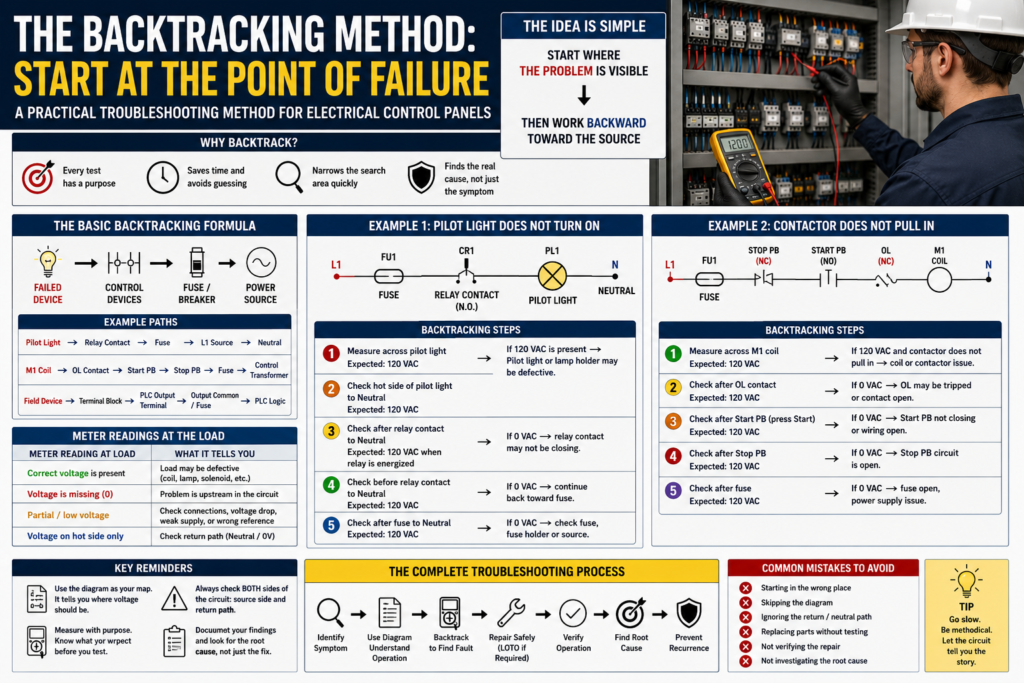
A Practical Troubleshooting Method for Electrical Control Panels
When troubleshooting an electrical control panel, one of the most effective methods is called the backtracking method.
The idea is simple:
Start where the problem is visible.
Then work backward toward the source.
Instead of checking random terminals, replacing parts, or guessing what failed, the technician begins at the device that is not working and follows the circuit backward until the fault is found.
This method is powerful because it gives every test a purpose.
A systematic backtracking procedure should reveal the source of the problem quickly when the technician begins testing at the point of failure.
1. What Is the Point of Failure?
The point of failure is the location where the problem is first observed.
Examples:
Pilot light does not turn on.
Motor starter does not pull in.
Solenoid valve does not energize.
PLC output LED is ON, but the field device is OFF.
Motor does not run.
Relay coil does not energize.
The point of failure is not always the bad component. It is simply where the symptom appears.
For example:
Symptom:
Pilot light does not turn on.

Possible causes:
Bad pilot light
No neutral
Open relay contact
Blown fuse
Loose terminal
No control voltage
Broken wire
The pilot light is the visible failure point, but the real fault could be anywhere in the circuit feeding it.
2. Why Start at the Failed Device?
Starting at the failed device helps you avoid wasting time.
If a contactor coil does not energize, it makes sense to first check whether the coil is receiving the correct voltage.
If the coil has voltage and does not pull in, the coil or contactor assembly becomes suspicious.
If the coil does not have voltage, the problem is upstream in the control circuit.
That first test immediately splits the problem into two directions:
| Meter Reading at Load | What It Tells You |
|---|---|
| Correct voltage is present | The load may be defective |
| Voltage is missing | The circuit path before the load must be checked |
| Partial/low voltage is present | Possible loose connection, voltage drop, wrong reference, or weak supply |
| Voltage present on hot side only | Check neutral/common return path |
This is the value of backtracking: each measurement narrows the search area.
3. The Basic Backtracking Formula
A simple formula looks like this:
Failed Device → Output/Contact → Control Device → Fuse/Breaker → Power SourceFor a basic 120 VAC control circuit:
Pilot Light → Relay Contact → Control Fuse → L1 Source → NeutralFor a motor starter coil:
M1 Coil → Overload NC Contact → Start PB → Stop PB → Fuse → Control TransformerFor a PLC output device:
Field Device → Terminal Block → Output Module Terminal → Output Common/Fuse → PLC CommandThe goal is to find the exact point where the expected voltage or signal disappears.
4. Example 1: Pilot Light Does Not Turn On
Imagine this circuit:
L1 → Fuse → Relay Contact → Pilot Light → NeutralSymptom:
The relay operates, but the pilot light does not turn on.Backtracking steps:
Step 1 — Check voltage at the pilot light
Measure across the pilot light.
Expected: 120 VAC when relay contact is closed.
Result A:
120 VAC is present.Conclusion:
The pilot light or lamp holder may be defective.Result B:
0 VAC is present.Conclusion:
The pilot light is not receiving power or does not have a return path.Step 2 — Check voltage before the pilot light
Measure from the hot side of the pilot light to neutral.
Expected: 120 VAC.
If voltage is present on one side but the lamp does not work, check the neutral side.
Step 3 — Check after the relay contact
Measure after the relay contact to neutral.
Expected: 120 VAC when the relay is energized.
If voltage is missing after the relay contact but present before it, the contact may not be closing.
Step 4 — Check before the relay contact
Measure before the relay contact to neutral.
Expected: 120 VAC.
If voltage is missing before the relay contact, continue backward toward the fuse and power source.
The manual uses a similar logic in the Basic Controls section: when one light does not operate, the technician verifies whether the other light and relay respond correctly, then measures at the affected lamp and works backward through the relay contact and wiring.
5. Example 2: Nothing in the Panel Works
Symptom:
Nothing works.
No relay response.
No pilot lights.
No machine function.
This is different from one failed device.
If nothing works, the failure point is not one output device. The failure is likely closer to the source.
Possible causes:
Main disconnect off
Tripped breaker
Blown control fuse
Failed control transformer
Failed 24 VDC power supply
Missing neutral
Loose incoming power wire
Open safety/control circuit
Backtracking method:
Panel devices not working → Control power distribution → Fuse/breaker → Transformer/power supply → Incoming powerIn the Basic Controls Problem 1 example, the work order states that nothing is working. The manual explains that the logical place to begin troubleshooting is the power source of the system, followed by checking the breaker and measuring voltage at test points to confirm whether control power is available.
This is an important distinction:
If one device fails, start at that device.
If everything fails, start at the common source.
6. Example 3: Contactor Does Not Pull In
Basic circuit:
L1 → Fuse → Stop PB NC → Start PB NO → Overload NC → M1 Coil → NeutralSymptom:
The motor does not start because the contactor does not pull in.Backtracking steps:
Step 1 — Measure across M1 coil
Expected: 120 VAC when Start is pressed.If 120 VAC is present and the contactor does not pull in:
Possible bad coil
Mechanical contactor issue
Wrong coil voltage
Loose coil terminal
If 0 VAC is present:
The coil is not being commanded.
Move backward through the control circuit.
Step 2 — Check after overload contact
Expected: 120 VAC when Start is pressed and overload is reset.If missing, check the overload auxiliary contact.
Step 3 — Check after Start PB
Expected: 120 VAC only while Start is pressed.If missing, the Start pushbutton may not be closing.
Step 4 — Check after Stop PB
Expected: 120 VAC when Stop is not pressed.If missing, the Stop circuit may be open.
Step 5 — Check after fuse
Expected: 120 VAC.If missing, check the fuse, fuse holder, or control transformer.
7. Example 4: PLC Output LED ON but Device OFF
This is very common in automation panels.
Symptom:
PLC output LED is ON.
Solenoid valve or relay does not energize.
A mistake would be to assume the PLC output is good just because the LED is ON.
The LED usually means the PLC logic is commanding the output. It does not always prove that field voltage is reaching the device.
Backtracking path:
Field Device → Field Wire → Terminal Block → Output Terminal → Output Fuse/Common → Output Module/PLC LogicCheck:
Is voltage present at the field device?
Is the 0VDC/common return present?
Is voltage present at the terminal block?
Is voltage present at the PLC output terminal?
Is the output common powered?
Is the output fuse good?
Is the field device coil good?
The manual’s PLC Problem 1 describes a similar situation: the output LEDs appear to work, but the actual field devices do not. The troubleshooting procedure directs the technician to measure the output points and then check the power feeding the output section.
This is one of the best examples of why the backtracking method matters.
8. Backtracking Is Not Random Meter Testing
Random meter testing looks like this:
Check this terminal.
Check that relay.
Check the fuse.
Check the PLC.
Replace the output card.
Try another fuse.
Reset the fault.
Professional backtracking looks like this:
The solenoid is not energizing.
Expected voltage at solenoid is 24 VDC.
Measured 0 VDC at solenoid.
Measured 24 VDC at terminal block output side.
Measured 0 VDC at field side after connector.
Found open field cable between panel and valve.
The difference is evidence.
A professional technician should be able to explain:
What was tested?
Why was it tested?
What was expected?
What was found?
What does that prove?
9. Use the Diagram While Backtracking
The backtracking method works best with a diagram.
The diagram tells you:
Where the source starts
What protective devices are in the path
What contacts must be closed
Where the load is located
What wire numbers to follow
Where the circuit returns
Without the diagram, you may still troubleshoot, but the risk of confusion is much higher.
The manual states that the circuit diagram serves as a guide for troubleshooting because it helps determine where voltage should be read, what voltage level should be expected, and when voltage should be present.
In simple words:
The diagram tells you what should happen.
The meter tells you what is actually happening.
10. Do Not Forget the Return Path
One of the most common troubleshooting mistakes is checking only the hot side of the circuit.
Every electrical load needs a complete path:
Source → Load → ReturnFor AC:
L1 → Load → NeutralFor DC:
+24VDC → Load → 0VDCA technician may measure 24 VDC on one side of a solenoid and assume the device should energize. But if the common/0V return is missing, the solenoid will not work.
Backtracking must include both sides:
Hot/source side
Return/common side
Common return path problems include:
Loose neutral terminal
Open 0VDC common
Broken field wire
Bad terminal jumper
Blown common fuse
Wrong reference point
Corroded connector
11. Backtracking with NO and NC Contacts
Normally open and normally closed contacts can confuse new technicians.
A normally closed device can stop the whole circuit when it opens.
Examples:
Stop pushbutton
E-Stop contact
Overload auxiliary contact
Safety relay contact
Guard door switch
Limit switch
Pressure switch
When backtracking, ask:
Is this contact supposed to be closed right now?
Is it actually closed?
Is voltage present before it?
Is voltage present after it?
If voltage is present before the contact but not after it, that contact is open or the wiring through it is open.
This is especially important with stop circuits, overload contacts, and permissives.
12. Backtracking vs Root Cause Analysis
Backtracking helps find the immediate fault.
Root cause analysis explains why it happened.
Example:
Immediate fault:
Blown fuse.

Backtracking result:
Voltage was present before the fuse but missing after the fuse.

Root cause:
Solenoid cable was damaged and shorting to ground when the actuator moved.
The manual repeatedly warns that a quick fix may not completely solve the problem and that the issue can return if the root cause is not corrected.
Replacing the fuse may restore operation, but if the cable is still damaged, the fuse will blow again.
That is why the complete process is:
Find the failure point.
Backtrack to the immediate fault.
Repair safely.
Test operation.
Investigate root cause.
Prevent recurrence.
13. Practical Backtracking Checklist
Use this checklist during real troubleshooting:
[ ] Identify the symptom.
[ ] Identify the device or function that failed.
[ ] Review the electrical diagram.
[ ] Identify the expected voltage or signal.
[ ] Start testing at the failed device.
[ ] Measure across the load.
[ ] Check source side voltage.
[ ] Check return/common path.
[ ] Move backward one device at a time.
[ ] Compare actual readings to expected readings.
[ ] Stop when you find where the signal/voltage disappears.
[ ] Repair only after safe isolation and LOTO when required.
[ ] Verify the repair.
[ ] Look for root cause.
[ ] Document findings.
14. Technician Report Example
A good report may look like this:
Symptom:
Conveyor discharge solenoid did not energize.

Expected Operation:
PLC output energizes solenoid when discharge request is active.

Observation:
PLC output LED was ON, but solenoid did not actuate.

Testing:
Measured 0 VDC at solenoid connector.
Measured 24 VDC at panel terminal TB2-14.
Measured 0 VDC at field side connector.
Checked cable continuity with power locked out.

Finding:
Open conductor between panel terminal and solenoid connector.

Correction:
Replaced damaged field cable.

Root Cause:
Cable was rubbing against a moving bracket and eventually opened.

Final Verification:
Solenoid energized correctly during manual test and automatic cycle.
Cable was rerouted and secured.
This is the kind of documentation that shows professional troubleshooting.
Final Thoughts
The backtracking method is one of the most useful habits a technician can develop.
Do not start by guessing.
Do not start by replacing parts.
Do not test random terminals.
Start where the failure is visible.
Understand what voltage or signal should be present.
Use the diagram.
Test with purpose.
Move backward one step at a time.
Find where the expected condition disappears.
Then repair safely and look for the root cause.