2. ControlLogix vs CompactLogix: What a Technician Should Know
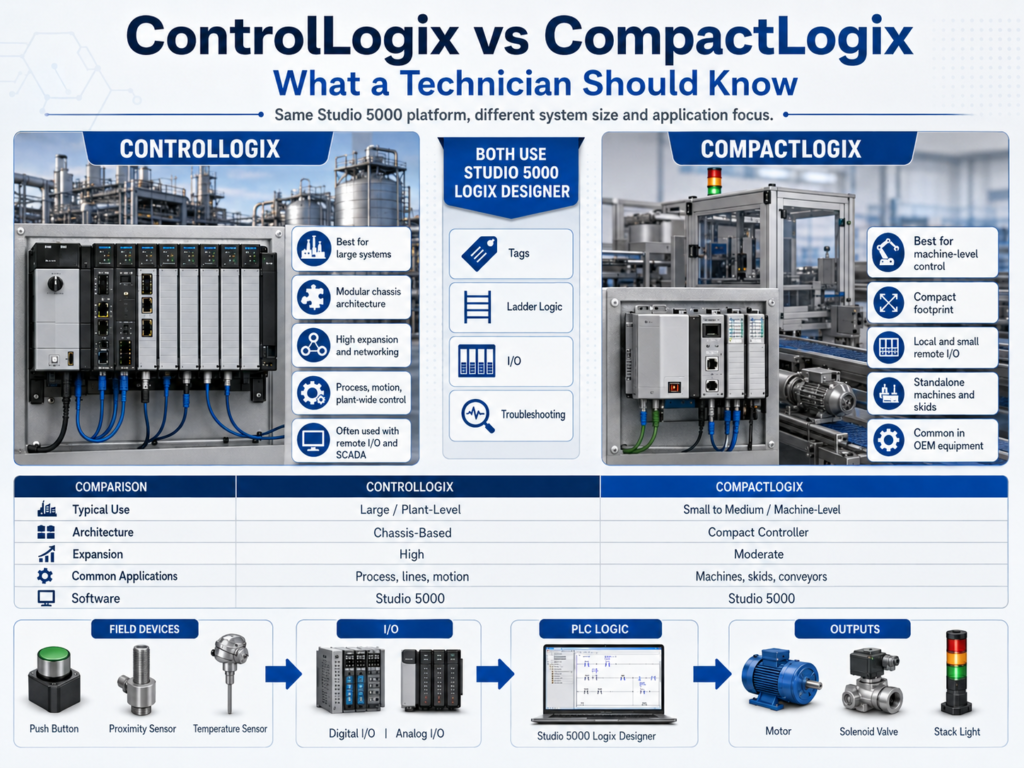
ControlLogix vs CompactLogix: What a Technician Should Know
When learning Studio 5000 Logix Designer, one of the first things an automation technician should understand is the difference between ControlLogix and CompactLogix.
Both platforms are part of the Allen-Bradley Logix family. Both are programmed with Studio 5000 Logix Designer. Both use tag-based programming, tasks, programs, routines, I/O configuration, and similar ladder logic instructions.
However, they are not normally used for the same size or type of application.
In simple terms:
ControlLogix = larger, higher-performance, plant-level or process-level control

CompactLogix = smaller, machine-level or skid-level control
Rockwell’s Studio 5000 lab material describes ControlLogix as a high-speed, high-performance platform for multidiscipline control, including sequential, process, drive, and motion applications. The same material describes CompactLogix as a smaller machine-level control platform with a compact footprint and economical design.
Why This Matters for Automation Technicians
As a technician, you may not always be the person selecting the PLC platform, but you still need to understand what you are looking at in the electrical panel.
When you open a cabinet and see a Logix controller, you should ask:
What platform is this?
What type of machine or process does it control?
Where is the I/O located?
How is it connected to the network?
Is this a standalone machine or part of a larger system?
This helps you troubleshoot faster.
For example, a CompactLogix controller may be mounted directly in a smaller machine panel with local I/O modules beside it. A ControlLogix system may be in a larger chassis with multiple communication modules, remote I/O networks, drives, safety systems, and connections to plant-level systems.
Both use Studio 5000, but the system architecture may look very different.
What Is ControlLogix?
ControlLogix is typically used for larger and more demanding applications.
It is a modular platform. That means the controller, power supply, communication modules, and I/O modules are installed in a chassis. Depending on the application, the chassis may include:
- Controller processor
- Ethernet communication module
- Digital input modules
- Digital output modules
- Analog input modules
- Analog output modules
- Motion modules
- Specialty modules
- Redundancy modules
- Safety-related hardware, depending on system design
ControlLogix is often used where the process or machine requires higher performance, larger memory, more communication options, and more system expansion.
The lab manual mentions that ControlLogix provides a common programming environment, common networks, and a common control engine. It also highlights modular network communications, time synchronization, and high availability through redundant controller architecture.
Where You Might See ControlLogix
In the field, ControlLogix is commonly found in larger systems such as:
- Process control areas
- Tank farms
- Filling lines
- Packaging systems with multiple stations
- Large conveyor systems
- Plant-wide control systems
- Motion control applications
- Systems with many remote I/O racks
- Systems requiring redundancy
- Systems connected to SCADA or plant networks
A ControlLogix system is usually not just controlling one small device. It may control an entire area, line, process cell, or coordinated machine system.
What Is CompactLogix?
CompactLogix is also part of the Logix platform, but it is designed for smaller and medium-size applications.
It normally has a smaller physical footprint than ControlLogix and is commonly used in machine-level control.
The lab manual describes CompactLogix as a platform for smaller machine-level control applications. It also notes that CompactLogix is suitable for standalone and system-level control over networks such as EtherNet/IP, ControlNet, or DeviceNet.
CompactLogix can still be powerful. It can support:
- Local I/O
- Remote I/O
- EtherNet/IP communication
- Motion, depending on model
- Analog modules
- Digital modules
- Specialty modules
- HMI communication
- VFD communication
- Skid or machine-level control
The key point is that CompactLogix usually fits better when the system is smaller, more localized, or machine-specific.
Where You Might See CompactLogix
In the field, CompactLogix may be used for:
- Standalone packaging machines
- Small conveyor systems
- Pump skids
- Mixers
- Small filling machines
- OEM equipment
- Local control panels
- Small process skids
- Test stands
- Machine-level automation cells
For many technicians, CompactLogix is a very common platform because it is widely used by OEMs and machine builders.
Same Software, Different Hardware
One important thing to understand is that both platforms are programmed using Studio 5000 Logix Designer.
The lab manual explains that the Logix family of controllers uses Studio 5000 Logix Designer, but each controller type may be set up slightly differently. For example, ControlLogix has more settings than CompactLogix.
That means if you learn the Studio 5000 environment, you are building a skill that transfers across multiple Logix controllers.
The project setup may be different, but many programming concepts stay the same:
Tags
Tasks
Programs
Routines
Ladder Logic
I/O Configuration
Online Monitoring
Trends
UDTs
AOIs
This is one of the biggest advantages of learning Studio 5000.
Main Difference: System Size and Architecture
The biggest practical difference is the system architecture.
ControlLogix Architecture
ControlLogix is chassis-based and highly modular.
A typical ControlLogix chassis may look conceptually like this:
[Power Supply] [Ethernet Module] [CPU] [DI] [DO] [AI] [AO] [Motion]It is common to see ControlLogix used with:
Remote I/O racks
Multiple EtherNet/IP networks
Large HMI/SCADA systems
VFD networks
Motion axes
Redundant controllers
Plant-level integration
CompactLogix Architecture
CompactLogix is more compact and machine-focused.
A typical CompactLogix setup may look like this:
[CompactLogix CPU] [Local DI] [Local DO] [Analog I/O] [EtherNet/IP]It is common to see CompactLogix used with:
Local I/O
Small remote I/O drops
PanelView HMI
PowerFlex drives
Machine sensors
Machine actuators
OEM equipment
ControlLogix vs CompactLogix Comparison
| Feature | ControlLogix | CompactLogix |
|---|---|---|
| Typical Use | Large systems, process areas, plant-level control | Small to medium machines, OEM systems, local panels |
| Physical Style | Modular chassis-based system | Compact machine-level controller |
| Expansion | Very high | Moderate to high, depending on model |
| Communication | Many communication module options | Built-in and/or modular communication depending on model |
| Redundancy | Common in high-availability systems | Usually not the main use case |
| Motion | Strong support for integrated motion | Supported on many models |
| I/O | Local and remote chassis/racks | Local and remote I/O, depending on platform |
| Programming Software | Studio 5000 Logix Designer | Studio 5000 Logix Designer |
| Technician Focus | Network architecture, remote I/O, process logic, system coordination | Machine troubleshooting, local I/O, panel-level logic |
From the PLC Programmer’s Point of View
From a programmer’s perspective, the platform affects how the project is structured.
With ControlLogix, a project may be organized by large areas or systems:
MainTask
 ├── Filling_Area
 ├── CIP_System
 ├── Tank_Farm
 ├── Conveyor_System
 ├── VFD_Control
 ├── Alarm_Handling
 └── SCADA_Interface
With CompactLogix, the project may be organized around one machine:
MainTask
 └── Machine_Control
      ├── Input_Buffering
      ├── Mode_Control
      ├── Conveyor_Logic
      ├── Motor_Control
      ├── Fault_Logic
      ├── Output_Buffering
      └── HMI_Interface
The programming concepts are similar, but the size and organization of the project may be very different.
From the Automation Technician’s Point of View
From a technician’s perspective, the main concern is not only “which PLC is better.”
The real concern is:
How do I troubleshoot this system safely and correctly?When working with either ControlLogix or CompactLogix, focus on the control path:
Field Device → I/O Module → PLC Tag → Logic → Output Tag → Output Module → Field DeviceFor example, if a motor does not start, you should check:
- Is the start signal reaching the PLC?
- Is the input module healthy?
- Is the input tag changing in Studio 5000?
- Are permissives true?
- Are interlocks clear?
- Is the PLC sending the output command?
- Is the output module energizing?
- Is the starter or VFD receiving the command?
- Is motor feedback returning?
This troubleshooting mindset works on both platforms.
I/O Tags: Important Technician Concept
In Studio 5000, I/O modules create module-defined tags.
For example, you may see tags similar to:
Local:1:I.Data
Local:2:O.Data
These are the raw module tags generated by the I/O configuration.
The lab manual explains that after configuring I/O modules, the I/O module tags are created in Controller Scope, and modules that reside within the controller chassis are called “Local.”
From a technician point of view, this is very important.
You may troubleshoot an input two ways:
Raw I/O Tag:
Local:1:I.Data.0

Alias Tag:
DI_Start_PB
The alias tag is easier to understand, but the raw I/O tag shows the direct relationship to the physical module.
Important Studio 5000 Setup Differences
When creating a project, Studio 5000 asks for information such as:
- Controller type
- Project name
- Firmware revision
- Chassis type, if applicable
- Slot number, if applicable
- Security authority, if used
The lab manual explains that controller type defines whether the project uses ControlLogix, CompactLogix, or SoftLogix; revision defines the firmware revision; chassis type applies to some controller types; and slot number may not apply to all controllers because some CompactLogix controllers are fixed at slot zero.
This is important because choosing the wrong controller type or revision may prevent download or cause compatibility issues.
Practical Example: CompactLogix Machine Panel
Imagine a small conveyor machine controlled by CompactLogix.
The system may include:
Inputs:
- Start push button
- Stop push button
- Photo eye
- Proximity sensor
- E-stop status
- Motor overload feedback

Logic:
- Start/stop seal-in
- Permissives
- Jam detection
- Fault reset
- Conveyor sequence

Outputs:
- Motor starter command
- Stack light
- Horn
- Solenoid valve
This is a typical machine-level application.
A CompactLogix controller is usually a good fit because the system is localized, compact, and machine-focused.
Practical Example: ControlLogix Process Area
Now imagine a larger process area controlled by ControlLogix.
The system may include:
Inputs:
- Tank levels
- Flow meters
- Pressure transmitters
- Temperature transmitters
- Valve feedback
- Motor feedback
- Safety status

Logic:
- Pump sequencing
- Valve control
- Tank transfer logic
- CIP sequences
- PID control
- Alarm handling
- SCADA interface

Outputs:
- Pump commands
- Valve commands
- VFD speed references
- Alarm beacons
- Process control outputs
This system may require more I/O, more communication modules, more memory, more networking, and stronger integration with SCADA or plant-level systems.
That is where ControlLogix is commonly used.
Common Misunderstanding
A common misunderstanding is thinking:
CompactLogix = small and basic
ControlLogix = advanced
That is not always true.
CompactLogix can still be very capable, especially newer models. ControlLogix is not “better” for every job. It depends on the application requirements.
A better way to think about it is:
CompactLogix = optimized for machine-level and smaller systems

ControlLogix = optimized for larger, modular, high-performance systems
The right controller depends on:
- Number of I/O points
- Network requirements
- Motion requirements
- Safety requirements
- Redundancy requirements
- Memory requirements
- Scan time requirements
- Plant integration requirements
- Future expansion
What Should a Technician Learn First?
Before worrying about every hardware difference, focus on the common Studio 5000 skills:
Go online with the controller
Understand controller status
Read ladder logic
Monitor tags
Find I/O tags
Understand alias tags
Troubleshoot inputs and outputs
Use cross reference
Understand tasks, programs, and routines
Read fault and alarm logic
These skills apply to both ControlLogix and CompactLogix.
Once you understand the common Logix environment, it becomes easier to work with different controller families.
Final Thoughts
ControlLogix and CompactLogix are both part of the Allen-Bradley Logix platform, and both are programmed with Studio 5000 Logix Designer.
The main difference is not the basic programming style. The main difference is the size, architecture, and application type.
Use this simple rule:
ControlLogix:
Large systems, high performance, modular architecture, plant-level or process-level control.

CompactLogix:
Smaller systems, machine-level control, compact footprint, economical and flexible.
For an automation technician, the most important skill is not memorizing every model number. The most important skill is understanding how the controller connects the field devices, I/O modules, logic, outputs, and machine behavior.
Once you understand that, Studio 5000 becomes much easier to use in real industrial troubleshooting.