PLC Timers: TON, TOF, and RTO
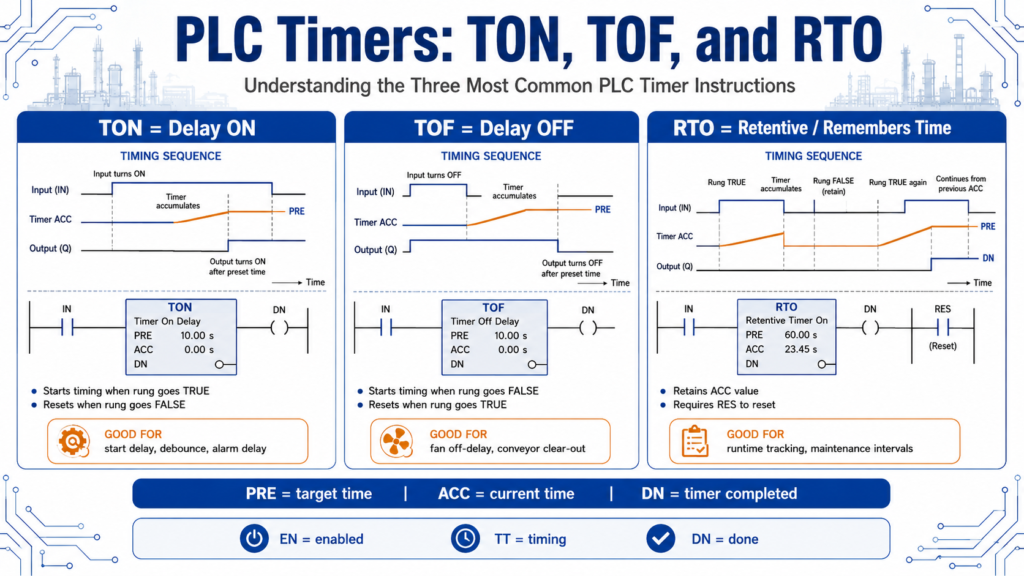
Understanding the Three Most Common PLC Timer Instructions
Timers are one of the most important instructions in PLC programming. They are used everywhere in industrial automation.
You will see timers used for:
Start-up delays
Shutdown delays
Alarm delays
Debounce logic
Motor feedback faults
Fill time monitoring
Conveyor delays
Sequence timing
Flashing lights
Auto-close / auto-open logic
In simple terms, a PLC timer allows the program to make decisions based on time.
The basic principles of timers are the same even when the addressing format changes between PLC platforms. It also explains that preset and accumulated times are stored and compared on each processor scan, and timers can be programmed as On Delay, Off Delay, or Retentive timers.
The three common timer types are:
TON = Timer On Delay
TOF = Timer Off Delay
RTO = Retentive Timer On
1. Basic Timer Terms
Before comparing TON, TOF, and RTO, it helps to understand the basic timer terms.
| Term | Meaning |
|---|---|
| PRE / Preset | The target time value |
| ACC / Accumulated | The current time value |
| EN / Enable Bit | Timer rung is enabled |
| TT / Timer Timing Bit | Timer is actively timing |
| DN / Done Bit | Timer has reached the preset |
| RES / Reset | Instruction used to reset some timer types, especially RTO |
A simple way to understand it:
PRE = where the timer is going
ACC = where the timer is right now
DN = the timer reached the target
The timer does not jump directly to the preset. It accumulates time while the PLC scans the program.
2. TON — Timer On Delay
A TON timer begins timing when the rung becomes true.
In simple words:
TON waits before turning something ON.
Example:
Input turns ON
      ↓
Timer starts accumulating
      ↓
ACC reaches PRE
      ↓
DN bit turns ON
      ↓
Output can turn ON
The TON instruction begins timing when its rung goes true, waits the preset time, tracks the accumulated time, and sets the done bit when ACC equals the preset. It also notes that the accumulated value resets when rung conditions go false.
TON Example
A motor feedback fault delay is a good example.
Motor_Run_Cmd = ON
Motor_Feedback = OFF
      ↓
Start TON timer
      ↓
If feedback does not appear after 3 seconds
      ↓
Set Motor_Feedback_Fault
This prevents the PLC from faulting instantly. It gives the motor starter or VFD time to respond.
3. When to Use a TON Timer
Use a TON when you need to delay an action after a condition becomes true.
Common applications:
| Application | Why TON Is Useful |
|---|---|
| Motor feedback fault | Gives motor time to prove running |
| Sensor debounce | Confirms signal is stable |
| Auto-close delay | Waits before closing a door |
| Fill timeout | Detects if filling takes too long |
| Start-up delay | Delays next device in sequence |
| Alarm delay | Avoids nuisance alarms |
Example:
Box_Present
      ↓
TON 0.5 seconds
      ↓
Stop conveyor under fill station
The input must stay true long enough for the timer to finish.
4. TON Logic Concept
A beginner-friendly ladder concept:
Rung 1:
Sensor_ON -------------------- TON Timer_Confirm_Present

Rung 2:
Timer_Confirm_Present.DN ----- Confirmed_Part_Present
In plain English:
If the sensor stays ON long enough,
the timer done bit turns ON,
and the PLC accepts the signal as valid.
This is very useful for noisy sensors or signals that should not be accepted instantly.
5. TOF — Timer Off Delay
A TOF timer behaves differently.
A TOF timer is normally true while the rung is true. When the rung goes false, the timer begins timing.
In simple words:
TOF keeps something ON for a short time after the condition turns OFF.
Example:
Input is ON
      ↓
Output is ON
      ↓
Input turns OFF
      ↓
TOF starts timing
      ↓
Output stays ON until timer expires
The TOF instruction begins timing when its rung goes false, waits the preset time, tracks the accumulated intervals, and resets the done bit when the accumulated time equals the preset. It also notes that the accumulated value resets when rung conditions go true.
6. When to Use a TOF Timer
Use a TOF when you want to delay turning something OFF.
Common applications:
| Application | Why TOF Is Useful |
|---|---|
| Fan off-delay | Fan runs after heater stops |
| Conveyor clear-out | Conveyor runs after product sensor clears |
| Light delay | Light stays on briefly after condition ends |
| Pneumatic exhaust delay | Valve remains active briefly |
| Signal dropout protection | Avoids quick OFF flicker |
| Output anti-chatter | Holds output stable through short drops |
Example:
Product_Detected = ON
Conveyor_Run = ON

Product_Detected turns OFF
TOF keeps Conveyor_Run ON for 2 seconds
This allows the conveyor to clear the product before stopping.
7. TOF Logic Concept
A simple TOF-style concept:
Rung 1:
Product_Present ------------- TOF Conveyor_Off_Delay

Rung 2:
Conveyor_Off_Delay.DN -------- Conveyor_Run_Cmd
In plain English:
While product is present, the conveyor runs.
When product is no longer present,
the conveyor continues for a short delay,
then turns off.
TOF can be a little confusing at first because it times when the rung goes false, not when it goes true.
8. RTO — Retentive Timer On
An RTO timer is similar to a TON, but with one major difference:
An RTO keeps its accumulated value when the rung goes false.
A TON resets when the rung goes false.
An RTO does not reset unless a reset instruction is used.
RTO functions like a TON, except that once it has started timing, it holds its accumulated count even if the rung goes false, a fault occurs, the controller mode changes from RUN to PGM, or power is lost. When the rung becomes true again, timing resumes from the stored accumulated value.
9. When to Use an RTO Timer
Use an RTO when you need to measure total accumulated time.
Common applications:
| Application | Why RTO Is Useful |
|---|---|
| Machine runtime tracking | Accumulates total running time |
| Pump runtime | Tracks hours for maintenance |
| Filter runtime | Triggers replacement after total use |
| Operator task timing | Adds total time across interruptions |
| Batch process timing | Holds time when paused |
| Maintenance interval | Tracks equipment usage |
Example:
Pump_Running = ON
      ↓
RTO accumulates runtime
      ↓
Pump stops
      ↓
ACC value is retained
      ↓
Pump starts again
      ↓
RTO continues from previous ACC
To clear it, you need a reset instruction.
10. RTO Reset Concept
An RTO should normally have a dedicated reset condition.
Example:
Maintenance_Reset_PB -------- RES Pump_Runtime_TimerIn plain English:
The RTO keeps counting total runtime.
The reset button clears the accumulated value when maintenance is completed.
Be careful with RTO timers. If you forget to reset them properly, they may keep old accumulated values and cause confusing behavior.
11. TON vs TOF vs RTO
Here is a simple comparison:
| Timer | Starts Timing When | Resets When | Best For |
|---|---|---|---|
| TON | Rung goes true | Rung goes false | Delay ON |
| TOF | Rung goes false | Rung goes true | Delay OFF |
| RTO | Rung goes true | Only with RES | Accumulated time |
Simple memory trick:
TON = wait before ON
TOF = wait before OFF
RTO = remember the time
12. Timer Bits: EN, TT, and DN
Most PLC timers include status bits.
EN — Enable Bit
The enable bit is true when the timer rung is enabled.
Timer rung true → EN = 1TT — Timer Timing Bit
The timing bit is true while the timer is actively timing.
ACC < PRE and timer is active → TT = 1DN — Done Bit
The done bit turns on when the timer reaches its preset.
ACC >= PRE → DN = 1These bits are powerful because they can be used in other rungs.
Example:
Timer.DN → Start next conveyor
Timer.TT → Turn on “Timing” indicator
Timer.EN → Show timer is enabled
The lab exercises specifically ask learners to observe the timer accumulator, preset, and control bits such as EN, TT, and DN while the timer operates.
13. Cascaded Timers
Sometimes one timer is not enough, or you want a sequence of delays.
This is called cascading timers.
Example:
Timer_1.DN starts Timer_2
Timer_2.DN starts Timer_3
Timer_3.DN starts the next step
The done bit of the previous timer can be used to enable the next timer in the sequence, and that consecutive rungs and numbering make the program easier to read and troubleshoot.
14. Cascaded Timer Example
Imagine a three-conveyor start-up sequence.
Start Command
      ↓
Conveyor 3 starts
      ↓
TON 15 seconds
      ↓
Conveyor 2 starts
      ↓
TON 10 seconds
      ↓
Conveyor 1 starts
This is common in conveyor systems because downstream equipment often needs to start first.
15. Self-Resetting Timers
A self-resetting timer is commonly used to create repeating timing behavior.
Example use cases:
Flashing pilot light
Heartbeat bit
Periodic status check
Repeating pulse
Timed sequence loop
Self-resetting timers where one timer starts another, then the done bit of the second timer resets the first timer, allowing the sequence to restart on the next scan.
For beginner logic, this is useful, but you must be careful not to create timer loops that are hard to stop or troubleshoot.
16. Practical Industrial Examples
Example 1: Alarm Delay
Low_Pressure
      ↓
TON 5 seconds
      ↓
Low_Pressure_Alarm
This prevents nuisance alarms from short pressure dips.
Example 2: Motor Feedback Fault
Motor_Run_Cmd AND NOT Motor_Feedback
      ↓
TON 3 seconds
      ↓
Motor_Feedback_Fault
This gives the motor time to start before faulting.
Example 3: Conveyor Clear-Out
Product_Present
      ↓
TOF 2 seconds
      ↓
Conveyor_Run_Cmd
The conveyor runs briefly after the product sensor clears.
Example 4: Runtime Tracking
Motor_Running
      ↓
RTO Motor_Runtime
      ↓
Maintenance due after preset time
This is good for preventive maintenance.
17. Common Beginner Mistakes
Mistake 1: Using TON when TOF is needed
If you want something to stay ON after a signal turns OFF, use TOF, not TON.
Mistake 2: Forgetting that TON resets when the rung goes false
If the condition flickers, the TON may never finish timing.
Mistake 3: Using RTO without a reset
An RTO retains time. Always plan how it will be reset.
Mistake 4: Using the wrong timer bit
Using EN, TT, and DN incorrectly can create confusing logic.
Mistake 5: Resetting a timer every scan
If reset logic is always true, the timer will never accumulate.
Mistake 6: Not considering scan behavior
Timers are evaluated during PLC scans, so scan time and rung conditions matter.
18. Practical Technician Troubleshooting Questions
When a timer does not work as expected, ask:
| Question | Why It Matters |
|---|---|
| Is the rung true? | Timer must be enabled correctly |
| Is the ACC increasing? | Confirms timer is timing |
| Is the PRE correct? | Wrong preset causes wrong delay |
| Is DN turning on? | Confirms timer completed |
| Is the timer being reset? | Reset may prevent timing |
| Is the condition flickering? | TON may restart repeatedly |
| Is it a TON, TOF, or RTO? | Each behaves differently |
| Is another rung changing the same bit? | Logic conflict |
| Is the routine being scanned? | Timer logic must execute |
This troubleshooting mindset is important in real industrial environments.
19. Timer Naming Examples
Good tag names make timer logic easier to understand.
TON examples
TMR_Start_Delay
TMR_Feedback_Fault_Delay
TMR_Debounce_PE
TMR_Auto_Close_Delay
TOF examples
TMR_Conveyor_Off_Delay
TMR_Fan_Off_Delay
TMR_Output_Hold_Delay
RTO examples
TMR_Pump_Runtime
TMR_Motor_Runtime_Total
TMR_Filter_Usage_Time
Done bits
TMR_Start_Delay.DN
TMR_Feedback_Fault_Delay.DN
TMR_Auto_Close_Delay.DN
The tag name should describe the timer’s purpose, not just the instruction type.
Final Thoughts
PLC timers are one of the most useful tools in ladder logic.
The three basic timer instructions are:
TON = delay before turning ON
TOF = delay before turning OFF
RTO = retain accumulated time
Once you understand PRE, ACC, EN, TT, and DN, timers become much easier to use and troubleshoot.
A good technician does not just ask:
“Is the timer done?”A good technician asks:
Is the rung true?
Is the ACC increasing?
Is the preset correct?
Is the timer being reset?
Is the right timer type being used?
What should happen when DN turns on?
Timers are simple at first, but they become very powerful when used properly in motor control, alarms, debounce logic, process sequences, and troubleshooting.