Servo Motors, Servo Drives, and Encoders Explained for Automation Technicians
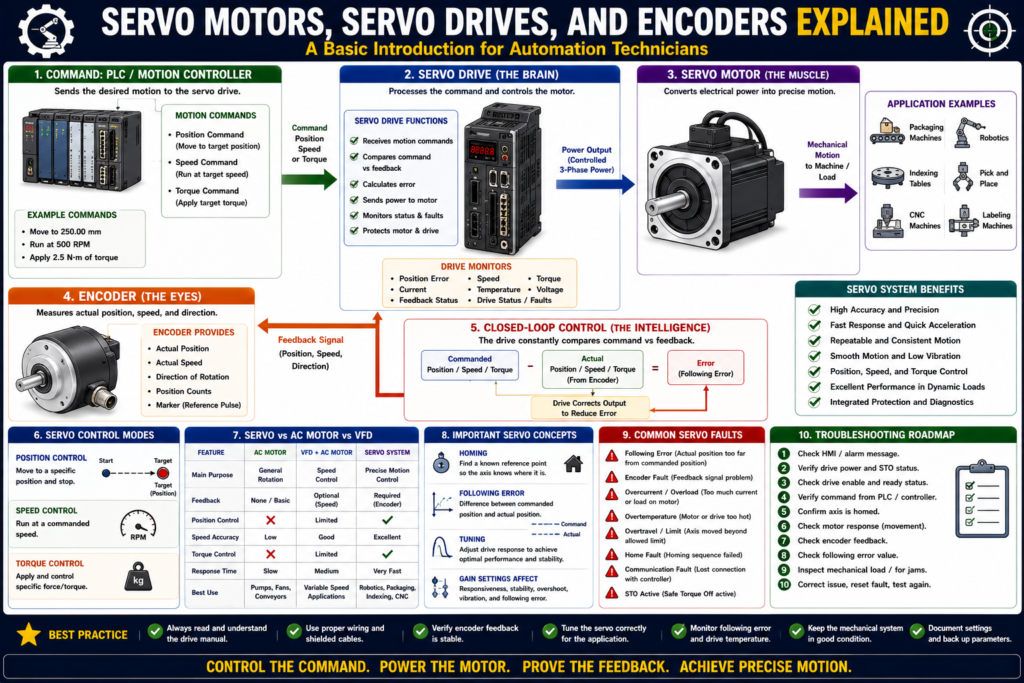
A Basic Introduction for Automation Technicians
Introduction
In industrial motor control, we often work with contactors, overload relays, motor starters, VFDs, and three-phase AC motors. These systems are excellent for running motors on conveyors, pumps, fans, mixers, compressors, and many general-purpose applications.
But some machines need more than simple start, stop, forward, reverse, or speed control.
Some applications need precise position, controlled motion, accurate speed, repeatability, and feedback. This is where servo systems are used.
A simple way to understand it is:
A standard motor is usually used to run a load. A servo motor is used to control motion precisely.
Servo systems are common in packaging machines, robotics, filling machines, indexing tables, labeling machines, CNC equipment, pick-and-place systems, and automated positioning systems.
This bonus post is a basic introduction to servo motors, servo drives, and encoders so we can transition from traditional motor control into motion control.
Why This Topic Is Different from Basic Motor Control
In the previous posts, we focused mostly on motors controlled by:
Contactors
Motor starters
Overload relays
VFDs
PLC outputs
HOA switches
Jog circuits
Feedback contacts
These systems are commonly used for general motor control.
Servo systems are different because they are designed for controlled motion.
A servo system usually controls:
Position
Speed
Torque
Acceleration
Deceleration
Direction
Motion profile
Feedback error
Axis status
In other words:
A VFD controls motor speed. A servo system controls motion with precision.
What Is a Servo Motor?
A servo motor is a motor designed to be controlled very accurately by a servo drive.
A servo motor can rotate to a specific position, move at a commanded speed, hold torque, stop accurately, and repeat movements with high precision.
Servo motors are commonly used when the machine needs:
- Accurate positioning
- Fast response
- Repeatable motion
- Controlled acceleration
- Controlled deceleration
- Torque control
- Speed control
- Position feedback
- Synchronization with other machine parts
Examples:
Move a label head to the correct position
Index a conveyor exactly 12 inches
Rotate a filling carousel to a precise angle
Move a robotic axis to a target position
Control a packaging jaw position
Synchronize a cutter with product movement
A basic motor can run a conveyor.
A servo motor can move a conveyor exactly a set distance and stop at a precise position.
What Is a Servo Drive?
A servo drive is the electronic controller that powers and controls the servo motor.
The servo drive receives commands from a PLC, motion controller, or machine controller. Then it sends controlled power to the servo motor.
The servo drive also receives feedback from the encoder so it knows what the motor is actually doing.
Simple concept:
PLC / Motion Controller
        ↓
Servo Drive
        ↓
Servo Motor
        ↓
Encoder Feedback
        ↑
Back to Servo Drive
The servo drive compares:
Commanded position / speed / torque
vs
Actual position / speed / torque
Then it corrects the motor output to reduce the error.
That closed-loop correction is what makes servo systems powerful.
What Is an Encoder?
An encoder is a feedback device that tells the servo drive the motor’s actual position, speed, and direction.
In simple terms:
The encoder tells the drive where the motor shaft really is.
Without encoder feedback, the drive would not know if the motor actually reached the commanded position.
The encoder can provide information such as:
Actual position
Actual speed
Direction of rotation
Position error
Movement completed
Motor shaft angle
This is very different from a simple contactor auxiliary feedback.
A contactor auxiliary contact may only tell you:
The contactor pulled in.An encoder can tell you:
The motor shaft is at this exact position.That is why encoders are so important in servo systems.
Command vs Feedback in a Servo System
The command vs feedback concept still applies, but it becomes more advanced.
In basic motor control:
Command = PLC output to starter or VFD
Feedback = auxiliary contact or VFD running status
In servo control:
Command = move to position, run at speed, or apply torque
Feedback = actual position, actual speed, or actual torque response
Example:
Commanded Position: 100.000 mm
Actual Position: 99.985 mm
Position Error: 0.015 mm
This is why servo systems are used when precision matters.
Open-Loop vs Closed-Loop Control
Servo systems are usually closed-loop systems.
Open-Loop Concept
In an open-loop system, the controller sends a command but does not verify precise motion feedback.
Example:
Turn output ON
Motor runs
No exact position feedback
This may be acceptable for simple motor control.
Closed-Loop Concept
In a closed-loop system, feedback is constantly compared to the command.
Example:
Command position = 100 mm
Encoder feedback = 98 mm
Drive corrects motion
Encoder feedback = 100 mm
Move complete
The servo drive is always checking:
Where should the motor be?
Where is it actually?
How much correction is needed?
That is the core idea of servo control.
Main Parts of a Servo System
A basic servo system includes:
| Component | Purpose |
|---|---|
| PLC / Motion Controller | Sends motion commands |
| Servo Drive | Controls power to the servo motor |
| Servo Motor | Produces controlled motion |
| Encoder | Provides position/speed feedback |
| Power Cable | Carries motor power from drive to motor |
| Feedback Cable | Carries encoder feedback to the drive |
| Mechanical Load | Machine part being moved |
| HMI | Displays status, faults, and controls |
Simple layout:
HMI
 ↓
PLC / Motion Controller
 ↓
Servo Drive
 ↓
Servo Motor
 ↓
Machine Load
 ↑
Encoder Feedback
Servo Motor vs Standard AC Motor
| Feature | Standard AC Motor | Servo Motor |
|---|---|---|
| Main purpose | General rotation | Precise motion |
| Control device | Starter or VFD | Servo drive |
| Feedback | Optional / basic | Required |
| Position control | Not typical | Main function |
| Speed control | With VFD | Very precise |
| Torque control | Limited | Advanced |
| Accuracy | Lower | High |
| Common use | Pumps, fans, conveyors | Packaging, robotics, indexing |
A standard AC motor is excellent for many applications.
A servo motor is used when the machine needs exact motion.
Servo Drive vs VFD
A VFD and a servo drive may look similar because both are electronic motor controllers, but they are not the same.
| Feature | VFD | Servo Drive |
|---|---|---|
| Main purpose | Speed control | Motion control |
| Common motor | AC induction motor | Servo motor |
| Feedback | Optional or basic | Required |
| Position control | Limited or not typical | Core function |
| Response | Slower than servo | Fast dynamic response |
| Precision | Good for speed | High for position/speed/torque |
| Tuning | Basic parameters | Motion tuning required |
| Application | Pumps, fans, conveyors | Robotics, indexing, packaging |
Simple way to remember:
A VFD is mainly for controlling motor speed. A servo drive is for controlling precise motion.
Three Main Servo Control Modes
Servo systems commonly work in three main control modes:
Position control
Speed control
Torque control
1. Position Control
Position control means the servo moves to a commanded position.
Example:
Move axis to 250.00 mm
Move rotary table to 90 degrees
Move packaging jaw to home position
This is very common in automation.
The servo drive uses encoder feedback to confirm the motor reached the target.
2. Speed Control
Speed control means the servo runs at a commanded speed.
Example:
Run at 500 RPM
Run conveyor at 12 inches per second
Synchronize speed with another axis
Servo speed control is usually more precise and responsive than basic VFD speed control.
3. Torque Control
Torque control means the servo controls how much force or twisting force is applied.
Example:
Apply controlled tension
Press with controlled force
Cap tightening
Web handling
Winding and unwinding
Torque control is useful when force matters more than position.
What Is Homing?
Homing is the process of finding a known reference position.
A servo system needs to know where the axis is before it can move accurately.
A homing sequence may use:
Home sensor
Limit switch
Encoder marker pulse
Hard stop, in some systems
Absolute encoder position
Simple concept:
Axis moves slowly
Finds home sensor
Sets position = 0
Axis is now referenced
After homing, the controller knows the axis position.
Without homing, an incremental servo system may not know where it is after power-up.
What Is Following Error?
Following error is the difference between the commanded position and the actual position.
Example:
Commanded Position: 100.000 mm
Actual Position: 95.000 mm
Following Error: 5.000 mm
If following error becomes too large, the servo drive or controller may fault.
Possible causes:
- Mechanical jam
- Load too heavy
- Incorrect tuning
- Acceleration too aggressive
- Motor undersized
- Encoder issue
- Coupling slipping
- Drive fault
- Cable problem
Following error is one of the most important servo troubleshooting concepts.
What Is Servo Tuning?
Servo tuning is the process of adjusting how the servo responds to commands.
A servo system must be responsive but stable.
If tuning is poor, the machine may have:
Oscillation
Vibration
Overshoot
Position error
Noisy motion
Slow response
Following error faults
Mechanical stress
Tuning affects how aggressively the servo corrects position or speed error.
A simple way to think about it:
Servo tuning controls how fast and how smoothly the servo corrects motion error.
This is a more advanced topic and deserves its own post in the next series.
Common Servo Faults
Common servo-related faults include:
| Fault | Possible Meaning |
|---|---|
| Following Error | Actual position is too far from commanded position |
| Encoder Fault | Feedback signal problem |
| Overcurrent | Motor or drive current too high |
| Overload | Motor overloaded over time |
| Overtemperature | Motor or drive too hot |
| Overtravel | Axis moved beyond allowed limit |
| Home Fault | Homing sequence failed |
| Communication Fault | PLC/controller lost communication with drive |
| STO Active | Safe Torque Off circuit is active |
| Position Error | Axis did not reach target correctly |
Servo faults should be read carefully before reset.
Just like with VFDs:
Do not reset blindly. Read the fault, understand the cause, correct the problem, then reset.
Basic Servo Troubleshooting Mindset
When troubleshooting a servo system, follow the path:
Command → Drive Status → Motor Response → Encoder Feedback → Mechanical LoadAsk:
Is the drive powered?
Is the drive enabled?
Is STO healthy?
Is the servo faulted?
Is the PLC sending a valid motion command?
Is the axis homed?
Is the motor trying to move?
Is encoder feedback changing?
Is the mechanical load jammed?
Is there a following error?
This is very similar to motor troubleshooting, but with more precise feedback and motion states.
Safety in Servo Systems
Servo systems can move very quickly and with high force.
Hazards include:
- Unexpected motion
- Pinch points
- High-speed movement
- Stored energy
- Vertical axis drop
- Robot or actuator movement
- Mechanical collision
- High torque at low speed
- Automatic restart
- Drive DC bus voltage
Important:
A servo motor can move fast, stop fast, and hold torque. Treat it with respect.
Servo systems often use safety functions such as:
Safe Torque Off
Safety relay
Guard doors
Light curtains
E-Stops
Safe speed monitoring, in advanced systems
Never assume that disabling a command is the same as removing hazardous energy.
Practical Example: Packaging Machine Axis
Imagine a packaging machine with a servo-driven indexing conveyor.
The PLC sends a command:
Move conveyor 12 inches forwardThe servo drive powers the motor.
The encoder reports actual position.
The PLC watches:
Axis moving
Position error
Move complete
Drive fault
Home status
Limit status
If the conveyor jams, the servo may not reach the commanded position.
The controller may detect:
Following Error FaultThis tells the technician:
The controller commanded movement, but actual feedback did not follow the command correctly.That is servo troubleshooting in action.
How This Connects to the Previous Motor Control Series
This bonus post connects to the concepts we already covered:
| Motor Control Concept | Servo System Equivalent |
|---|---|
| Start command | Motion command |
| Motor output | Servo enable / drive command |
| Run feedback | Encoder / drive status |
| Failed to start | Axis failed to move |
| Failed to stop | Axis failed to stop |
| Overload trip | Servo overload fault |
| VFD fault | Servo drive fault |
| HOA / Manual | Manual jog / axis control |
| Jogging | Servo jog / inching |
| Troubleshooting | Command vs feedback with position data |
The core thinking remains the same:
Command → Output → Feedback → Fault DetectionBut servo systems add precision:
Position
Speed
Torque
Encoder feedback
Motion profiles
Following error
Homing
Tuning
When Should a Servo Be Used?
A servo system may be the right choice when the machine requires:
Precise position
Repeatable motion
Fast acceleration
Fast deceleration
Accurate speed control
Torque control
Synchronization
Electronic gearing
Indexing
Motion profiles
Examples:
- Robotic arm
- Pick-and-place machine
- Labeling machine
- Filling machine
- Packaging machine
- Indexing table
- Servo press
- Cutter axis
- Web tension system
- CNC axis
If the motor only needs to run a fan, pump, or simple conveyor at variable speed, a VFD may be enough.
If the motor must move to an exact position repeatedly, a servo system is usually better.
Quick Summary
Servo motor = motor designed for precise motion control.

Servo drive = controller that powers and controls the servo motor.

Encoder = feedback device that reports actual position, speed, and direction.

Servo systems are usually closed-loop systems.

Closed-loop means command is compared to feedback.

Main control modes are position, speed, and torque.

Homing finds a known reference position.

Following error is the difference between commanded and actual position.

Servo tuning affects response, stability, and accuracy.

Servo troubleshooting uses command, drive status, motor response, encoder feedback, and mechanical load.
Final Thoughts
Servo motors, servo drives, and encoders are the next level after basic industrial motor control.
Traditional motor control focuses on safely starting, stopping, protecting, and monitoring motors. Servo control focuses on precise motion.
The key concept is feedback. A servo system does not simply command motion and hope the motor moves. It constantly compares the command to the encoder feedback and corrects the motor output.
For automation technicians, understanding servo systems starts with the same foundation we already built:
Request → Command → Output → Feedback → Fault DetectionThe difference is that servo feedback is much more precise. Instead of only knowing that a motor is running, the system can know exactly where the motor shaft or machine axis is.
This is why servo systems are essential in modern automation, robotics, packaging, positioning, and motion control.
This post closes the Industrial Motor Control series and opens the door to the next series: Servo Motors and Motion Control for Automation Technicians.