13. Hand-Off-Auto Control Explained for Industrial Motor Control (13 of 22)
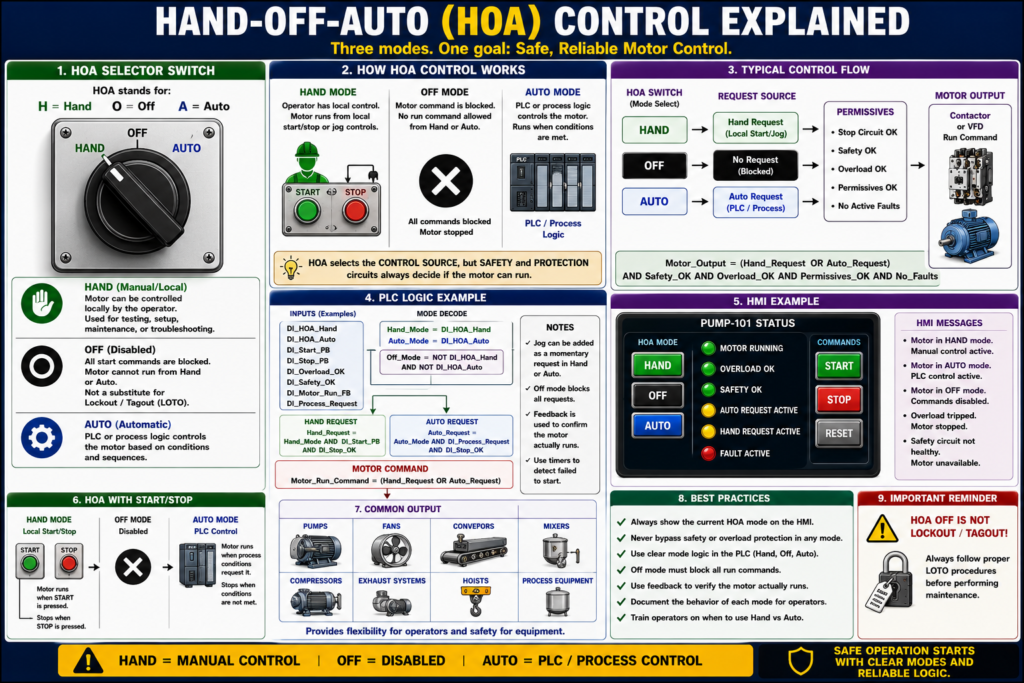
Hand-Off-Auto Control Explained
Understanding HOA Switches in Industrial Motor Control
Introduction
In industrial motor control, HOA means:
H = Hand
O = Off
A = Auto
A Hand-Off-Auto selector switch allows a motor or device to be controlled in different modes. This is very common in industrial systems such as pumps, fans, conveyors, mixers, exhaust systems, compressors, and process equipment.
A simple way to understand HOA control is:
Hand mode allows local/manual control.
Off mode disables the motor command.
Auto mode allows the PLC or process logic to control the motor.
HOA control is important because it gives technicians, operators, and automation systems a clear way to decide who is allowed to control the motor.
What Is an HOA Switch?
An HOA switch is a selector switch with three positions:
HAND OFF AUTOEach position changes how the motor is controlled.
| HOA Position | Meaning | Typical Behavior |
|---|---|---|
| Hand | Manual/local control | Motor can be controlled locally |
| Off | Disabled | Motor command is blocked |
| Auto | Automatic control | PLC/process logic controls the motor |
The key idea is that the HOA switch determines the control source.
Hand Mode
Hand mode is used when the operator or technician wants local manual control of the motor.
In many systems, Hand mode may allow the motor to run from a local selector switch or local pushbutton station.
Example:
HOA in HAND
AND Safety_OK
AND Overload_OK
→ Motor runs manually
Hand mode is commonly used for:
- Maintenance testing
- Local operation
- Manual pump operation
- Verifying motor rotation
- Troubleshooting
- Running a device without automatic process logic
Important:
Hand mode should not bypass safety devices or overload protection.
Even in Hand mode, the motor should still depend on safety circuits, overload status, and critical permissives.
Off Mode
Off mode disables the motor command.
When the HOA switch is in Off, the motor should not run from Hand or Auto commands.
Example:
HOA in OFF
→ Motor command blocked
Off mode is useful when:
- Equipment must be held stopped
- Maintenance wants to prevent automatic operation
- A motor is not ready for operation
- The process needs a device disabled
- Troubleshooting requires command isolation
However, Off mode is not the same as lockout/tagout.
Important safety note:
HOA Off is a control command. It is not an energy isolation method. Use proper LOTO when required.
Auto Mode
Auto mode allows the PLC or process logic to control the motor.
In Auto, the motor does not run simply because the selector is in Auto. It runs only when the automatic logic requests it.
Example:
HOA in AUTO
AND Auto_Start_Request
AND Safety_OK
AND Overload_OK
AND Permissives_OK
→ Motor runs automatically
Auto mode is used for:
- Process-controlled pumps
- Conveyor sequences
- Tank level control
- Pressure control
- Temperature-controlled fans
- PLC-controlled production logic
- HMI automatic commands
In Auto mode, the PLC usually decides when the motor starts and stops based on process conditions.
Basic HOA Control Concept
A basic HOA control can be represented like this:
HAND Mode  → Local/manual request
OFF Mode   → No run command allowed
AUTO Mode  → PLC/process request
Final motor command:
Motor_Run_Command =
    (Hand_Mode AND Hand_Request)
    OR
    (Auto_Mode AND Auto_Request)
Then the final output should still be protected:
Motor_Output =
    Motor_Run_Command
    AND Safety_OK
    AND Overload_OK
    AND Permissives_OK
    AND No_Faults
This is the key professional concept:
HOA selects the control source, but protection and safety conditions still decide if the motor is allowed to run.
HOA Switch Contacts
A physical HOA selector switch may have separate contacts for each position.
For example:
Hand contact closes in HAND position
Auto contact closes in AUTO position
Off position opens both Hand and Auto contacts
Typical PLC inputs:
DI_HOA_Hand
DI_HOA_Auto
When both are OFF, the system can interpret that as Off mode:
Hand_Mode = DI_HOA_Hand
Auto_Mode = DI_HOA_Auto
Off_Mode = NOT DI_HOA_Hand AND NOT DI_HOA_Auto
Some systems may wire all three positions as inputs, but many only wire Hand and Auto.
Hardwired HOA Example
A simple hardwired HOA control can be arranged so that:
- Hand position energizes the starter coil locally.
- Auto position allows a PLC relay/contact to energize the starter coil.
- Off position opens both paths.
Simple concept:
HAND path:
L1 → HOA Hand → Stop/Safety/OL → M Coil

AUTO path:
L1 → HOA Auto → PLC Output Contact → Stop/Safety/OL → M Coil
Simplified ladder concept:
L1 ----[/ STOP]----[/ OL]----[ HOA HAND ]----------------( M )
                         |
                         |----[ HOA AUTO ]----[ PLC OUT ]-|
L2
This means:
Hand path OR Auto path can energize the motor,
but Stop and Overload must remain healthy.
PLC-Based HOA Control
In modern automation systems, the HOA switch is often wired into the PLC.
Recommended PLC tags:
DI_HOA_Hand
DI_HOA_Auto
DI_Start_PB
DI_Stop_PB
DI_Overload_OK
DI_Safety_OK
DI_Motor_Run_FB

Auto_Start_Request
Hand_Start_Request
Motor_Run_Command
Motor_Output
Motor_Fault
Mode Decode Logic
Hand_Mode = DI_HOA_Hand
Auto_Mode = DI_HOA_Auto
Off_Mode = NOT DI_HOA_Hand AND NOT DI_HOA_Auto
Hand Request Logic
Hand_Start_Request =
    Hand_Mode
    AND DI_Start_PB
    AND DI_Stop_OK
Depending on the machine, Hand mode may be maintained or momentary. For some equipment, Hand may directly run the motor while the selector is in Hand. For other equipment, Hand may enable local Start/Stop control.
Auto Request Logic
Auto_Start_Request =
    Auto_Mode
    AND Process_Start_Request
Examples of process start requests:
Tank_Level_Low
Pressure_Low
Temperature_High
Conveyor_Sequence_Request
HMI_Auto_Start
Final Motor Command
Motor_Run_Command =
    (Hand_Mode AND Hand_Start_Request)
    OR
    (Auto_Mode AND Auto_Start_Request)
Then final output:
Motor_Output =
    Motor_Run_Command
    AND Safety_OK
    AND Overload_OK
    AND Permissives_OK
    AND No_Faults
This keeps the logic clean and easy to troubleshoot.
HOA with Start/Stop Pushbuttons
Some systems use HOA plus Start/Stop pushbuttons.
Example behavior:
Hand Mode
HOA = HAND
Start PB starts motor
Stop PB stops motor
Off Mode
HOA = OFF
Motor cannot start
Auto Mode
HOA = AUTO
PLC process logic starts/stops motor
This is common for motors that need both local operator control and automatic process control.
HOA with HMI Control
Some systems use a physical HOA switch. Others use an HMI software HOA.
An HMI may show:
Mode: HAND / OFF / AUTO
Start Button
Stop Button
Auto Enable
Motor Command
Motor Feedback
Overload Status
Fault Reset
Important:
A physical HOA switch gives local hardware mode selection. An HMI HOA is software-based and depends on PLC logic.
Both can be useful, but physical and software controls must be designed carefully so they do not conflict.
Hand Mode vs Jog Mode
Hand mode and Jog mode are not always the same.
| Mode | Meaning |
|---|---|
| Hand | Manual control source |
| Jog | Momentary movement only |
| Auto | PLC/process control |
| Off | Command disabled |
A motor may be in Hand mode and still use Start/Stop control.
A motor may also have Jog mode for momentary movement.
Example:
Hand Mode = operator has local control
Jog Command = motor runs only while button is held
Do not assume Hand always means Jog. It depends on the machine design.
HOA and Permissives
A common mistake is allowing Hand mode to bypass too many conditions.
Good design:
Hand_Mode_Request
AND Safety_OK
AND Overload_OK
AND Critical_Permissives_OK
→ Motor_Output
Hand mode may bypass automatic process conditions, but it should not bypass critical safety or equipment protection.
Conditions that usually should not be bypassed:
- E-Stop healthy
- Safety relay healthy
- Overload OK
- Motor fault cleared
- Guard closed, if required
- Critical pressure/level permissives, depending on risk
- Drive ready
- No active lockout or maintenance inhibit
HOA and Faults
The HOA switch should interact clearly with faults.
Example:
If Overload_OK = false
then Motor_Overload_Fault = true
and Motor_Output = false
Even if the HOA is in Hand:
Motor_Output = false if Overload_Fault is activeRecommended fault behavior:
Fault active → motor output blocked
Fault reset allowed only when fault condition is healthy
Example:
If Reset_PB
AND Overload_OK
AND Safety_OK
then clear Motor_Fault
HOA Status on the HMI
A good HMI should clearly show the selected HOA mode.
Recommended indicators:
HOA Mode: HAND
HOA Mode: OFF
HOA Mode: AUTO
Motor Commanded
Motor Running Feedback
Overload Healthy
Motor Faulted
Auto Request Active
Hand Request Active
Recommended messages:
Motor in HAND mode — local/manual control active.
Motor in OFF mode — automatic start disabled.
Motor in AUTO mode — PLC process control active.
Motor unavailable — overload tripped.
Motor unavailable — safety circuit not healthy.
Auto request active but motor not running.
This helps operators and technicians understand why a motor is or is not running.
Troubleshooting HOA Control
Symptom: Motor Runs in Hand but Not Auto
Possible causes:
- Auto mode input not working
- PLC auto request not active
- Auto permissive missing
- HMI auto command not set
- Process condition not calling for motor
- PLC output logic blocked
- Auto mode contact failed
Troubleshooting question:
Is the PLC actually requesting the motor in Auto?
Symptom: Motor Runs in Auto but Not Hand
Possible causes:
- Hand mode input not working
- Local Start PB failed
- Hand contact failed
- Manual permissive missing
- Local control wiring issue
- HOA switch contact problem
Troubleshooting question:
Does the PLC or control circuit see the Hand command?
Symptom: Motor Runs When HOA Is in Off
This is serious.
Possible causes:
- HOA wired incorrectly
- Output bypassed
- Contactor welded
- PLC logic error
- Incorrect mode decode
- Manual bypass installed
- HMI command overriding Off
Troubleshooting question:
Is Off actually removing the run command, or is another path energizing the output?
Symptom: HMI Shows Wrong HOA Mode
Possible causes:
- Bad selector switch contact
- Broken input wire
- Failed PLC input
- Incorrect input mapping
- Wrong HMI tag
- Mode decode logic error
Practical Troubleshooting Method
Use this method when troubleshooting HOA systems:
1. Verify the physical selector position.
2. Check PLC input status for Hand and Auto.
3. Confirm Off mode is decoded correctly.
4. Check Stop and safety circuits.
5. Check overload status.
6. Check Hand request logic.
7. Check Auto request logic.
8. Check final motor command.
9. Check output to starter or VFD.
10. Verify motor feedback.
This keeps troubleshooting organized.
HOA Control with VFDs
HOA control can also be used with VFD-driven motors.
In Hand mode:
Local speed reference or preset speed may be used.In Auto mode:
PLC or process controller provides run command and speed reference.Common VFD signals:
VFD_Run_Command
VFD_Ready
VFD_Fault
VFD_Running
Speed_Reference
Actual_Speed
Example:
Hand Mode:
Run from local command at preset speed

Auto Mode:
Run from PLC command using process speed reference
Important:
When using a VFD, HOA control must define both the run source and the speed reference source.
A motor may receive a run command but not run correctly if the speed reference is missing or set to zero.
HOA Control Examples
Example 1 — Pump Control
HAND:
Operator runs pump manually.

OFF:
Pump disabled.

AUTO:
Pump starts when tank level is low and stops when tank level is high.
Auto logic:
Pump_Auto_Request =
    Auto_Mode
    AND Tank_Level_Low
Final output:
Pump_Output =
    (Hand_Request OR Pump_Auto_Request)
    AND Safety_OK
    AND Overload_OK
Example 2 — Exhaust Fan
HAND:
Fan runs manually for testing.

OFF:
Fan disabled.

AUTO:
Fan runs when temperature is high.
Auto logic:
Fan_Auto_Request =
    Auto_Mode
    AND Temperature_High
Example 3 — Conveyor
HAND:
Local operator can run conveyor.

OFF:
Conveyor disabled.

AUTO:
Conveyor runs as part of automatic line sequence.
Auto logic:
Conveyor_Auto_Request =
    Auto_Mode
    AND Line_Run_Request
    AND Downstream_Ready
Common Mistakes with HOA Control
Mistake 1 — Letting Hand Bypass Safety
Hand mode should not bypass E-Stops, overloads, or required safety devices.
Mistake 2 — Not Showing HOA Mode on HMI
Operators need to know whether the motor is in Hand, Off, or Auto.
Mistake 3 — No Feedback
The PLC may command the motor, but without feedback, it cannot prove the motor actually ran.
Mistake 4 — Confusing Off with LOTO
HOA Off is not a lockout method. It only disables the control command.
Mistake 5 — Poor Mode Decode
If Hand and Auto inputs are both ON or both OFF unexpectedly, the PLC should handle that clearly.
Example:
If Hand_Mode AND Auto_Mode
then Mode_Conflict_Fault = true
Industrial Pro Tips
Pro Tip 1 — Decode Mode First
Create clean internal mode bits:
Hand_Mode
Off_Mode
Auto_Mode
Mode_Conflict
Do this before writing motor command logic.
Pro Tip 2 — Separate Requests From Outputs
Use a clear structure:
Hand_Request
Auto_Request
Motor_Run_Command
Motor_Output
Motor_Run_Feedback
Do not mix everything into one rung.
Pro Tip 3 — Keep Final Output Protected
Final output should include protection:
Motor_Output =
    Motor_Run_Command
    AND Safety_OK
    AND Overload_OK
    AND No_Faults
Pro Tip 4 — Use Feedback Timers
If the motor is commanded and feedback does not turn on, create a failed-to-start fault.
If Motor_Output is ON
AND Motor_Run_Feedback is OFF
after 3 seconds
then Motor_Failed_To_Start = true
Pro Tip 5 — Make Off Clear
When HOA is Off, the motor should clearly show:
Mode = OFF
Motor command disabled
Auto request ignored
Hand request ignored
Quick Summary
HOA = Hand-Off-Auto

Hand = local/manual control

Off = motor command disabled

Auto = PLC/process control

Hand mode should not bypass safety or overload protection.

Auto mode requires a process request.

Off mode is not lockout/tagout.

A good PLC structure separates mode, request, command, output, and feedback.

For VFDs, HOA must define both run source and speed reference source.
Final Thoughts
Hand-Off-Auto control is one of the most practical concepts in industrial motor control. It gives operators and technicians a clear way to choose between manual control, disabled operation, and automatic PLC control.
For automation technicians, HOA control is more than a selector switch. It is a control philosophy.
A good HOA design clearly separates:
Mode → Request → Command → Output → FeedbackHand mode allows local/manual operation. Off mode blocks the motor command. Auto mode allows the PLC or process logic to run the motor. But in every mode, safety, overload protection, and critical permissives must still be respected.
When troubleshooting HOA circuits, always verify the selector position, PLC inputs, mode logic, run command, output, and motor feedback. This approach makes motor control problems easier to understand and much easier to solve.