12. Jogging and Inching in Industrial Motor Control (12 of 22)
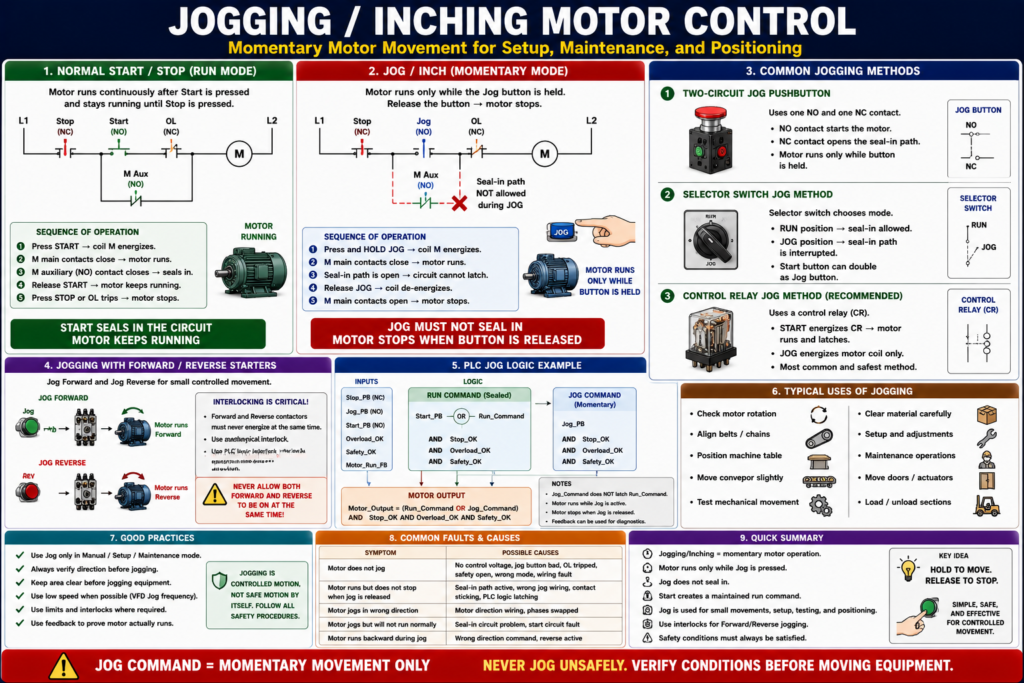
Momentary Motor Movement for Setup, Maintenance, and Positioning
Introduction
In industrial motor control, jogging and inching refer to momentary motor operation. Instead of starting the motor and allowing it to stay running, the motor only runs while the operator holds a jog pushbutton or command.
A simple way to understand it is:
Start keeps the motor running. Jog moves the motor only while the button is held.
Jogging is commonly used when a machine needs small, controlled movement during setup, adjustment, alignment, maintenance, or troubleshooting.
Defines jogging, also called inching, as the momentary operation of a motor to accomplish small movements of the driven machine. In this operation, the motor runs when the pushbutton is pressed and stops when the pushbutton is released.
What Is Jogging?
Jogging is a control method where the motor runs only while the jog command is active.
Example:
Press and hold Jog → Motor runs
Release Jog → Motor stops
This is different from a normal Start/Stop circuit.
In a normal Start/Stop seal-in circuit:
Press Start → Motor starts and stays running
Press Stop → Motor stops
In a jog circuit:
Press Jog → Motor runs momentarily
Release Jog → Motor stops
Jogging vs Inching
In many industrial motor control references, jogging and inching are used almost interchangeably.
| Term | Meaning |
|---|---|
| Jogging | Momentary motor operation for short movement |
| Inching | Small, controlled motor movement, often for positioning |
| Jog Pushbutton | Operator device used to command momentary motion |
Jogging is sometimes called inching.
In practical field language, a technician may say:
“Jog the motor forward.”
“Inch the conveyor a little.”
“Bump the motor to check rotation.”
They all refer to controlled, short-duration movement, but the exact meaning depends on the machine and plant procedure.
Why Jogging Is Used
Jogging is useful when continuous operation is not desired.
Common uses include:
- Checking motor rotation
- Aligning belts or chains
- Moving a conveyor slightly
- Positioning a machine table
- Clearing material carefully
- Testing mechanical movement
- Maintenance setup
- Loading or unloading a machine section
- Moving a door or actuator a short distance
- Adjusting equipment before full automatic operation
The key idea is control.
Jogging allows small movement without latching the motor into a continuous run state.
Start vs Jog
This comparison is very important:
| Function | Behavior | Typical Use |
|---|---|---|
| Start | Motor stays running after command | Normal production operation |
| Stop | Removes run command | Stops motor |
| Jog | Motor runs only while held | Setup, testing, positioning |
| Inching | Very small controlled movement | Fine positioning |
A Start command usually uses seal-in logic.
A Jog command should not seal in.
Basic Start/Stop Seal-In Circuit Review
A normal Start/Stop circuit uses an auxiliary contact to maintain the motor starter coil after the Start button is released.
L1 ----[/ STOP]----[ START ]----[/ OL ]----( M )
              |----[ M AUX ]----|
L2
This creates memory:
Start button energizes the coil.
M auxiliary contact seals in the circuit.
Motor keeps running after Start is released.
Jogging is different because the motor should not seal in during a jog command.
Basic Jogging Concept
A jog circuit must energize the motor starter coil without allowing the seal-in contact to maintain the circuit.
Simple concept:
Jog command → energize motor coil directly
Release Jog → remove coil power
No seal-in path allowed
This gives momentary operation.
Basic Jog Logic
In logic form:
Motor_Output =
    Run_Command
    OR Jog_Command
But there is an important condition:
Jog_Command must not latch the Run_Command.A better industrial structure is:
Run_Command = Start/Stop seal-in logic

Motor_Output =
    (Run_Command OR Jog_Command)
    AND Safety_OK
    AND Overload_OK
    AND Permissives_OK
The Jog command can energize the motor output, but it should not create a maintained Run state.
Common Jogging Methods
The training material identifies several common jogging control methods, including selector switch jogging, two-circuit pushbutton jogging, and control relay jogging. It also describes the control relay method as a common industrial method because the jog button directly energizes the starter coil without allowing the motor to remain sealed in.
The three common methods are:
1. Two-circuit jog pushbutton
2. Selector switch jog method
3. Control relay jog method
1. Two-Circuit Jog Pushbutton Method
A two-circuit jog pushbutton uses two contacts:
One normally open contact
One normally closed contact
The normally open contact energizes the motor starter coil during jogging.
The normally closed contact interrupts the seal-in path so the starter cannot maintain itself after the jog button is released.
A pushbutton jog circuit can use a double-contact jog pushbutton with one normally closed contact and one normally open contact. When the jog button is pressed, the M coil energizes, the main contacts close, but the maintaining circuit is incomplete because the normally closed jog contact is open. As a result, the starter coil will not seal in and stays energized only while the jog button is fully pressed.
Simple Behavior
Press Jog:
- NO jog contact closes
- NC jog contact opens seal-in path
- Motor runs

Release Jog:
- NO jog contact opens
- Coil drops out
- Motor stops
Important Hazard
The two-circuit pushbutton method can create a hazard if contact timing is wrong or if the button is operated rapidly.
The textbook warns that if the normally closed jog contact recloses before the starter maintaining contact opens, the motor could continue to run, which may be hazardous. Rapid operation of a two-circuit jog pushbutton can allow a seal-in condition, depending on contact timing.
2. Selector Switch Jog Method
The selector switch method uses a selector switch to choose whether the circuit operates in normal Run mode or Jog mode.
Example selector positions:
RUN
JOG
In Run mode:
Start button works like normal three-wire control.
Seal-in contact is allowed.
Motor can stay running.
In Jog mode:
Seal-in path is interrupted.
The Start button or Jog command only runs the motor while held.
Start/stop/selector jog control circuit where a selector switch is used to obtain jogging, and the Start button can double as the Jog button.
When the selector switch is closed, a normal three-wire control exists; when it is open, the power feeding the seal-in contacts is interrupted and the circuit will not seal in.
3. Control Relay Jog Method
The control relay method uses a relay to separate normal Run logic from Jog logic.
This is often considered a safer and cleaner method because the jog command energizes only the motor starter coil and does not energize the seal-in relay path.
A control relay jogging circuit uses a jog control relay. Pressing Start energizes the control relay, which closes contacts that start and maintain the motor circuit. Pressing Jog energizes the motor coil only, while the relay contacts remain open, so the motor will not stay energized when the jog pushbutton is released.
The control relay method as intrinsically safe and the prevalent method of jogging used in industry.
Simple Jog Circuit Example
A simplified hardwired jog concept:
Normal Run Path:
L1 ----[/ STOP]----[ START ]----[/ OL ]----( M )
              |----[ M AUX ]----|
L2

Jog Path:
L1 ----[/ STOP]----[ JOG ]----[/ OL ]----( M )
L2
But this simple sketch must be applied carefully. If the jog path accidentally feeds the seal-in path, the motor may latch ON.
That is why proper jog circuit design is important.
Jogging in PLC Logic
In PLC-controlled systems, jogging is usually easier to structure clearly.
Recommended tags:
DI_Start_PB
DI_Stop_PB
DI_Jog_PB
DI_Overload_OK
DI_Safety_OK
DI_Motor_Run_FB

Motor_Run_Command
Motor_Jog_Command
Motor_Output
Motor_Failed_To_Start
Normal Run Logic
Motor_Run_Command =
    Stop_OK
    AND Overload_OK
    AND Safety_OK
    AND (Start_PB OR Motor_Run_Command)
Jog Logic
Motor_Jog_Command =
    Jog_PB
    AND Stop_OK
    AND Overload_OK
    AND Safety_OK
Final Output Logic
Motor_Output =
    (Motor_Run_Command OR Motor_Jog_Command)
    AND Overload_OK
    AND Safety_OK
Key rule:
Jog command can energize the output, but it should not latch the Run command.
Jogging With Forward/Reverse Starters
Jogging can also be used with reversing starters.
Examples:
Jog Forward
Jog Reverse
This is common on:
- Conveyors
- Doors
- Hoists
- Machine slides
- Indexers
- Positioning mechanisms
For reversing jog logic, interlocking is critical.
Example:
Jog_FWD_Output =
    Jog_FWD_PB
    AND Safety_OK
    AND Overload_OK
    AND NOT REV_Output
Jog_REV_Output =
Jog_REV_PB
AND Safety_OK
AND Overload_OK
AND NOT FWD_OutputImportant:
Forward jog and reverse jog must never energize at the same time.
Use mechanical interlocking, electrical interlocking, and PLC interlocking where appropriate.
Jogging With VFDs
When jogging with a VFD, the jog function may be handled inside the drive.
Common VFD jog-related parameters may include:
Jog frequency
Jog acceleration time
Jog deceleration time
Jog input assignment
Direction command
Start source
Speed reference
Example:
Jog command ON → VFD runs at 5 Hz
Jog command OFF → VFD stops
VFD jogging is useful because it allows controlled low-speed movement.
However, the VFD must be configured correctly, and the machine must be safe for motion.
Safety Considerations
Jogging is used for setup and maintenance, but that does not mean it is automatically safe.
Jogging can be dangerous because the operator may be close to moving parts.
Potential hazards:
- Pinch points
- Rotating shafts
- Conveyor movement
- Stored energy
- Unexpected startup
- Reverse motion
- Multiple operators
- Bypassed guards
- Incorrect mode selection
Before jogging equipment:
Verify the area is clear.
Verify guards and safety conditions.
Verify correct direction.
Use approved procedures.
Do not bypass safety devices.
Do not stand in the path of moving equipment.
Important:
Jogging is controlled motion, not safe motion by itself.
Safety must still be engineered and verified.
Jog Mode vs Maintenance Mode
Jogging is often part of a machine’s setup or maintenance mode, but these are not exactly the same thing.
| Mode | Meaning |
|---|---|
| Jog Mode | Allows momentary motor movement |
| Maintenance Mode | May allow special controlled functions for maintenance |
| Manual Mode | Operator directly commands movement |
| Auto Mode | PLC controls movement based on process logic |
| Setup Mode | Allows positioning and adjustments |
A well-designed system should clearly show the mode on the HMI or selector switch.
Example HMI status:
Mode: MANUAL
Jog Forward Available
Jog Reverse Available
Auto Start Disabled
Safety OK
Overload OK
HMI and Operator Feedback
A good HMI should make jog status clear.
Recommended indicators:
Jog Mode Active
Jog Forward Command
Jog Reverse Command
Motor Running Feedback
Overload Healthy
Safety OK
Forward Limit
Reverse Limit
Auto Mode Disabled During Jog
Recommended messages:
Jog active — motor will run only while command is held.
Jog unavailable — safety circuit not healthy.
Jog unavailable — overload tripped.
Jog unavailable — opposite direction active.
Jog stopped — limit reached.
This helps the operator understand why the motor will or will not move.
Troubleshooting Jogging Circuits
Symptom: Motor Does Not Jog
Possible causes:
- No control voltage
- Jog pushbutton not working
- Stop circuit open
- Overload contact open
- Safety circuit open
- PLC not in Manual/Jog mode
- Wrong VFD input configuration
- Bad contactor coil
- Broken wire
Symptom: Motor Jogs but Does Not Run Normally
Possible causes:
- Start circuit problem
- Seal-in auxiliary contact failed
- Run permissive missing
- Control relay problem
- PLC Run command not latching
- Selector switch problem
Symptom: Motor Runs but Does Not Jog
Possible causes:
- Jog pushbutton failed
- Jog path open
- Selector not in Jog mode
- PLC jog logic blocked
- VFD jog parameter not configured
- Safety condition not satisfied
Symptom: Motor Stays Running After Jog Is Released
This is serious.
Possible causes:
- Seal-in path accidentally energized
- Wrong jog pushbutton contact timing
- Jog contact wired incorrectly
- PLC logic latching jog command
- Contactor auxiliary contact maintaining circuit
- Welded contactor
The training material specifically warns that a two-circuit jog pushbutton can create a seal-in hazard if contact timing allows the maintaining circuit to complete.
Practical Technician Rule
Use this rule:
Start = maintained run command
Jog = momentary movement only
Stop = removes motion command
Another good rule:
Jog should energize the motor output, not latch the run command.And for troubleshooting:
If the motor runs only while Jog is pressed, that is correct.

If the motor stays running after Jog is released, troubleshoot immediately.
Industrial Pro Tips
Pro Tip 1 — Keep Jog Separate From Run
Do not let Jog logic latch the normal Run command.
Pro Tip 2 — Use Mode Permissives
Jog should usually be allowed only in Manual, Setup, or Maintenance mode.
Example:
Jog_Command =
    Jog_PB
    AND Manual_Mode
    AND Safety_OK
    AND Overload_OK
Pro Tip 3 — Use Direction Interlocks
For forward/reverse jogging, always block the opposite direction.
Pro Tip 4 — Use Low Speed When Possible
With VFDs, use a safe jog speed appropriate for the machine.
Pro Tip 5 — Use Feedback
If the motor is commanded to jog but feedback never turns on, generate a clear diagnostic.
Example:
Jog command active but no motor feedback.Common Mistakes
Mistake 1 — Letting Jog Seal In
Jog should be momentary. If it seals in, the circuit is not behaving correctly.
Mistake 2 — Using Jog Without Safety Conditions
Jog still moves the machine. Safety permissives must still apply.
Mistake 3 — Allowing Auto and Jog Together
Auto commands should usually be disabled during manual jog.
Mistake 4 — Ignoring Direction
Jogging a motor in the wrong direction can damage equipment or create hazards.
Mistake 5 — Not Using Feedback
The output may be ON, but the motor may not actually move.
Practical Field Example
A conveyor has a Jog button for maintenance.
Desired behavior:
Hold Jog → Conveyor moves slowly
Release Jog → Conveyor stops
Press Start → Conveyor runs normally
Press Stop → Conveyor stops
PLC logic concept:
Conveyor_Jog_Command =
    Jog_PB
    AND Manual_Mode
    AND Safety_OK
    AND Overload_OK
    AND NOT Auto_Mode
Final output:
Conveyor_Motor_Output =
    (Conveyor_Run_Command OR Conveyor_Jog_Command)
    AND Safety_OK
    AND Overload_OK
Fault check:
If Conveyor_Jog_Command is ON
and Conveyor_Run_Feedback is OFF after 2 seconds,
then latch Conveyor_Failed_To_Jog_Fault.
This gives clear behavior, clear troubleshooting, and prevents Jog from accidentally becoming a maintained Run command.
Quick Summary
Jogging/Inching = momentary motor operation.

Motor runs only while Jog is pressed.

Used for setup, maintenance, positioning, and small movements.

Jog must not seal in.

Start creates a maintained run command.

Jog creates momentary movement.

Control relay jogging is commonly used because it separates jog from seal-in logic.

PLC jog logic should energize the output without latching Run_Command.

Forward/Reverse jog requires strong interlocking.

Safety conditions still apply during jogging.
Final Thoughts
Jogging and inching are important motor control functions used in real industrial equipment. They allow technicians and operators to move a machine in small, controlled steps without placing the motor into a continuous run state.
The key concept is simple:
Jogging should move the motor only while the command is held.
For automation technicians, this concept connects directly to seal-in circuits, contactors, PLC logic, VFD parameters, manual mode, feedback, and safety. A well-designed jog circuit separates Run from Jog, prevents accidental seal-in, blocks unsafe direction changes, and provides clear operator feedback.
When troubleshooting jogging circuits, always verify that the jog command is momentary, safety conditions are healthy, the overload is reset, the correct mode is selected, and the motor feedback matches the command.
Jogging is a small movement function, but it requires big attention to safety and logic.